This post is older than 2 years and might not be relevant anymore
More Info: Consider searching for newer posts

While following the steps required to provision the nRF9160 Connect for Cloud certificate,I entered the 'AT+CFUN=4' in the AT command text field and I clicked 'Send' but then the following error message comes up in the log file: Error:'

While following the steps required to provision the nRF9160 Connect for Cloud certificate, I entered the 'AT+CFUN=4' in the AT command text field and I clicked 'Send' but then the following error message comes up in the log file: Error:'AT+CFUN=4' timed out.

As instructed, I completed the following steps in order to provision the nRF Connect for Cloud certificate:

1. I downloaded the relevant " *.cert.json" file to my PC.

2. I opened the nRF Connect for Desktop on my PC and I launched the nRF Connect LTE Link Monitor.

3. In the setting pane, I deselected the checkbox for 'Automatic requests'.

4. I did not insert any SIM card into my nRF9160 DK.

5. I connected the nRF9160 DK to my PC and I turned it on. (In the navigation bar "No devices available" changed to "Select Device").

6. I selected my device (nRF9160 DK).

7. I clicked 'Terminal' in the navigation bar to switch to the terminal view.

8. I entered 'AT+CFUN=4' in the AT command text field and I clicked "Send".

9. As soon as I clicked "Send" , the following error message appeared in the log file: "Error: 'AT+CFUN=4' timed out".  I also did not see any OK or other confirmation that my message was received.

10. I then tried to enter "AT+CFUN?" in the AT command text field and I clicked "Send" but again, I did not see any OK or other confirmation that my message was received and again the Error message "Error: 'AT+CFUNC?' timed out" appeared in the log file.

N.B.

1. The version of my nRF9160 DK is v 0.8.2.

2. I am using Windows 10 Pro operating system, version: 20H2, OS build: 19042.631

3. I am using nRF Connectt v.3.6.1

Parents
  • Jacek, thanks for providing this information! The issue is the .hex files that you are using does not include the bootloader. 

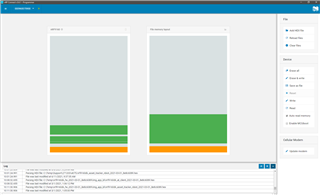
    This is how my Programmer looks, running AT client on my board and loaded the img_app_bl/nrf9160dk_asset_tracker_nbiot_2021-03-01_8e8c6089.hex

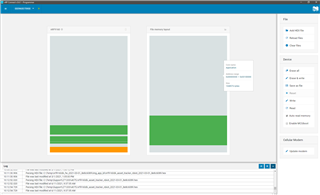
    And this is with the file you provided, assuming this is: img_fota_dfu_hex/nrf9160dk_at_client_2021-03-01_8e8c6089.hex

    Please try with images found in img_app_bl/ (Full application images, including bootloader. Updated only via debug probe.)

    Let me know how that works for you.

    Kind regards,
    Øyvind

Reply
  • Jacek, thanks for providing this information! The issue is the .hex files that you are using does not include the bootloader. 

    This is how my Programmer looks, running AT client on my board and loaded the img_app_bl/nrf9160dk_asset_tracker_nbiot_2021-03-01_8e8c6089.hex

    And this is with the file you provided, assuming this is: img_fota_dfu_hex/nrf9160dk_at_client_2021-03-01_8e8c6089.hex

    Please try with images found in img_app_bl/ (Full application images, including bootloader. Updated only via debug probe.)

    Let me know how that works for you.

    Kind regards,
    Øyvind

Children
No Data
Related