This post is older than 2 years and might not be relevant anymore
More Info: Consider searching for newer posts

nRFConnect SDK custom application/board set up issues with nRF5340

Hello,

I am in the process of writing a custom application for a custom board for the nRF5340, but have run into some odd behavior with SES when I started changing around things to use relative paths instead of the absolute paths that are put in place by default when creating a new project based on a previous example.

The long term goal for this is to have a project that supports the following:

1) use a custom nRF5340 board

2) use relative paths for the main application code and the Zephyr components as this is something that will potentially be worked on by multiple developers on different machines.

3) custom application code for the application core and very likely the network core as well that exist outside the SDK files (i.e. a folder heirarchy that is something like CustomApp/AppCore/<app core application code>, CustomApp/NetCore/<net core application code>, and then CustomApp/Common/<the nRFCOnnect SDK .

I have managed to create at least a custom board based on the nRF5340dk and when I initially set up my sample project (the BLE peripheral_uart example), I could assign it to my custom board.

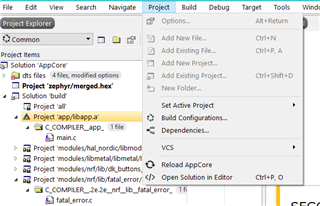
However, in the process of updating the project files to support relative paths (using the $(ProjectDir) field supported by SES), I have managed to somehow have lost the "Add New File to CMakeLists.txt" and the "Configure nRFConnect SDK" menu that adds the GUI support for the config files. I have checked to make sure that # NORDIC SDK APP START and # NORDIC SDK APP END are in the CMakeLists.txt file. Not sure if it matters, but based on the documentation, the .config file in the app/zephyr folder should get wiped out on a clean build, but it still remains on any clean build (the other files like .hex doe get cleaned out). This makes me thing that I have either royally screwed up something while trying to add relative paths.

Is there a list of all the files that need to change when moving over to a custom application from a sample app? The SES project files I know of, but I also see things like the zephyr_modules.txt, zephyr_settings.txt, cmake_install.cmake, that seem like they may be auto-generated perhaps?

Sorry if this has been asked before. I have found bits and pieces of answers for similar issues but nothing exactly quite matching what I was looking to do (perhaps there is a good reason for this though).

Parents
  • Hi Carl!

    So I took a bit more time to try and parse through more of the documentation, webinars, etc again, and I have the code building in my own application (outside of the Zephyr codebase) for my own custom board (also outside the Zephyr codebase). However, in my search for trying to make the relative pathing work, I am stuck again.

    1) I added in find_package(Zephyr REQUIRED HINTS ${CMAKE_CURRENT_SOURCE_DIR}/../Common/zephyr) to replace the $ENV{ZEPHYR_BASE} include, but that so far has seemed to have no effect on anything from a build perspective. I even made the path something that was invalid, and the code appears to compile for the ZEPHYR_BASE regardless.

    2) For my board.cmake file for the custom board, I swapped the include($ENV{ZEPHYR_BASE}/boards/common/nrfjprog.board.cmake) to include(${CMAKE_CURRENT_SOURCE_DIR}/../Common/zephyr/boards/common/nrfjprog.board.cmake) to try and make it relative, but the compilation process throws errors. It looks like everything is being pulled from the cache as the path used for the CURRENT_SOURCE ends up being the 'original' zephyr base, and not the new one I want to use.

    The CMakeLists.txt is pasted below.

    For reference the directories in question are:

    Original Zephyr Base: C:/Users/SMougey/nRFConnect/1.5.1/zephyr

    New Zephyr Base: C:/Workspace/CustomerApp/Common/zephyr

    Application Location: C:/Workspace/CustomerApp/AppCore

    Application board Location: C:/Workspace/CustomerApp/AppCore/boards/arm/nRF5340_Custom

    #
    # Copyright (c) 2018 Nordic Semiconductor
    #
    # SPDX-License-Identifier: LicenseRef-Nordic-5-Clause
    #
    cmake_minimum_required(VERSION 3.13.1)
    
    # use this to ensure that we are using the custom board directory in the
    # board/<arch>/<board>
    list(APPEND BOARD_ROOT ${CMAKE_CURRENT_SOURCE_DIR})
    
    find_package(Zephyr REQUIRED HINTS ${CMAKE_CURRENT_SOURCE_DIR}/../Common/zephyr)
    project(NONE)
    
    # NORDIC SDK APP START
    target_sources(app PRIVATE
      src/main.c
    )
    # NORDIC SDK APP END
    
    zephyr_library_include_directories(.)

Reply
  • Hi Carl!

    So I took a bit more time to try and parse through more of the documentation, webinars, etc again, and I have the code building in my own application (outside of the Zephyr codebase) for my own custom board (also outside the Zephyr codebase). However, in my search for trying to make the relative pathing work, I am stuck again.

    1) I added in find_package(Zephyr REQUIRED HINTS ${CMAKE_CURRENT_SOURCE_DIR}/../Common/zephyr) to replace the $ENV{ZEPHYR_BASE} include, but that so far has seemed to have no effect on anything from a build perspective. I even made the path something that was invalid, and the code appears to compile for the ZEPHYR_BASE regardless.

    2) For my board.cmake file for the custom board, I swapped the include($ENV{ZEPHYR_BASE}/boards/common/nrfjprog.board.cmake) to include(${CMAKE_CURRENT_SOURCE_DIR}/../Common/zephyr/boards/common/nrfjprog.board.cmake) to try and make it relative, but the compilation process throws errors. It looks like everything is being pulled from the cache as the path used for the CURRENT_SOURCE ends up being the 'original' zephyr base, and not the new one I want to use.

    The CMakeLists.txt is pasted below.

    For reference the directories in question are:

    Original Zephyr Base: C:/Users/SMougey/nRFConnect/1.5.1/zephyr

    New Zephyr Base: C:/Workspace/CustomerApp/Common/zephyr

    Application Location: C:/Workspace/CustomerApp/AppCore

    Application board Location: C:/Workspace/CustomerApp/AppCore/boards/arm/nRF5340_Custom

    #
    # Copyright (c) 2018 Nordic Semiconductor
    #
    # SPDX-License-Identifier: LicenseRef-Nordic-5-Clause
    #
    cmake_minimum_required(VERSION 3.13.1)
    
    # use this to ensure that we are using the custom board directory in the
    # board/<arch>/<board>
    list(APPEND BOARD_ROOT ${CMAKE_CURRENT_SOURCE_DIR})
    
    find_package(Zephyr REQUIRED HINTS ${CMAKE_CURRENT_SOURCE_DIR}/../Common/zephyr)
    project(NONE)
    
    # NORDIC SDK APP START
    target_sources(app PRIVATE
      src/main.c
    )
    # NORDIC SDK APP END
    
    zephyr_library_include_directories(.)

Children
  • Hi again, Spencer!

    Could it be a viable solution to explicitly set the ZEPHYR_BASE environment variable to the desired value at the start of CMakeLists.txt, like demonstrated below?

    # SPDX-License-Identifier: Apache-2.0
    
    
    cmake_minimum_required(VERSION 3.13.1)
    set(ENV{ZEPHYR_BASE} ${CMAKE_CURRENT_SOURCE_DIR}/../../..)
    
    find_package(Zephyr REQUIRED HINTS $ENV{ZEPHYR_BASE})
    project(fade_led)
    
    target_sources(app PRIVATE src/main.c)
    

    This should give you the desired ZEPHYR_BASE through the rest of the build process as well, without affecting the system environment variables.

    Best regards,
    Carl Richard

  • Hi Carl,

    So I updated to set the Zephyr base to match the pathing based on my CMakeLists.txt file for my new Zephyr base, and just to make sure that I could ensure that I was using the using the new zephyr base, I temporarily renamed my original 1.5.1 nRFConnect directory to 1.5.1_test so that anything that was using the old file paths would break if it tried to use the original zephyr base.

    The system does not build at all amongst other things, so there is more to just setting the zephyr base variable. When I try to build in SES, the build fails quickly with the error "1> CMake Error: Generator: execution of make failed. Make command was: C:/Users/SMougey/Documents/nRFConnectSDKs/v1.5.1/toolchain/opt/bin/ninja.exe"

    Just looking through the files that are in the directory for my project files, CMakeCache.txt, cmake_install.cmake, build.ninja, rules.ninja, zephyr_modules.txt, and zephyr_setting.txt files all still reference the old Zephyr path. Based on the .ninja files, these are created by Cmake, but it seems like that creation only occurs when I initially generate the entire project from nRFConnect based on the timestamps that the files were generated, and do not appear to be updated as I make changes to the CMakeLists.txt file (at least with what we have changed thus far).

    The .ninja files explicitly call out to not modify them, but I have to wonder if I need to do something to force update them. More importantly, I don't want to just change the absolute path it points to as that defeats the whole point of my goal to make a relative path to the CMake/project file.

    To add to this, I updated my build.emProject and AppCore.emProject files to use relative paths based on the $(ProjDir) variable which does in fact result in SES being able to find and open the files if I double click on them in the IDE. However, this seems to cause all sorts of problems with the nRFConnect linked in utilities where I can no longer edit the CmakeLists.txt file through the IDE (I get a "Can't open CMakeLists.txt for reading"), the GUI editor for the KConfig file under the project tab is now completely missing (see attached screenshot).

    Reverting the project files back to their original state results in the CMakeLists.txt editing to come back, but the KConfig editor is still missing.

Related