This post is older than 2 years and might not be relevant anymore
More Info: Consider searching for newer posts

Matter: Pre Compiled Examples

Hi,

I am trying to work on Matter light examples and tried to flash the firmware as it came. However, I am getting this error:

"[m[Kopening dependency file D:/WorkSpace/xxxxx/Nordic/NCS/v1.6.0-rc2/nrf/samples/matter/light_bulb/build_nrf52840dk_nrf52840/modules\nrfxlib\nrfxlib\nrf_security\src\mbedtls\CMakeFiles\mbedcrypto_base_vanilla.dir\D_\WorkSpace\xxxxx\Nordic\NCS\v1.6.0-rc2\mbedtls\library\psa_crypto_slot_management.c.obj.d: No such file or directory"

NCS Version: 1.6.0-rc2

Board: 52840-DK

Toolchain: 1.6.0

I just installed the NCS using the nRFConnect Windows application. May I know what's causing this and how to fix it?

Parents
  • Hello,

    I just installed the NCS using the nRFConnect Windows application. May I know what's causing this and how to fix it?
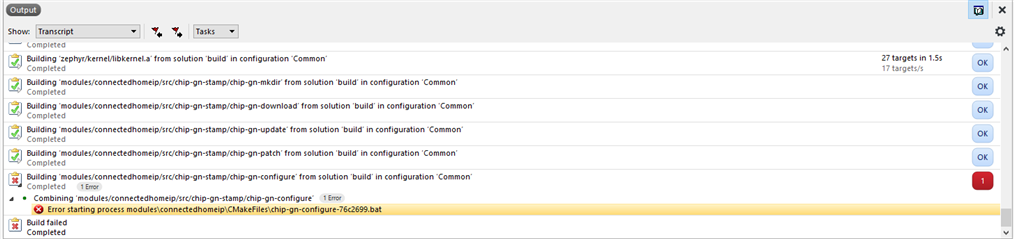
    It seems that there is an issue with the path length on Windows. Could you try to move your NCS installation to the top folder, i.e removing /WorkSpace/xxxxx/Nordic/ from the path, and seeing if this resolves the issue?
    As far as I know the maximum valid path length on Windows is 260 characters, while the path in question is > 270.

    Please let me know if this resolves your issue.

    Best regards,
    Karl

  • Hi Karl,

    Thanks for your response. After moving the NCS to a different directory, this issue went away. However, a couple of new errors popped up.

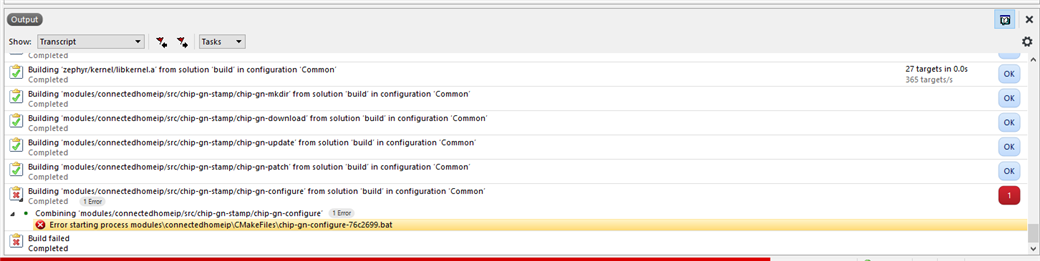
    Error 1: During rebuilding the solution, I'm getting this error:

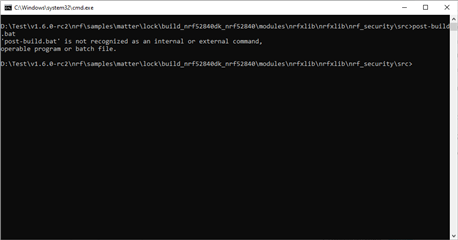
    Error 2: When I tried to flash (I know I shouldn't flash the solution which isn't building, but just wanted to see if any new errors may come), I got this error:

    How should I move forward?

Reply Children
  • tejaChintalapati said:
    Thanks for your response. After moving the NCS to a different directory, this issue went away.

    No problem at all, I am happy to help and glad to hear that the issue went away!

    tejaChintalapati said:
    Error 1: During rebuilding the solution, I'm getting this error:

    Could you elaborate how you moved the NCS sdk?
    To properly move it you should use the toolchain manager to change the base directory, and then reinitialize the sdk.

    Best regards,
    Karl

  • I didn't move anything manually. Using the toolchain manager, I removed the old installation and initiated a fresh installation under a different directory. After that, I opened SES -> Open NCS Project -> And opened the project.

    Do I have to do any configuration before getting these to work?

  • tejaChintalapati said:
    I didn't move anything manually. Using the toolchain manager, I removed the old installation and initiated a fresh installation under a different directory. After that, I opened SES -> Open NCS Project -> And opened the project.

    Great, thank you for confirming this for me! This is the proper way to move the NCS directories, so that all dependencies etc. are taken care of.

    tejaChintalapati said:
    Do I have to do any configuration before getting these to work?

    No, you should not have to make any configurations before getting it to work. I have tested this on my end, and it compiles right off the bat. Could you also confirm for me that you have the "Clean directory" option set, when opening the example?
    Could you also try this again in ncs v.1.5.1? 1.6 is still only a release candidate, and 1.5.1 is the latest sdk version that we still recommend that you use.

    Please do this, and let me know if you encounter the same issue with ncs 1.5.1.

    Best regards,
    Karl

  • Hi Karl,

    Could you also try this again in ncs v.1.5.1? 1.6 is still only a release candidate, and 1.5.1 is the latest sdk version that we still recommend that you use.

    unfortunately, Matter samples aren't available in NCS 1.5.1.

    Could you also confirm for me that you have the "Clean directory" option set, when opening the example?

    After doing this, the error changed to: "Error starting process modules\nrfxlib\nrfxlib\nrf_security\src\CMakeFiles\mbedcrypto.dir\post-build.bat".

    I tried running this batch file using the command prompt and was unsuccessful.

    However, opening the same from the file explorer, I could run this file. Although the command prompt, as expected, closed rather quickly before I could take a screenshot.

    I also tried installing NCS in a different laptop and have the exact same error. This answer from DevZone says it may be something related to unsupported characters in the path. However, I couldn't find anything weird in this path: "D:\Test\v1.6.0-rc2\nrf\samples\matter\light_switch\build_nrf52840dk_nrf52840\modules\nrfxlib\nrfxlib\nrf_security\src\CMakeFiles\mbedcrypto.dir"

    I'm starting to think that there may be some problem with the path setting in the project options. Would you like me to change any variables under project options?

  • Hello,

    tejaChintalapati said:
    unfortunately, Matter samples aren't available in NCS 1.5.1.

    My apologies, I should have been more explicit here. In NCS 1.5.1 the matter examples are located in the connectedhomeip sample folder : v1.5.1\nrf\samples\connectedhomeip
    The project's name change to Matter happened in the time after the release of v1.5, which is why it in v1.5 still uses the old name.
    Please try the same example in v1.5.1, located in \connectedhomeip and let me know if you then face the same issue.

    If the issue persists is v1.5.1 I will request an internal examination of this by our Matter development team.

    Best regards,
    Karl

Related