This post is older than 2 years and might not be relevant anymore
More Info: Consider searching for newer posts

How can I use DFU with peripherals/blinky?

I have flashed DFU OTA bootlaoder to my nRF82540 DK. (C:\nRF5_SDK_17.0.2_d674dde\examples\dfu\secure_bootloader\pca10056_s140_ble_debug)

It shows the two LEDs 1 and 2.

I can flash ble_blinky. It shows LEDs 1 and 3 when flashing. It works.

BUT So I can get some understanding of what is going on I would like to flash plain old blink to the device using the OTA.

I change the blink *.ld file from

MEMORY
{
FLASH (rx) : ORIGIN = 0x1000, LENGTH = 0xff000
RAM (rwx) : ORIGIN = 0x20000008, LENGTH = 0x3fff8
}

to

MEMORY
{
FLASH (rx) : ORIGIN = 0x27000, LENGTH = 0xff000
RAM (rwx) : ORIGIN = 0x20000008, LENGTH = 0x3fff8
}

So that the application is now above the softdevice. It all looks fine, but it doesn't work.

So how do things work. I'm assuming that somewhere there is a jump to the address where the blinky app is loaded (at 0x27000?) and then blinky runs.

I'm guessing that my ignorance is going to give me a heart attack at some point. 

Is there a document that explains for newbies how all of this hangs together?

Gordon

(In my research I've seen references to a define for APPLICATION_START_ADDRESS or something similar, but I can't find it. It may have been an old sdk?)

Here is my memory map
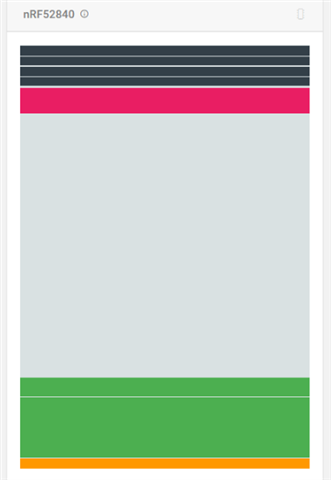
  • Uhmmm, somehow, I've done it! Was it the --debug-mode flag which I stopped using? Ordinary blinky has flashed across. Yay

    So is there an issue with:

    nrfutil pkg generate --debug-mode --hw-version 52 --application-version 1 --application $(OUTPUT_DIRECTORY)/nrf52840_xxaa.hex --sd-req 0x00 --key-file $(PROJ_DIR)/private.key $(PROJ_DIR)/dfu_blinky.zip

    Edit: add

    Without the --debug-mode I guess I have to update the --application-version each time?

    Is there not a conflict with using --debug-mode and --application-version=1?

    I'm using VS Code hence $(PROJ_DIR)

    Oh and for anyone else, to get into debug mode turn on whilst pressing Button 4 and only flash the application (I used the Nordic nRF Toolbox and DFU from my tablet. (My phone a Samsung Note 4.0 (with custom ROM (ViperOS)) won't show the advertisement, for DfuTarg, though it will for ble_app_blinky!! )

    And what gives with the formatting?

  • Oh sugar, now I can't access the device from nRF Connect.  Blinky is blinking, but there's no usb device (Windows) visible. I can get into what I assume is bootloader mode, but what do I do?

    Edit: I seem to have gotten into a mode (using hold reset and turn on), and there is a usb device visible now (BOOTLOADER), but device isn't recognised for JLInk connect by SES or by using NRF Connect Programmer.

    (SES suggested updated firmware, so I let it.)

    Followed these instructions: https://docs.edgeimpulse.com/docs/nordic-semi-nrf52840-dk 

    What the heck happened there???

  • No, can't duplicate getting blinky to flash across now. I keep getting: Upload failed, invalid object.

  • Done it again. i.e. flashed the application part of blinky.

    I think I was using SES for the OTA DFU and it mustn't have had access to the correct public key. I don't know how to check where it gets the public key from in Segger. So Iused my VS Code version.

    Did turn on with button 4 to get into DFU mode and I flashed the same blinky app again (using --debug-mode). It all seems good.

  • So could I ask:

    Is there  any conflict with using --debug-mode and --application-version=1? or does --debug-mode trump --application-version?

    Where is the idiot's guide reference to how the boot process works from master boot to bootloader to application. Apart from positioning an application properly in memory space are there any flags, defines apart from the memory origin in the *.ld linker file?

Related