This post is older than 2 years and might not be relevant anymore
More Info: Consider searching for newer posts

Entering DTM mode to test continuous TX @ fixed frequency for factory testing

Hi

We are trying to get the DTM mode working for the NRF52 2nd BLE for testing BLE TX power and RSSI at the factory.

(1)HW setup is shown

(2Procedure
We have referred to the link below and the example.py scripts. Below are the steps we have followed before we ran the python scripts
(3)BT module was flashed with the DTM firmware “2020_05_08_BLSD_DTM_CT40_V2.hex” along with serial# and MAC addresses.
Please let us know if we are missing any other step/config to put the device into DTM mode as we are reusing the hex files from another project.
What would be the SDK version that must be used for DTM tests in case we don't have the SDK which was originally used to generate the hex files?
(4)We have run the example.py  script on the PC with the DUT com port field updated to COM41.
We did not observe any UART transactions from PC when scripts were run. HW connections for the COM41 port were verified physically by looping TX to RX and it works fine.
(a)Can you please share the example code ( python script ) used in the factory to test constant_carrier-continuous TX power measurement?
(b)What is the value to be updated in ‘'GoldenSerialPortName'’ in the example.py code snippet shared below
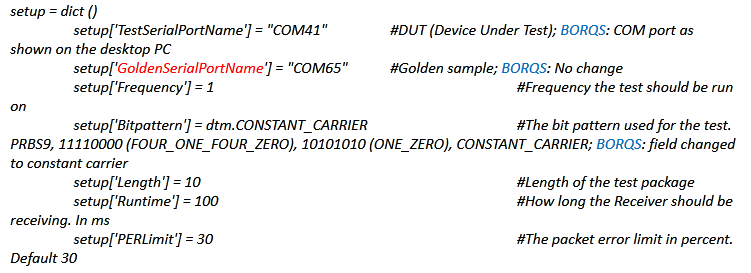
Best Regards

Mahesh HM

Parents
  • Hi

    Thanks for sharing the information.

    As we currently don't have the nRF dev kit with us. Can you please let us know how to check the 2nd BLE with the setup shared earlier. I believe these are the steps which can be followed

    (1) Flash the DTM firmware to the nRF as suggested by you

    (2) Access nRF UART from a PC ( with out dev kit ) and send commands from nRF connect app in DTM mode (GUI). Please let us know there is no dependency between DTM firmware and nRF connect app ( or let us know the version of nRF connect app to be used)

    (3)Observe the TX power on a spectrum analyser

    Please let us know if this is feasible, this would help is to check the conducted TX power from the BLE module and verifies our RF front end.

    Let us know if I have missed any other step/ configuration

    RegardsM

    MaheshHM

  • Hi,


    MaheshHM said:

    Thanks for sharing the information.

    As we currently don't have the nRF dev kit with us. Can you please let us know how to check the 2nd BLE with the setup shared earlier. I believe these are the steps which can be followed

    (1) Flash the DTM firmware to the nRF as suggested by you

    (2) Access nRF UART from a PC ( with out dev kit ) and send commands from nRF connect app in DTM mode (GUI). Please let us know there is no dependency between DTM firmware and nRF connect app ( or let us know the version of nRF connect app to be used)

    (3)Observe the TX power on a spectrum analyser

    Please let us know if this is feasible, this would help is to check the conducted TX power from the BLE module and verifies our RF front end.

    Let us know if I have missed any other step/ configuration

    With those steps, and a properly connected uart interface, you should be able to setup the device in constant carrier with nRF Connect application direct test mode.

    Note that you might have to modify the example if you do not have your uart interface routed via P0.06 and P0.08 (which are the default pins in the board). This modification can be done in direct_test_mode/main.c


    Kind regards,

    Håkon

Reply
  • Hi,


    MaheshHM said:

    Thanks for sharing the information.

    As we currently don't have the nRF dev kit with us. Can you please let us know how to check the 2nd BLE with the setup shared earlier. I believe these are the steps which can be followed

    (1) Flash the DTM firmware to the nRF as suggested by you

    (2) Access nRF UART from a PC ( with out dev kit ) and send commands from nRF connect app in DTM mode (GUI). Please let us know there is no dependency between DTM firmware and nRF connect app ( or let us know the version of nRF connect app to be used)

    (3)Observe the TX power on a spectrum analyser

    Please let us know if this is feasible, this would help is to check the conducted TX power from the BLE module and verifies our RF front end.

    Let us know if I have missed any other step/ configuration

    With those steps, and a properly connected uart interface, you should be able to setup the device in constant carrier with nRF Connect application direct test mode.

    Note that you might have to modify the example if you do not have your uart interface routed via P0.06 and P0.08 (which are the default pins in the board). This modification can be done in direct_test_mode/main.c


    Kind regards,

    Håkon

Children
No Data
Related