This post is older than 2 years and might not be relevant anymore
More Info: Consider searching for newer posts

Entering DTM mode to test continuous TX @ fixed frequency for factory testing

Hi

We are trying to get the DTM mode working for the NRF52 2nd BLE for testing BLE TX power and RSSI at the factory.

(1)HW setup is shown

(2Procedure
We have referred to the link below and the example.py scripts. Below are the steps we have followed before we ran the python scripts
(3)BT module was flashed with the DTM firmware “2020_05_08_BLSD_DTM_CT40_V2.hex” along with serial# and MAC addresses.
Please let us know if we are missing any other step/config to put the device into DTM mode as we are reusing the hex files from another project.
What would be the SDK version that must be used for DTM tests in case we don't have the SDK which was originally used to generate the hex files?
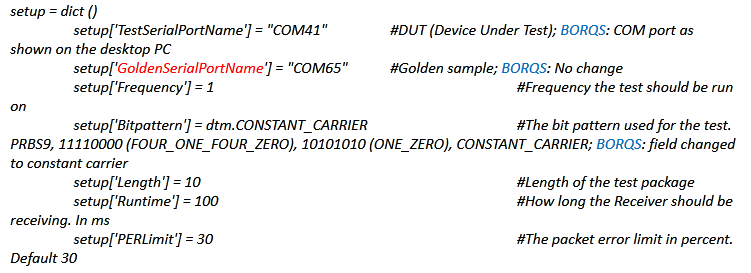
(4)We have run the example.py  script on the PC with the DUT com port field updated to COM41.
We did not observe any UART transactions from PC when scripts were run. HW connections for the COM41 port were verified physically by looping TX to RX and it works fine.
(a)Can you please share the example code ( python script ) used in the factory to test constant_carrier-continuous TX power measurement?
(b)What is the value to be updated in ‘'GoldenSerialPortName'’ in the example.py code snippet shared below
Best Regards

Mahesh HM

Parents
  • Hi,


    It is very understandable that you want this automated.

    In the lower right corner, you can open up the log file after you have issued a successful command:

    The most left meny here opens the log file.


    This log file shall then hold the raw commands, like this:

    2021-06-30T07:47:22.211Z INFO Running device setup
    2021-06-30T07:47:22.212Z DEBUG DTM Transport: Create setup CMD with control: 0
    2021-06-30T07:47:22.212Z DEBUG DTM Transport: Create setup CMD with parameter: 0
    2021-06-30T07:47:22.212Z DEBUG DTM Transport: Create setup CMD with dc type: 00
    2021-06-30T07:47:22.212Z DEBUG DTM Transport: Sending data: 0x00 0x00
    2021-06-30T07:47:22.216Z DEBUG DTM Transport: Receiving data: 0x00 0x00
    2021-06-30T07:47:22.216Z DEBUG DTM Transport: Create tx power CMD: 0
    2021-06-30T07:47:22.216Z DEBUG DTM Transport: Sending data: 0x80 0x0B
    2021-06-30T07:47:22.220Z DEBUG DTM Transport: Receiving data: 0x00 0x00
    2021-06-30T07:47:22.220Z DEBUG DTM Transport: Create setup CMD with control: 1
    2021-06-30T07:47:22.220Z DEBUG DTM Transport: Create setup CMD with parameter: 0
    2021-06-30T07:47:22.220Z DEBUG DTM Transport: Create setup CMD with dc type: 00
    2021-06-30T07:47:22.220Z DEBUG DTM Transport: Sending data: 0x01 0x00
    2021-06-30T07:47:22.224Z DEBUG DTM Transport: Receiving data: 0x00 0x00
    2021-06-30T07:47:22.224Z DEBUG DTM Transport: Create setup CMD with control: 3
    2021-06-30T07:47:22.224Z DEBUG DTM Transport: Create setup CMD with parameter: 0
    2021-06-30T07:47:22.224Z DEBUG DTM Transport: Create setup CMD with dc type: 00
    2021-06-30T07:47:22.224Z DEBUG DTM Transport: Sending data: 0x03 0x00
    2021-06-30T07:47:22.228Z DEBUG DTM Transport: Receiving data: 0x00 0x00
    2021-06-30T07:47:22.228Z DEBUG DTM Transport: Create setup CMD with control: 2
    2021-06-30T07:47:22.228Z DEBUG DTM Transport: Create setup CMD with parameter: 1
    2021-06-30T07:47:22.228Z DEBUG DTM Transport: Create setup CMD with dc type: 00
    2021-06-30T07:47:22.228Z DEBUG DTM Transport: Sending data: 0x02 0x04
    2021-06-30T07:47:22.232Z DEBUG DTM Transport: Receiving data: 0x00 0x00
    2021-06-30T07:47:22.232Z INFO Starting test
    2021-06-30T07:47:22.249Z DEBUG DTM Transport: Create transmitter CMD with frequency: 2440
    2021-06-30T07:47:22.249Z DEBUG DTM Transport: Create transmitter CMD with length: 1
    2021-06-30T07:47:22.249Z DEBUG DTM Transport: Create transmitter CMD with packet type: 3
    2021-06-30T07:47:22.261Z DEBUG DTM Transport: Sending data: 0x93 0x07
    2021-06-30T07:47:22.267Z DEBUG DTM Transport: Receiving data: 0x00 0x00
    2021-06-30T07:47:22.623Z INFO Ending test
    2021-06-30T07:47:22.623Z DEBUG DTM Transport: Create test end CMD
    2021-06-30T07:47:22.623Z DEBUG DTM Transport: Sending data: 0xC0 0x00
    2021-06-30T07:47:22.643Z DEBUG DTM Transport: Receiving data: 0x80 0x00
    2021-06-30T07:47:22.654Z INFO Transmitter test finished successfully


    As mentioned, you can also use the radio_test example to setup a constant carrier using uart commands.


    Kind regards,

    Håkon

Reply
  • Hi,


    It is very understandable that you want this automated.

    In the lower right corner, you can open up the log file after you have issued a successful command:

    The most left meny here opens the log file.


    This log file shall then hold the raw commands, like this:

    2021-06-30T07:47:22.211Z INFO Running device setup
    2021-06-30T07:47:22.212Z DEBUG DTM Transport: Create setup CMD with control: 0
    2021-06-30T07:47:22.212Z DEBUG DTM Transport: Create setup CMD with parameter: 0
    2021-06-30T07:47:22.212Z DEBUG DTM Transport: Create setup CMD with dc type: 00
    2021-06-30T07:47:22.212Z DEBUG DTM Transport: Sending data: 0x00 0x00
    2021-06-30T07:47:22.216Z DEBUG DTM Transport: Receiving data: 0x00 0x00
    2021-06-30T07:47:22.216Z DEBUG DTM Transport: Create tx power CMD: 0
    2021-06-30T07:47:22.216Z DEBUG DTM Transport: Sending data: 0x80 0x0B
    2021-06-30T07:47:22.220Z DEBUG DTM Transport: Receiving data: 0x00 0x00
    2021-06-30T07:47:22.220Z DEBUG DTM Transport: Create setup CMD with control: 1
    2021-06-30T07:47:22.220Z DEBUG DTM Transport: Create setup CMD with parameter: 0
    2021-06-30T07:47:22.220Z DEBUG DTM Transport: Create setup CMD with dc type: 00
    2021-06-30T07:47:22.220Z DEBUG DTM Transport: Sending data: 0x01 0x00
    2021-06-30T07:47:22.224Z DEBUG DTM Transport: Receiving data: 0x00 0x00
    2021-06-30T07:47:22.224Z DEBUG DTM Transport: Create setup CMD with control: 3
    2021-06-30T07:47:22.224Z DEBUG DTM Transport: Create setup CMD with parameter: 0
    2021-06-30T07:47:22.224Z DEBUG DTM Transport: Create setup CMD with dc type: 00
    2021-06-30T07:47:22.224Z DEBUG DTM Transport: Sending data: 0x03 0x00
    2021-06-30T07:47:22.228Z DEBUG DTM Transport: Receiving data: 0x00 0x00
    2021-06-30T07:47:22.228Z DEBUG DTM Transport: Create setup CMD with control: 2
    2021-06-30T07:47:22.228Z DEBUG DTM Transport: Create setup CMD with parameter: 1
    2021-06-30T07:47:22.228Z DEBUG DTM Transport: Create setup CMD with dc type: 00
    2021-06-30T07:47:22.228Z DEBUG DTM Transport: Sending data: 0x02 0x04
    2021-06-30T07:47:22.232Z DEBUG DTM Transport: Receiving data: 0x00 0x00
    2021-06-30T07:47:22.232Z INFO Starting test
    2021-06-30T07:47:22.249Z DEBUG DTM Transport: Create transmitter CMD with frequency: 2440
    2021-06-30T07:47:22.249Z DEBUG DTM Transport: Create transmitter CMD with length: 1
    2021-06-30T07:47:22.249Z DEBUG DTM Transport: Create transmitter CMD with packet type: 3
    2021-06-30T07:47:22.261Z DEBUG DTM Transport: Sending data: 0x93 0x07
    2021-06-30T07:47:22.267Z DEBUG DTM Transport: Receiving data: 0x00 0x00
    2021-06-30T07:47:22.623Z INFO Ending test
    2021-06-30T07:47:22.623Z DEBUG DTM Transport: Create test end CMD
    2021-06-30T07:47:22.623Z DEBUG DTM Transport: Sending data: 0xC0 0x00
    2021-06-30T07:47:22.643Z DEBUG DTM Transport: Receiving data: 0x80 0x00
    2021-06-30T07:47:22.654Z INFO Transmitter test finished successfully


    As mentioned, you can also use the radio_test example to setup a constant carrier using uart commands.


    Kind regards,

    Håkon

Children
No Data
Related