Hi, dear Nordic team. I would like to use buttonless OTA DFU for nRF52805.
Here is what I did:
Step 1) install all tools
Step 2) Build my ADC code, rename the output hex file as "app.hex"
Step 3) Because I use nRF52805, so I selected PCA10040e. Since both S112 and S113 support the nRF52805 BLE function, I just randomly selected S112. The final selected folder for bootloader code is: SDK_17.0.2\examples\dfu\secure_bootloader\pca10040e_s112_ble\ses
Build this project, rename the output hex file as "bootloader.hex"
Step 4) Generating the BootLoader settings page hex file "settings.hex" by using this command in win10 command promot:
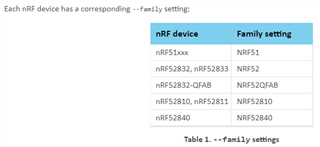
nrfutil settings generate --family NRF52 --application app.hex --application-version 1 --bootloader-version 1 --bl-settings-version 2 settings.hex

/*
Win10 cmd returns:

Note: Generating a DFU settings page with backup page included.
This is only required for bootloaders from nRF5 SDK 15.1 and newer.
If you want to skip backup page generation, use --no-backup option.

Generated Bootloader DFU settings .hex file and stored it in: settings.hex

Bootloader DFU Settings:
* File:                     settings.hex
* Family:                   nRF52
* Start Address:            0x0007F000
* CRC:                      0x4ED1A154
* Settings Version:         0x00000002 (2)
* App Version:              0x00000001 (1)
* Bootloader Version:       0x00000001 (1)
* Bank Layout:              0x00000000
* Current Bank:             0x00000000
* Application Size:         0x00009C10 (39952 bytes)
* Application CRC:          0xAC4D0291
* Bank0 Bank Code:          0x00000001
* Softdevice Size:          0x00000000 (0 bytes)
* Boot Validation CRC:      0xDF751A8C
* SD Boot Validation Type:  0x00000000 (0)
* App Boot Validation Type: 0x00000001 (1)

*/
Step 5) Merge all above 3 hex files and softdevice s112 version 7.2.0 by using this command
mergehex --merge bootloader.hex settings.hex --output bl_temp.hex
mergehex --merge bl_temp.hex app.hex s132_nrf52_7.0.1_softdevice.hex --output whole.hex
Step 6) Upload combined hex file "whole.hex" to nRF52805 by using this command:
nrfjprog --eraseall -f NRF52
nrfjprog --program whole.hex --verify -f NRF52
nrfjprog --reset -f NRF52
Question:
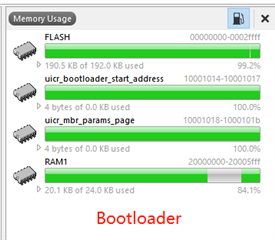
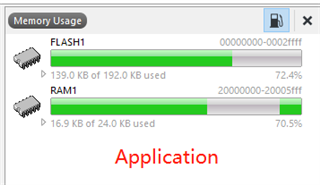
When I'm using command nrfjprog --program whole.hex --verify -f NRF52, the win10 command prompt gives me the following error. I found it's my bootloader.hex and app.hex overlaps.
Parsing image file.
ERROR: The file specified is not a valid hex file, has data outside valid areas
ERROR: or does not have data in valid areas.


/*
I found the issue was caused by bootloader.hex and app.hex, because in win10 cmd:

D:\buttonlessOTA>mergehex --merge bootloader.hex app.hex --output bootloader_app.hex
Parsing input files.
Merging file "bootloader.hex" into output.
Merging file "app.hex" into output.
Overlapping segments detected at address 102400.ERROR: The hex files cannot be merged since there are conflicts.

My SEGGER link-->section placement macros is:

FLASH_PH_START=0x0
FLASH_PH_SIZE=0x80000
RAM_PH_START=0x20000000
RAM_PH_SIZE=0x10000
FLASH_START=0x71000
FLASH_SIZE=0xd000
RAM_START=0x20005968
RAM_SIZE=0xa698
*/
What's the correct to select FLASH and RAM for my project, please? Should I choose "just enough" FLASH and RAM?
Thanks in advance!