Hi,
Most of the posts I have seen are related to adding nrf DK or thingy to nrf cloud. Is there any way to add custom nrf9160 devices to nrf Cloud? Is nrf Cloud even meant for handling 1000s of devices in production?
Regards
Noaman
Hi,
Most of the posts I have seen are related to adding nrf DK or thingy to nrf cloud. Is there any way to add custom nrf9160 devices to nrf Cloud? Is nrf Cloud even meant for handling 1000s of devices in production?
Regards
Noaman
Hello Noaman,
Is there any way to add custom nrf9160 devices to nrf Cloud?
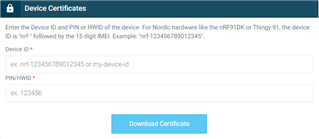
Yes, there is. In nRF Cloud, there is a menu on the top right corner. Click on account. In there you can add a device: 
Do not use nrf-IMEI number, as these are already added and specific for our DK and Thingy:91.
Click on Download Certificate to generate certificates for the device with that name.
Is nrf Cloud even meant for handling 1000s of devices in production?
I'm afraid I do not have those details, please contact your local RSM.
Kind regards,
Øyvind
Thank you Oyvind, I will give this a try.
Hello again,
I forgot to add that you also need to add the device name in the project as well.
For example, with the Asset Tracker application you add the Device ID by adding the following to the prj.conf:
CONFIG_NRF_CLOUD_CLIENT_ID_SRC_COMPILE_TIME=y CONFIG_NRF_CLOUD_CLIENT_ID="<your-device-id>"
After compiling and programming this, you should use e.g. LTE Link Monitor - Certificate Manager to update the certificates with the certificates you downloaded.
Afterwards reset the device and follow the output in LTE Link Monitor to see that it connects, then go to nRF Cloud and add LTE Device.
Kind regards,
Øyvind
Hi Oyvind,
Two follow up questions :
1. Since the device Id needs to included in proj.conf, how I do I manage that in production? If each device requires a unique Id is there a way to handle this for produciton programming?
2. The certificate that is downloaded, how often does that expire?
We have been having issues with getting Link Monitor to work on our custom board, it does not detect uart ports ("No device Available") so can't do anything with it.
Regards
Noaman
Hi Noaman,
Stratosphere said:1. Since the device Id needs to included in proj.conf, how I do I manage that in production? If each device requires a unique Id is there a way to handle this for produciton programming?
Yes, there is. To connect to nRF Cloud we have some configurations options for the device ID. E.g. you can configure a specific prefix and use with the IMEI number, similar to nrf-<IMEI> valid for all nRF Devices.
Stratosphere said:2. The certificate that is downloaded, how often does that expire?
I'm not aware of an expiration date on the certificates. By the way, in the FAQ section of nRF Cloud, I found an answer to:
Q10: How many devices can I connect to nRF Cloud? You can connect an unlimited number of devices to nRFcloud, but you are limited to 1M messages.
Kind regards,
Øyvind