This post is older than 2 years and might not be relevant anymore
More Info: Consider searching for newer posts

Can I add our custom nrf9160 to nrf Cloud?

Hi, 

Most of the posts I have seen are related to adding nrf DK or thingy to nrf cloud. Is there any way to add custom nrf9160 devices to nrf Cloud? Is nrf Cloud even meant for handling 1000s of devices in production?

Regards

Noaman

  • Hi,

    I followed this case, generated and downloaded a new certificate for my custom board with an nRF9160.  I tried to program the certificate to the module with the LTE Link Monitor.  I could see and pick my board from the "Select device" menu.  Unfortunately, I kept getting "Access denied" on the COM port?  I wasn't able to connect my board with LTE Link Monitor.  Any suggestion is much appreciated.  Thank you.

    Regards,

    Floyd

  • Hi , please register a new ticket regarding your issue. 

    Thanks.


    KInd regards,

    Øyvind

  • Hi Øyvind,

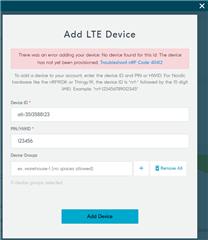
    The COM port issue is resolved.  So I followed your instructures and downloaded the new certificate onto my board.  I also added the 2 CONFIG_NRF_CLOUD_CLIENT_ID into the prj.conf.  However, I couldn't add my device in the nrf Cloud.  I kept getting "There was an error adding your device: No device found for this id. The device has not yet been provisioned. Troubleshoot nRF Code 40412".  How can I resolve this?  Thank you.

    Regards,

    Floyd

  • Hi Floyd, 

    The device needs to run e.g. Asset Tracker v2 with the correct device ID and use the certificates you added (sec_tag), then follow the instructions provided in the link you pasted:

    40412
    No device found for this id. The device has not yet been provisioned. The device cannot be found in the device registry, i.e., it is not 'known' by the IoT cloud platform. Possible reasons:

    1. You entered the device id and/or ownership code (PIN or HWID) incorrectly.
    2. Before attempting association, you did not wait for the LEDs to indicate the device was provisioned.
    3. Corrupt modem firmware.
    4. Corrupt, wrongly flashed, or illegitimate device certificates.
    5. Poor LTE connection
    Solutions that match the possible reasons are listed here. For items 2-4, refer to the nRF9160 DK Getting Started Guide or Thingy:91 Getting Started Guide.

    1. Verify the values and try again. For Nordic Semiconductor products, please see the solution for nRF Code 40411, above.
    2. Check the LED status indicators to ensure the device indicates it was provisioned.
    3. (Re-)flash the latest modem firmware.
    4. Flash new device certificates obtained from the CreateDeviceCertificate endpoint.
    5. Move to a location with a better LTE connection.
  • Hi Øyvind,

    I am not that far yet.  I couldn't even add my board to the nRF Cloud.  

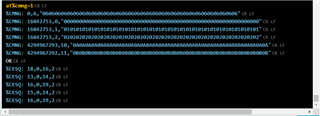
    I downloaded and updated the certificate.  AT%AMGN=1 showed the following.

    Does it make any sense?

    Regards,

    Floyd

Related