This post is older than 2 years and might not be relevant anymore
More Info: Consider searching for newer posts
This discussion has been locked.
You can no longer post new replies to this discussion. If you have a question you can start a new discussion

nRF5340 Multi image build with MCUBOOT + netboot

Short
Our project runs application code on the nrf5340 application core and a bt_mesh configuration on the network core.
Everything works as expected when we build as two separate projects and flash the two cores independently, but things break when we add multi-image build and bootloader support.

System:
-nRF5340
- nRFConnect SDK V1.5.0

Goal
The goal is to:

  1. Enable MCUBOOT with netboot support on the application core
  2. Enable netboot on the network core

Issues:

  1. Add multi-image configuration
    I have followed the steps outlined here: https://devzone.nordicsemi.com/f/nordic-q-a/72840/nrf5340-multi-image-example-configuration-help in order to enable multi image builds with our network core image as a child to our application core image.

    Result:
    Building the application core with this configuration will successfully produce images for both cores, but now settings subsys init fails on the network core:
    E: settings_subsys_init failed (err -37).

    I have not been able to resolve this issue. It seems like settings subsys will fail no matter what I don when multi image builds are enabled. Are there any examples I could look at to figure out how this is supposed to be done?
  2. Enable MCUBOOT for the application core
    I am enabling mcuboot by adding CONFIG_BOOTLOADER_MCUBOOT=y to our application core prj.conf file
    Result: Build is successful, and the application core bootloader correctly jumps to the loaded image. Settings are still failing on the network core.

  3. Enableing secure for the network core
    I am enabling secure boot on the network core by adding CONFIG_SECURE_BOOT=y to our network core prj.conf file and building with
    west build targets/nRF5340/cpuapp/ -d build/nrf5340_cpuapp/ --pristine -- -DZEPHYR_EXTENTIONS_DIR=c:/git/alpha/zephyr -Dmcuboot_CONFIG_PCD=y

    Result:Everything builds but the application core hangs after printing "Jumping to the first image slot" in the debug terminal.
    This problem seems to be related to the RPMSG service. Removing this disables functionality we need, but the cores seems to boot as expected.

  4. Removing RPMSG
    I am removing RPMSG by commenting out the following configurations from our network core and application core proj.conf files
    Network core Appication core
    CONFIG_IPM=y
    CONFIG_RPMSG_SERVICE=y
    CONFIG_RPMSG_SERVICE_MODE_REMOTE=y
    CONFIG_OPENAMP_MASTER=n
    CONFIG_IPM=y
    CONFIG_RPMSG_SERVICE=y
    CONFIG_RPMSG_SERVICE_MODE_MASTER=y
    CONFIG_OPENAMP_SLAVE=n

    Result:
    • Both cores boot.
    • The bootloader seems to handle application core uppdates correctly.
    • There are no images with net_core_ prefix in the build output folder
    • Flashing with a net_core image from nRF5340: Network core bootloader activates the net core bootloader

Summary

  • Enabeling multi-image build breakes the settings subsys on the network core
  • Enabeling secure boot on the network core breaks everything if RPMSG is enabled
  • net_core_ prefixed are not available as expected after building with secureboot(network core) + mcuboot(application core)

I have looked at the samples and documentation, but I have not been able to figure out what I am missing. Suggestions are most welcome.

Parents
  • Enable MCUBOOT with netboot support on the application core
    Enabeling multi-image build breakes the settings subsys on the network core

    Why are you doing this? If you set CONFIG_BOOTLOADER_MCUBOOT=y in the pjr.conf of you application, the mcuboot will get added as a child image and you will have a multi image build (the partition manager will also get enabled and used to partition the flash). There is no need to enable multi-image build in this case explicitly.

    Best regards,

    Simon

  • My understanding was that this would enable mcuboot for the application core, but not for the network core. The additional steps were all in an effort to add bootloader support for the network core.

    My approach was based on the solution documented here: https://developer.nordicsemi.com/nRF_Connect_SDK/doc/1.5.0/nrf/samples/nrf5340/netboot/README.html

    The end goal is to implement a recovery mode where both the application core and network core can receive new images from a serial interface. I am new to zephyr and the nRF SDK, and more than happy to take a different approach if you have suggestions.

  • All you need to do is the following

    1. Set CONFIG_BOOTLOADER_MCUBOOT=y in the applications prj.conf (e.g. ncs/nrf/samples/bluetooth/mesh/light_switch/prj.conf)
    2. Set CONFIG_SECURE_BOOT=y in the network core sample (will be ncs/zephyr/samples/bluetooth/hci_rpmsg/prj.conf when building Bluetooth examples for the nRF53 DK).
    3. Build the BLE sample
      • This can be done by running the following commands:
        • cd <ncs location>/ncs/nrf/samples/bluetooth/mesh/light_switch
        • west build -b nrf5340dk_nrf5340_cpuapp
      • If the the two conditions below are met, the hci_rpmsg sample will always be included as a child image (which will make it a multi image build)
        • Using the board name nrf5340dk_nrf5340_cpuapp
        • Bulding a BLE example (e.g. the mesh light_switch sample, or the sample nrf/samples/bluetooth/peripheral_uart)
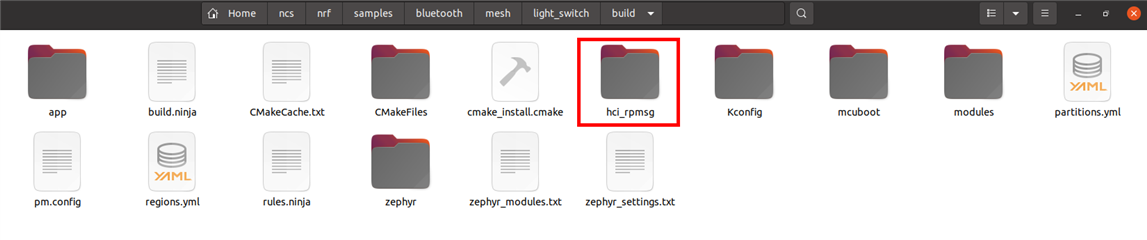
    4. Then you can see that the sample hci_rpmsg is added as a child image:
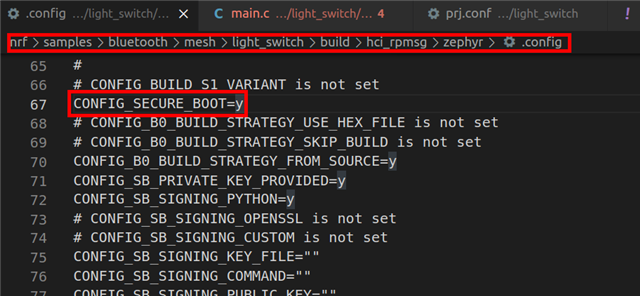
    5. And that CONFIG_SECURE_BOOT=y for the network core sample (hci_rpmsg):
      • When CONFIG_SECURE_BOOT=y in the network core sample (hci_rpmsg) the netboot will be included as well
    6. Next you can run west flash from <ncs location>/ncs/nrf/samples/bluetooth/mesh/light_switch and both the network core and the application core will get flashed with respectively the hci_rpmsg sample and the light_switch sample (If you use SEGGER, the net core won't get flashed automatically, and you need to flash it separately).
    7. Then you can follow the steps under Network core Bootloader-->Testing
      • If you see the log "Done updating network core", it works successfully

    It does not seem like it is necessary to execute step 2 (set CONFIG_SECURE_BOOT=y) in the hci_rpmsg, as it will happen automatically, as explained in the documentation:

    Best regards,

    Simon

Reply
  • All you need to do is the following

    1. Set CONFIG_BOOTLOADER_MCUBOOT=y in the applications prj.conf (e.g. ncs/nrf/samples/bluetooth/mesh/light_switch/prj.conf)
    2. Set CONFIG_SECURE_BOOT=y in the network core sample (will be ncs/zephyr/samples/bluetooth/hci_rpmsg/prj.conf when building Bluetooth examples for the nRF53 DK).
    3. Build the BLE sample
      • This can be done by running the following commands:
        • cd <ncs location>/ncs/nrf/samples/bluetooth/mesh/light_switch
        • west build -b nrf5340dk_nrf5340_cpuapp
      • If the the two conditions below are met, the hci_rpmsg sample will always be included as a child image (which will make it a multi image build)
        • Using the board name nrf5340dk_nrf5340_cpuapp
        • Bulding a BLE example (e.g. the mesh light_switch sample, or the sample nrf/samples/bluetooth/peripheral_uart)
    4. Then you can see that the sample hci_rpmsg is added as a child image:
    5. And that CONFIG_SECURE_BOOT=y for the network core sample (hci_rpmsg):
      • When CONFIG_SECURE_BOOT=y in the network core sample (hci_rpmsg) the netboot will be included as well
    6. Next you can run west flash from <ncs location>/ncs/nrf/samples/bluetooth/mesh/light_switch and both the network core and the application core will get flashed with respectively the hci_rpmsg sample and the light_switch sample (If you use SEGGER, the net core won't get flashed automatically, and you need to flash it separately).
    7. Then you can follow the steps under Network core Bootloader-->Testing
      • If you see the log "Done updating network core", it works successfully

    It does not seem like it is necessary to execute step 2 (set CONFIG_SECURE_BOOT=y) in the hci_rpmsg, as it will happen automatically, as explained in the documentation:

    Best regards,

    Simon

Children
Related