This post is older than 2 years and might not be relevant anymore
More Info: Consider searching for newer posts
This discussion has been locked.
You can no longer post new replies to this discussion. If you have a question you can start a new discussion

Alternative IDE to Segger Embedded Studio - nRF5340

Hello all,

I have successfully installed nRF Connect, nRF Connect SDK v1.6.0 and SEGGER Embedded Studio (SES) v5.50.c to run and debug some samples on my nRF5340 Development Kit. The experience with SES has not been bad at all (projects are ready to go - no configuration needed!). However, I would like to know if there are any alternatives.

I usually work with IAR, which includes the controllers of the nRF53 as target device. Unfortunately, I do not really know how to port or configure any of the nRF samples (e.g. blinky project).
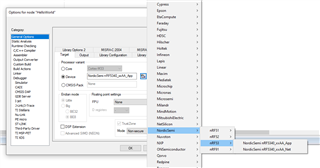
As previously discussed here, I understand that the previous SDK (nRF5 SDK) included IAR support and it was pretty straightforward to use IAR as the default IDE. I wonder if there have been any updates regarding the use of IAR for projects that use nRF53 and nRF Connect SDK.

If IAR were not a viable option, does anybody know of any alternative IDE (e.g.Visual Studio Code, Eclipse)?

Best regards and thanks in advance.

Parents
  • Hello!

    Thanks for reaching out! There are currently no plans for supporting IAR with the nRF Connect SDK and that is not likely to change anytime soon. However, while not officially supported yet it's definitely possible to use something like VSCode or CLion. I use VS Code + command line tools myself and are very happy with that!

    If you want to use VSCode I suggest getting the following extensions: trond-snekvik.kconfig-langtrond-snekvik.devicetree and of course ms-vscode.cpptools. In addition it should be possible to do in app debugging using the marus25.cortex-debug extension.

    For CLion you can check out this tutorial by JetBrains


    I do not recommend using the MDK directly, but I will come back to you tomorrow on the possibilities of doing this with the nRF5340.

    Best regards,
    Carl Richard

Reply
  • Hello!

    Thanks for reaching out! There are currently no plans for supporting IAR with the nRF Connect SDK and that is not likely to change anytime soon. However, while not officially supported yet it's definitely possible to use something like VSCode or CLion. I use VS Code + command line tools myself and are very happy with that!

    If you want to use VSCode I suggest getting the following extensions: trond-snekvik.kconfig-langtrond-snekvik.devicetree and of course ms-vscode.cpptools. In addition it should be possible to do in app debugging using the marus25.cortex-debug extension.

    For CLion you can check out this tutorial by JetBrains


    I do not recommend using the MDK directly, but I will come back to you tomorrow on the possibilities of doing this with the nRF5340.

    Best regards,
    Carl Richard

Children
Related