This post is older than 2 years and might not be relevant anymore
More Info: Consider searching for newer posts

Debug and Release Configuration not working in SES

I was working with "Debug configuration" for my nrf board on Segger Embedded Studio. It was working perfectly. But when I changed it to "Release configuration", It doesn't work. Now even the debug configuration doesn't work.
I use latest SES version (Setup_EmbeddedStudio_ARM_v550d_win_x64).
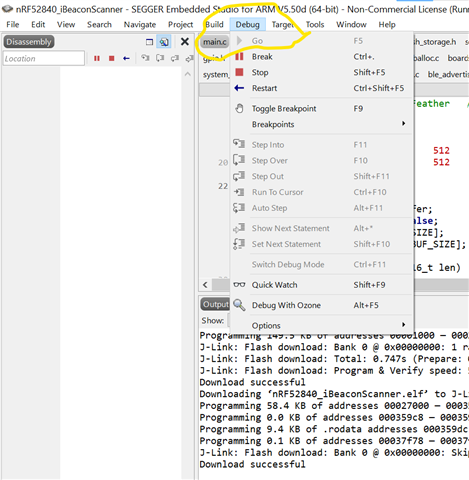
In the image you can see that I cannot click the "Go button". 
What should I do. Please help me out.
Thank you.

Parents
  • Hello, 

    In the image you can see that I cannot click the "Go button". 
    What should I do. Please help me out.

    The image indicates that debugging is already running - since you are able to press stop, break and reset, for example.
    Could this be the case? If you click 'stop', are you then able to attach the debugger again, and click 'go'?

    I was working with "Debug configuration" for my nrf board on Segger Embedded Studio. It was working perfectly. But when I changed it to "Release configuration", It doesn't work. Now even the debug configuration doesn't work.

    The build configurations actually refer to the different ways to build a large C project. This allows you to generate different hex files with different levels of debugging output, or compiler optimization levels, etc.
    Build configuration does not actually have anything to do with the debugger's way of accessing the chip.

    Best regards,
    Karl 

  • Thank you for your response. I had these errors when I built the program in segger.

    1> File "c:\users\nishi\appdata\local\programs\python\python39\lib\site-packages\nordicsemi\__main__.py", line 53, in <module>
    1> from nordicsemi.dfu.dfu_transport_serial import DfuTransportSerial
    1> File "c:\users\nishi\appdata\local\programs\python\python39\lib\site-packages\nordicsemi\dfu\dfu_transport_serial.py", line 52, in <module>
    1> from nordicsemi.lister.device_lister import DeviceLister
    1> File "c:\users\nishi\appdata\local\programs\python\python39\lib\site-packages\nordicsemi\lister\device_lister.py", line 39, in <module>
    1> from nordicsemi.lister.windows.lister_win32 import Win32Lister
    1> File "c:\users\nishi\appdata\local\programs\python\python39\lib\site-packages\nordicsemi\lister\windows\lister_win32.py", line 43, in <module>
    1> from constants import DIGCF_PRESENT, DEVPKEY, DIGCF_DEVICEINTERFACE
    1> ModuleNotFoundError: No module named 'constants'
    Build failed

    So I changed the python version from 3.9.6 to 3.7.
    Now it shows as below when built.


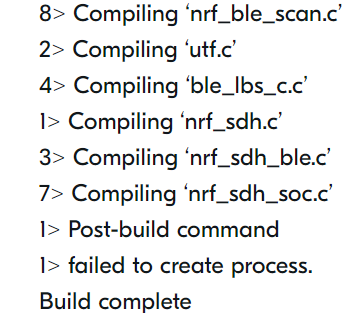
    1> Compiling ‘ble_conn_state.c’
    7> Compiling ‘ble_db_discovery.c’
    3> Compiling ‘ble_srv_common.c’
    6> Compiling ‘nrf_ble_gatt.c’
    5> Compiling ‘nrf_ble_gq.c’
    8> Compiling ‘nrf_ble_scan.c’
    2> Compiling ‘utf.c’
    4> Compiling ‘ble_lbs_c.c’
    1> Compiling ‘nrf_sdh.c’
    3> Compiling ‘nrf_sdh_ble.c’
    7> Compiling ‘nrf_sdh_soc.c’
    1> Post-build command
    1> failed to create process.
    Build complete

    In Debug configuration, I have seen that it displays we have to click "Go" twice to see the working in the output window.
    But in Release configuration, I can click the "Go" only once. And Also my nrf board gets hanged. It doesn't send the data that it was sending in debug configuration. I have to erase the chip every time.
  • Hello,

    Thank you for your patience with this. The summer holidays have begun here in Norway, and DevZone is therefore operating with reduced staff for the time being. Sorry for any inconvenience this might cause.

    Prathik said:
    But in Release configuration, I can click the "Go" only once. And Also my nrf board gets hanged. It doesn't send the data that it was sending in debug configuration.

    What is the difference between your release configuration and your debug configuration? Please elaborate what you mean when you say that the board gets hanged. Are you encountering an error?
    You could check this by doing a diff comparison between the two sections of the project file.

    Best regards,
    Karl

Reply
  • Hello,

    Thank you for your patience with this. The summer holidays have begun here in Norway, and DevZone is therefore operating with reduced staff for the time being. Sorry for any inconvenience this might cause.

    Prathik said:
    But in Release configuration, I can click the "Go" only once. And Also my nrf board gets hanged. It doesn't send the data that it was sending in debug configuration.

    What is the difference between your release configuration and your debug configuration? Please elaborate what you mean when you say that the board gets hanged. Are you encountering an error?
    You could check this by doing a diff comparison between the two sections of the project file.

    Best regards,
    Karl

Children
  • Thanks for your response Karl.


    Here it shows failed to create process when built the program in "release configuration". When I try to debug in release configuration it doesn't work. So I changed back to debug configuration and when i did the debug, again it didn't debug. So I had to erase the device in order to make it run even in Debug configuration.

    Program sends data perfectly in Debug mode, but wont work in Release mode. Is there anything that I have to change for my device to run on Release Configurations?

  • Prathik said:
    Here it shows failed to create process when built the program in "release configuration". When I try to debug in release configuration it doesn't work. So I changed back to debug configuration and when i did the debug, again it didn't debug. So I had to erase the device in order to make it run even in Debug configuration.
    Prathik said:
    Is there anything that I have to change for my device to run on Release Configurations?

    I understand. Could it be that you have only made changes to your debug build configuration during the development, instead of making them for the common configuration?
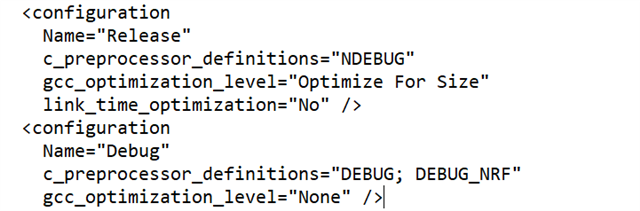
    Could you show me the difference between the release and the debug configuration? You can see this in plain text if you open your SES project file in an editor, instead of opening it with SES.
    It may look something like this:

    ..
      <configuration
        Name="Release"
        c_preprocessor_definitions="NDEBUG"
        gcc_optimization_level="Optimize For Size"
        link_time_optimization="No" />
      <configuration
        Name="Debug"
        c_preprocessor_definitions="DEBUG; DEBUG_NRF"
        gcc_optimization_level="None" />
    ..


    Best regards,
    Karl


  • Is this what you wanted me to check? It's same as yours. Is it correct?

  • Yes. Could you try changing the gcc_optimization_level for release to "None", to see if this makes your Release build configuration behave the same as your debug configuration?

    Have you made any other changes to the project options's tab for the debug configuration, compared to the common or release configuration?

    Best regards,
    Karl


  • Changed it to "None". It works just like Debug configuration.


    No. I didn't make any other changes.

    Thank you.

Related