Hello
I really need your help !
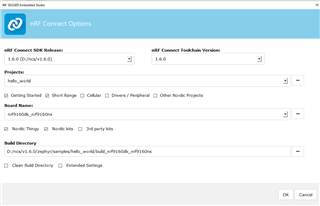
I am using SEGGER Embedded studio with two EV boards: nRF9160 and NRF52 DK
First I started with NRF9160 with clean installation of the IDE, and a brand new computer, It worked fine
I could build a "hello world" application for nrf9160 and work with that.
Then I closed this environment, and I switched to nRF52 DK, and everything was fine so far.
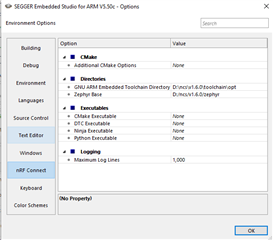
But when I switched back to NRF9160, I could not open any Zephyr project any more. I kept getting the following error:
Creating solution hello_world.emProject
D:/ncs/v1.6.0/toolchain/opt/bin/cmake.exe -GNinja -DBOARD=nrf9160dk_nrf9160ns -DBOARD_DIR=D:\ncs\v1.6.0\zephyr\boards\arm\nrf9160dk_nrf9160 -BD:\ncs\hello_world\build_nrf9160dk_nrf9160ns -SD:\ncs\hello_world -DNCS_TOOLCHAIN_VERSION=1.6.0 -DEXTRA_KCONFIG_TARGETS=menuconfig_ses -DEXTRA_KCONFIG_TARGET_COMMAND_FOR_menuconfig_ses=D:\ncs\v1.6.0\toolchain\segger_embedded_studio/html/configure_nordic_project_menuconfig.py
-- Application: D:/ncs/hello_world
-- Zephyr version: 2.6.0-rc1 (D:/ncs/v1.6.0/zephyr), build: b938aafbcdd8
-- Found Python3: D:/ncs/v1.6.0/toolchain/opt/bin/python.exe (found suitable exact version "3.8.2") found components: Interpreter
-- Found west (found suitable version "0.11.0", minimum required is "0.7.1")
-- Configuring incomplete, errors occurred!
Including boilerplate (Zephyr base): D:/ncs/v1.6.0/zephyr/cmake/app/boilerplate.cmake
-- Using NCS Toolchain 1.6.0 for building. (D:/ncs/v1.6.0/toolchain/cmake)
CMake Error at D:/ncs/v1.6.0/zephyr/cmake/zephyr_module.cmake:61 (message):
Traceback (most recent call last):
File "D:/ncs/v1.6.0/zephyr/scripts/zephyr_module.py", line 378, in <module>
main()
File "D:/ncs/v1.6.0/zephyr/scripts/zephyr_module.py", line 283, in main
manifest = Manifest.from_file()
File "D:\ncs\v1.6.0\toolchain\opt\bin\Lib\site-packages\west\manifest.py", line 1141, in from_file
return Manifest(**kwargs)
File "D:\ncs\v1.6.0\toolchain\opt\bin\Lib\site-packages\west\manifest.py", line 1340, in __init__
self._load(source_data['manifest'], mpath, ctx)
File "D:\ncs\v1.6.0\toolchain\opt\bin\Lib\site-packages\west\manifest.py", line 1670, in _load
self._load_projects(manifest, url_bases, defaults, ctx)
File "D:\ncs\v1.6.0\toolchain\opt\bin\Lib\site-packages\west\manifest.py", line 1956, in _load_projects
self._import_from_project(project, imp, ctx)
File "D:\ncs\v1.6.0\toolchain\opt\bin\Lib\site-packages\west\manifest.py", line 2145, in _import_from_project
self._import_path_from_project(project, imap.file, new_ctx)
File "D:\ncs\v1.6.0\toolchain\opt\bin\Lib\site-packages\west\manifest.py", line 2156, in _import_path_from_project
imported = self._import_content_from_project(project, path)
File "D:\ncs\v1.6.0\toolchain\opt\bin\Lib\site-packages\west\manifest.py", line 2219, in _import_content_from_project
content = self._importer(project, path)
File "D:\ncs\v1.6.0\toolchain\opt\bin\Lib\site-packages\west\manifest.py", line 182, in _default_importer
raise ManifestImportFailed(project, file)
west.manifest.ManifestImportFailed: ManifestImportFailed: project <Project
zephyr ('D:\\ncs\\v1.6.0\\zephyr') at v2.6.0-rc1-ncs1> file west.yml
Call Stack (most recent call first):
D:/ncs/v1.6.0/zephyr/cmake/app/boilerplate.cmake:183 (include)
D:/ncs/v1.6.0/zephyr/share/zephyr-package/cmake/ZephyrConfig.cmake:24 (include)
D:/ncs/v1.6.0/zephyr/share/zephyr-package/cmake/ZephyrConfig.cmake:35 (include_boilerplate)
CMakeLists.txt:5 (find_package)
error: cmake failed
create_nordic_project.py failed (1)
I repeated the process again: Format the computer, install NCS/IDE, build for 9160, Switch to NRF52, switch back to nRF9160. And I got the same result.
It seems that after working with NRF52 environment, I cannot get back to NRF9160.
Any workaround?
Thanks
Danny