This post is older than 2 years and might not be relevant anymore
More Info: Consider searching for newer posts

Segger Embedded studio conflict NRF9160 and NRF52 DK

Hello

I really need your help !

 I am using SEGGER Embedded studio with two EV boards: nRF9160 and NRF52 DK

First I started with NRF9160 with clean installation of the IDE, and a brand new computer, It worked fine

I could build a "hello world" application for nrf9160 and work with that.

Then I closed this environment, and I switched to nRF52 DK, and everything was fine so far.

But when I switched back to NRF9160, I could not open any Zephyr project any more. I kept getting the following error:

Creating solution hello_world.emProject
D:/ncs/v1.6.0/toolchain/opt/bin/cmake.exe -GNinja -DBOARD=nrf9160dk_nrf9160ns -DBOARD_DIR=D:\ncs\v1.6.0\zephyr\boards\arm\nrf9160dk_nrf9160 -BD:\ncs\hello_world\build_nrf9160dk_nrf9160ns -SD:\ncs\hello_world -DNCS_TOOLCHAIN_VERSION=1.6.0 -DEXTRA_KCONFIG_TARGETS=menuconfig_ses -DEXTRA_KCONFIG_TARGET_COMMAND_FOR_menuconfig_ses=D:\ncs\v1.6.0\toolchain\segger_embedded_studio/html/configure_nordic_project_menuconfig.py
-- Application: D:/ncs/hello_world
-- Zephyr version: 2.6.0-rc1 (D:/ncs/v1.6.0/zephyr), build: b938aafbcdd8
-- Found Python3: D:/ncs/v1.6.0/toolchain/opt/bin/python.exe (found suitable exact version "3.8.2") found components: Interpreter
-- Found west (found suitable version "0.11.0", minimum required is "0.7.1")
-- Configuring incomplete, errors occurred!
Including boilerplate (Zephyr base): D:/ncs/v1.6.0/zephyr/cmake/app/boilerplate.cmake
-- Using NCS Toolchain 1.6.0 for building. (D:/ncs/v1.6.0/toolchain/cmake)
CMake Error at D:/ncs/v1.6.0/zephyr/cmake/zephyr_module.cmake:61 (message):
Traceback (most recent call last):

File "D:/ncs/v1.6.0/zephyr/scripts/zephyr_module.py", line 378, in <module>
main()
File "D:/ncs/v1.6.0/zephyr/scripts/zephyr_module.py", line 283, in main
manifest = Manifest.from_file()
File "D:\ncs\v1.6.0\toolchain\opt\bin\Lib\site-packages\west\manifest.py", line 1141, in from_file
return Manifest(**kwargs)
File "D:\ncs\v1.6.0\toolchain\opt\bin\Lib\site-packages\west\manifest.py", line 1340, in __init__
self._load(source_data['manifest'], mpath, ctx)
File "D:\ncs\v1.6.0\toolchain\opt\bin\Lib\site-packages\west\manifest.py", line 1670, in _load
self._load_projects(manifest, url_bases, defaults, ctx)
File "D:\ncs\v1.6.0\toolchain\opt\bin\Lib\site-packages\west\manifest.py", line 1956, in _load_projects
self._import_from_project(project, imp, ctx)
File "D:\ncs\v1.6.0\toolchain\opt\bin\Lib\site-packages\west\manifest.py", line 2145, in _import_from_project
self._import_path_from_project(project, imap.file, new_ctx)
File "D:\ncs\v1.6.0\toolchain\opt\bin\Lib\site-packages\west\manifest.py", line 2156, in _import_path_from_project
imported = self._import_content_from_project(project, path)
File "D:\ncs\v1.6.0\toolchain\opt\bin\Lib\site-packages\west\manifest.py", line 2219, in _import_content_from_project
content = self._importer(project, path)
File "D:\ncs\v1.6.0\toolchain\opt\bin\Lib\site-packages\west\manifest.py", line 182, in _default_importer
raise ManifestImportFailed(project, file)

west.manifest.ManifestImportFailed: ManifestImportFailed: project <Project
zephyr ('D:\\ncs\\v1.6.0\\zephyr') at v2.6.0-rc1-ncs1> file west.yml

Call Stack (most recent call first):
D:/ncs/v1.6.0/zephyr/cmake/app/boilerplate.cmake:183 (include)
D:/ncs/v1.6.0/zephyr/share/zephyr-package/cmake/ZephyrConfig.cmake:24 (include)
D:/ncs/v1.6.0/zephyr/share/zephyr-package/cmake/ZephyrConfig.cmake:35 (include_boilerplate)
CMakeLists.txt:5 (find_package)


error: cmake failed
create_nordic_project.py failed (1)

I repeated the process again: Format the computer, install NCS/IDE, build for 9160, Switch to NRF52, switch back to nRF9160. And I got the same result.

It seems that after working with NRF52 environment, I cannot get back to NRF9160.

Any workaround?

Thanks

Danny

Parents Reply Children
  • Understood. Let's try something different:
    1. Open the drop down menu besides the "Open IDE" button in the Toolchain manager
    2. Open "Bash"
    3. Call the following command and share the output with me: 

    cd zephyr/samples/hello_world
    west build -b nrf9160dk_nrf9160ns


    Just to verify whether the build system actually works or not.

    Best regards,
    Carl Richard

  • Hi Carl,

     It seems that my ticket was not clear enough. Your advices are very trivial and I have already did them.

    My complain is that there is a conflict between the nRF52810_nRF52832 environment and the nrf9160dk_nrf9160 environment.

    The first one does NOT use the Zephyr (cmake) environment and the second one DOES.

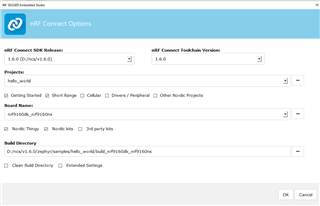
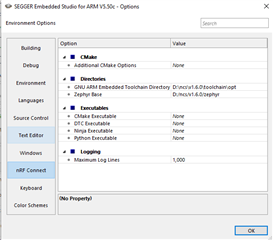
    For the first one, I open an Segger Embedded Studio emProject project, But for the second one we use the cmake "Open Connect nRF SDK Project" in the Segger IDE.

    These are two different ways of opening a project. They are conflicting. 

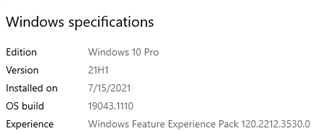
    Let me explain: After a clean installation of the NCS, on a clean computer, I can open the hello world application for 9160 using "Open Connect nRF SDK Project" . To build it and to run it. Everything is working. I can also use the west command line as you wrote. Everything is good.

    Once I run the Segger Embedded Studio IDE and open an emProject (like ble_app_uart for nRF52810_nRF52832 ), from that point on, I cannot open the the Hello world application in the Zephyr environment with "Open Connect nRF SDK Project".

    Danny

  • Hi, Danny!

    It was indeed not clear. Thank you for the clarification. However, I'm still not able to reproduce the issue here. Please provide some more details:
    - What version of the nRF5 SDK are you using?
    - How are you installing the nRF5 SDK (used for the nRF52810_nRF52832 project)? (where is it located, what are the contents of Makefile.windows and so on)
    - Which toolchain is used for the nRF5 SDK?
    - Are you using the same Segger IDE (the one bundled with the Toolchain manager download) for both environments?
    - Can you still build NCS projects on the command line when they fail to open in SES?
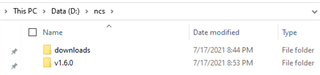
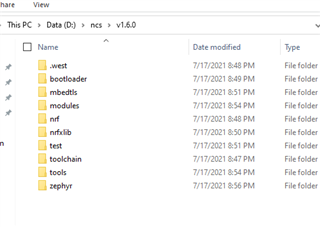
    - As mentioned earlier, please share screenshots of the folder structure within the ncs and v1.6.0 directories. 
    - Please attach an archive with the complete hello_world sample (including the build folder) when it fails to open in SES.

    The questions above may seem trivial, but I will not be able to help you without deeper knowledge of the issue. 

    Best regards,
    Carl Richard

  • - What version of the nRF5 SDK are you using?

      nRF_SDK_V17.02


    - How are you installing the nRF5 SDK (used for the nRF52810_nRF52832 project)? (where is it located, what are the contents of Makefile.windows and so on)

    It is located here: D:\git\gitnordic\nRF_SDK_V17.02

    I downloaded nRF_SDK_V17.02_DeviceDownload.zip from Nordic web site

    www.nordicsemi.com/.../download


    - Which toolchain is used for the nRF5 SDK?

    I am using the default comes with SEGGER Embedded studio. I am using the same IDE for both Nordic platform.


    - Are you using the same Segger IDE (the one bundled with the Toolchain manager download) for both environments?

    Yes - The same version - The same installation.


    - Can you still build NCS projects on the command line when they fail to open in SES?

    No


    - As mentioned earlier, please share screenshots of the folder structure within the ncs and v1.6.0 directories. 


    - Please attach an archive with the complete hello_world sample (including the build folder) when it fails to open in SES.

    I don't have it right now. I am working on 9160 environment now. To reproducer the issue, I need to switch to other environment and then I need to reinstall everything.  It consumes so much time.

  • Thank you for the additional information. I just tried following the same steps as you on a clean Windows installation, but I still didn't manage to reproduce your issue. However, I noticed I ended up with a different setup than yours when installing things and running them for the first time. Could you describe step-by-step how you produce the issue? Please be detailed. I need to know how you open SES each time, how you open the projects and what changes you (may) have done. The more information the better!

    Another question: you are using the nRF Connect for Desktop Toolchain Manager app, right? If so, what version of the nRF Connect for Desktop and what version of the Toolchain Manager are you using? Please share the logs located under %appdata%/nrfconnect/pc-nrfconnect-toolchain-manager/logs as well.

    Best regards,
    Carl Richard

Related