
I'm downloading a firmware image from AWS via cell onto the nRF9160. I want to perform a serial DFU over UART. The DFU target is the nRF52840. Are there any existing samples outlining this process?

I'm downloading a firmware image from AWS via cell onto the nRF9160. I want to perform a serial DFU over UART. The DFU target is the nRF52840. Are there any existing samples outlining this process?
Hi Ethan,
Could you let me know more about what firmware running on the nRF52840 ?
If it's running NCS , please have a look at this case: https://devzone.nordicsemi.com/support-private/support/269959
ould you try to test using the repo that Simon pointed to in the case.
Simon is on vacation but here is the instruction I got from him:
*** Booting Zephyr OS build v2.1.99-ncs1 **
[00:00:00.120,208] [1B][0m<inf> mcuboot: Starting bootloader[1B][0m
[00:00:00.126,312] [1B][0m<inf> mcuboot: Primary image: magic=unset, swap_type=0x1, copy_done=0x3, image_ok=0x3[1B][0m
[00:00:00.136,108] [1B][0m<inf> mcuboot: Boot source: none[1B][0m[00:00:00.141,479] [1B][0m<inf> mcuboot: Swap type: test[1B][0m
[00:00:02.377,655] [1B][0m<inf> mcuboot: Bootloader chainload address offset: 0xc000[1B][0m
[00:00:02.385,162] [1B][0m<inf> mcuboot: Jumping to the first image slot[1B][0m
** Booting Zephyr OS build v2.1.99-ncs1 ***Hello world! nrf52840_pca10090
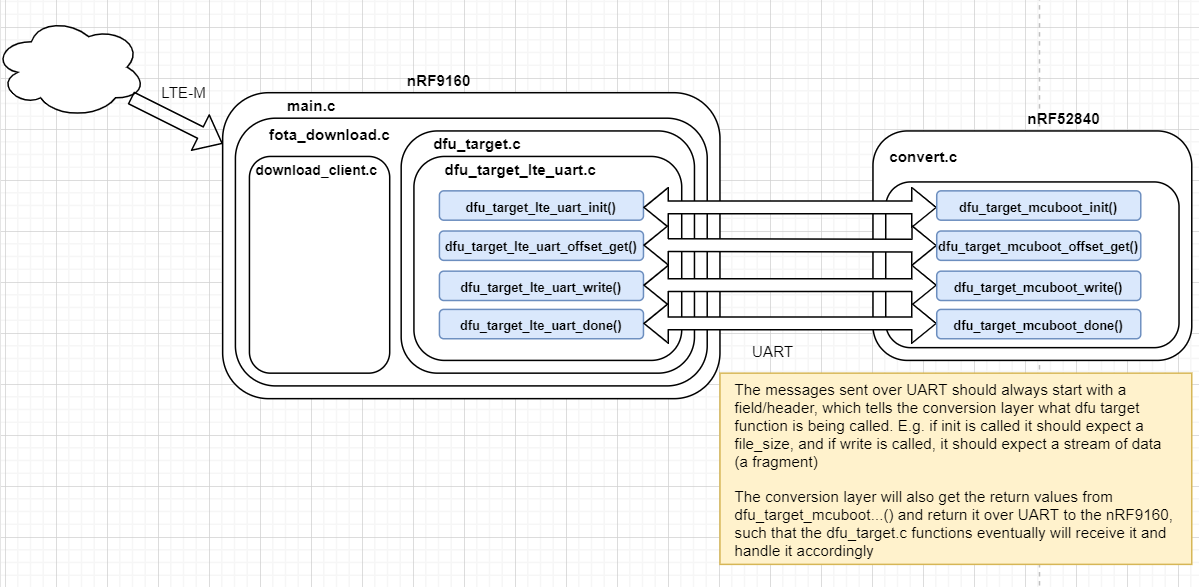
Hey Hung, I switched our toolchain over to NCS and I was wondering if you could re-answer my original question based on that. I can't view the link you sent in your original response because it's a private ticket.
Thanks Hung, do you think trying to use this code is going to be an issue if we're using NCS v1.5.1?
I would suggest to try testing the code with v1.4.0 first and after you get it running, you can study the code and try to port it to v1.5.1.
I'm not very familiar with the code but I think it's better to try step by step.
Thanks!
I see that app_update.bin is tagged with a magic header at the beginning, and a uart magic header is added in order to trigger the uart dfu. I know you're not too familiar with this code, but do you happen to know anything about generating magic headers when app_update.bin is created? I want to understand how to add a custom magic header so when I port over this code, I can utilize the dfu_target library

Hi,
As a generic note, I must express that this is a proof-of-concept implementation which is not feature complete, and it's provided as-is.
esisk said:I see that app_update.bin is tagged with a magic header at the beginning, and a uart magic header is added in order to trigger the uart dfu. I know you're not too familiar with this code, but do you happen to know anything about generating magic headers when app_update.bin is created? I want to understand how to add a custom magic header so when I port over this code, I can utilize the dfu_target library
Here's the logic check for application, modem delta, and full modem (more types to come if required):
https://github.com/nrfconnect/sdk-nrf/blob/v1.6.1/subsys/dfu/dfu_target/src/dfu_target.c#L43-L57
Normally you would use "imgtool.py" to generate the correct magic headers for the app update binary, but since this tool also uses this in the rest of the image, it is easier just to manually replace the first bytes with the uart magic header.
This is the uart magic: https://github.com/plskeggs/sdk-nrf/commit/6baf0e006299bb69152cf3fb7e690985cdcbcb3b#diff-fc58c71f2315c9f063d8c3bd4b43e9aa7fd0e8b42c6cef8d4a8962f56e6144ebR9
Here's an example on how it should look in the binary itself (build/zephyr/app_update.bin):
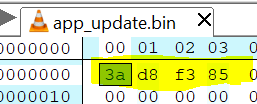
For mcuboot to accept the image, the header must be swapped back again from "uart type" to mcuboot:
This is to work around the restriction of the dfu_target library, which does not support "sub-types" of mcuboot-images (ie: targetting internal, external, transport A, transport B, etc).
Kind regards,
Håkon
Hi,
As a generic note, I must express that this is a proof-of-concept implementation which is not feature complete, and it's provided as-is.
esisk said:I see that app_update.bin is tagged with a magic header at the beginning, and a uart magic header is added in order to trigger the uart dfu. I know you're not too familiar with this code, but do you happen to know anything about generating magic headers when app_update.bin is created? I want to understand how to add a custom magic header so when I port over this code, I can utilize the dfu_target library
Here's the logic check for application, modem delta, and full modem (more types to come if required):
https://github.com/nrfconnect/sdk-nrf/blob/v1.6.1/subsys/dfu/dfu_target/src/dfu_target.c#L43-L57
Normally you would use "imgtool.py" to generate the correct magic headers for the app update binary, but since this tool also uses this in the rest of the image, it is easier just to manually replace the first bytes with the uart magic header.
This is the uart magic: https://github.com/plskeggs/sdk-nrf/commit/6baf0e006299bb69152cf3fb7e690985cdcbcb3b#diff-fc58c71f2315c9f063d8c3bd4b43e9aa7fd0e8b42c6cef8d4a8962f56e6144ebR9
Here's an example on how it should look in the binary itself (build/zephyr/app_update.bin):
For mcuboot to accept the image, the header must be swapped back again from "uart type" to mcuboot:
This is to work around the restriction of the dfu_target library, which does not support "sub-types" of mcuboot-images (ie: targetting internal, external, transport A, transport B, etc).
Kind regards,
Håkon
