This post is older than 2 years and might not be relevant anymore
More Info: Consider searching for newer posts

Where is CONFIG_LOG enabled in ncs1.6.0 light demo?

prj.conf of light demo:

#
# Copyright (c) 2019 Nordic Semiconductor ASA
#
# SPDX-License-Identifier: LicenseRef-Nordic-5-Clause
#
CONFIG_NCS_SAMPLES_DEFAULTS=y

# General configuration
CONFIG_SYSTEM_WORKQUEUE_STACK_SIZE=2048
CONFIG_FLASH=y
CONFIG_FLASH_MAP=y
CONFIG_NVS=y
CONFIG_SETTINGS=y
CONFIG_HWINFO=y
CONFIG_DK_LIBRARY=y

# Bluetooth configuration
CONFIG_BT=y
CONFIG_BT_COMPANY_ID=0x0059
CONFIG_BT_DEVICE_NAME="Mesh Light"
CONFIG_BT_L2CAP_TX_MTU=69
CONFIG_BT_L2CAP_TX_BUF_COUNT=8
CONFIG_BT_LL_SW_SPLIT=y
CONFIG_BT_OBSERVER=y
CONFIG_BT_PERIPHERAL=y
CONFIG_BT_SETTINGS=y
CONFIG_BT_TINYCRYPT_ECC=y

# Disable unused Bluetooth features
CONFIG_BT_CTLR_DUP_FILTER_LEN=0
CONFIG_BT_CTLR_LE_ENC=n
CONFIG_BT_DATA_LEN_UPDATE=n
CONFIG_BT_PHY_UPDATE=n
CONFIG_BT_CTLR_CHAN_SEL_2=n
CONFIG_BT_CTLR_MIN_USED_CHAN=n
CONFIG_BT_CTLR_PRIVACY=n

# Bluetooth mesh configuration
CONFIG_BT_MESH=y
CONFIG_BT_MESH_RELAY=y
CONFIG_BT_MESH_FRIEND=y
CONFIG_BT_MESH_ADV_BUF_COUNT=13
CONFIG_BT_MESH_TX_SEG_MAX=10
CONFIG_BT_MESH_PB_GATT=y
CONFIG_BT_MESH_GATT_PROXY=y
CONFIG_BT_MESH_DK_PROV=y

# Bluetooth mesh models
CONFIG_BT_MESH_ONOFF_SRV=y
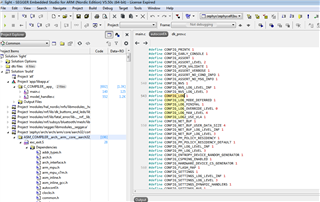
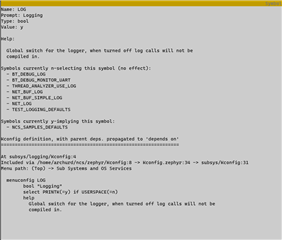
Can you tell me where CONFIG_LOG is enabled? It is inconsistent with ncs1.5.0. When I enabled CONFIG_LOG_BACKEND_RTT, I was notified of an error because it conflicted with CONFIG_LOG_MINIMAL. This bothers me a lot.

Parents
  • Hi Xinjiang

    Try to debug using "ninja menuconfig".

    To debug project configuration using ninja menuconfig, follow these steps:

    1. Build the project as normal, for example using Segger Embedded Studio.

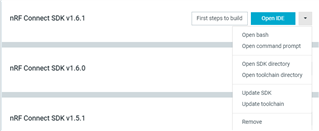
    2.Use nRF Connect Toolchain Manager to "Open command prompt"

    3. Use terminal to navigate to the build folder for the project, using the "cd" command.
    Below is an example for navigating to build folder for central_uart example. Your path may be different.

    $ C:\PATH_TO_NCS\v1.6.1\>
    $ C:\PATH_TO_NCS\v1.6.1\>cd nrf\samples\bluetooth\central_uart\build_nrf52840dk_nrf52840
    $ C:\PATH_TO_NCS\v1.6.1\nrf\samples\bluetooth\central_uart\build_nrf52840dk_nrf52840> 

    4. Use the command "ninja menuconfig":

    $ C:\PATH_TO_NCS\v1.6.1\nrf\samples\bluetooth\central_uart\build_nrf52840dk_nrf52840> ninja menuconfig

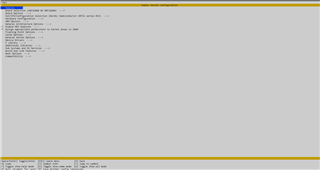
    Then you will see this screen:

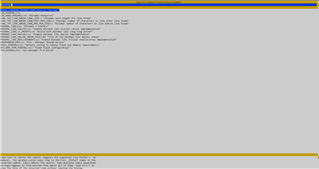
    5. Search for the symbol you want using "/".
    Example on search for "MINIMAL":

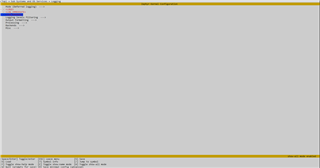
    6. Navigate to symbol you want to know more about and press Enter to go to configuration destination.

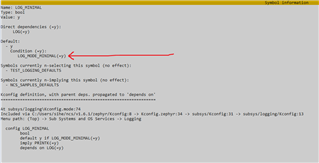
    7. Press "?" on the symbol to see more about this configuration. Here you can see what configuration is set to, as well as the default value, and what other configurations have set this config. Arrow shows that in this example, LOG_MODE_MINIMAL has is "y", which makes LOG_MINIMAL "y" as well

    Did this help you fix you application?

    Regards,
    Sigurd Hellesvik

Reply
  • Hi Xinjiang

    Try to debug using "ninja menuconfig".

    To debug project configuration using ninja menuconfig, follow these steps:

    1. Build the project as normal, for example using Segger Embedded Studio.

    2.Use nRF Connect Toolchain Manager to "Open command prompt"

    3. Use terminal to navigate to the build folder for the project, using the "cd" command.
    Below is an example for navigating to build folder for central_uart example. Your path may be different.

    $ C:\PATH_TO_NCS\v1.6.1\>
    $ C:\PATH_TO_NCS\v1.6.1\>cd nrf\samples\bluetooth\central_uart\build_nrf52840dk_nrf52840
    $ C:\PATH_TO_NCS\v1.6.1\nrf\samples\bluetooth\central_uart\build_nrf52840dk_nrf52840> 

    4. Use the command "ninja menuconfig":

    $ C:\PATH_TO_NCS\v1.6.1\nrf\samples\bluetooth\central_uart\build_nrf52840dk_nrf52840> ninja menuconfig

    Then you will see this screen:

    5. Search for the symbol you want using "/".
    Example on search for "MINIMAL":

    6. Navigate to symbol you want to know more about and press Enter to go to configuration destination.

    7. Press "?" on the symbol to see more about this configuration. Here you can see what configuration is set to, as well as the default value, and what other configurations have set this config. Arrow shows that in this example, LOG_MODE_MINIMAL has is "y", which makes LOG_MINIMAL "y" as well

    Did this help you fix you application?

    Regards,
    Sigurd Hellesvik

Children
Related