This post is older than 2 years and might not be relevant anymore
More Info: Consider searching for newer posts

APP irq priority

Hi, I have developed a BLE/ZigBee application starting from nRF5 SDK for Thread and Zigbee v3.2.0.
Now I need to add a "timer" for measurement timing most precise as possible.
I tried:
- RTC, but unfortunatly: RTC0 is locked by SoftDevice, RTC2 is locked by 802.15.4 radio functions and RTC1 is used by APP timers.
- configuring by application_timers_start() function an application timer.
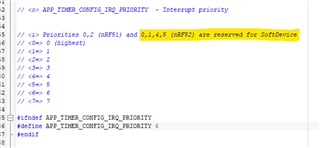
In this last case, I tried to change the IRQ priority reconfiguring APP_TIMER_CONFIG_IRQ_PRIORITY macro inside sdk_config.h header file
As on comment here below, I tried with priority level 2 or 3, but as sonn as the BLE connect, the FW goes into Hard Fault Handler
Where I wrong?
In addition, using the application timer with IRQ priority level 6, irq timing is not granted: for example, using 1 millisecond timer, very often the timer is served after 3-5 milliseconds, but the very troublesome think is that the followings IRQ after this issue, starts very time shifted and the long time sincronicity is not longer granted
How can I solve this issue?
Abele
Parents
  • Hi Abele

    Would it be an option to use a TIMER module rather than an RTC module?

    The nRF52840 has 5 TIMER modules available, so there is usually one or more available. 

    Please note that running a TIMER module in sleep could increase sleep current, but if you're already running BLE and ZigBee this might not be noticeable on overall system current. 

    Best regards
    Torbjørn

  • Hi  Ovrebeek,

    TIMER modules use system clock, I think less stable of external 32768 clock crystal.
    Really, my issue is that, when my device is disconnected from BLE, I need to handle and increment one local Unix Time Stamp variable (to use it as "RealTimeClock" ).
    UnixTime Stamp variable will be used as clock when BLE is disconnected, and must grant the local time, with best precisione possible, for at least some week.
    Any suggests are welcome how to solve this function
    Many thanks


    Abele

  • Hi Torbjørn

    Yes, it's not needed a millisecond resolution, I think the best resolution could be 0,1 second.
    My questions:
    - for your knoledge, for some week or one month the clock time accuracy is enough?
    - TIMER modules can take all IRQ priority levels or there are some limitation?
    BR
    Abele

  • Hi Abele

    abe said:
    - for your knoledge, for some week or one month the clock time accuracy is enough?

    This depends on the accuracy of the 32kHz crystal on your board. 

    As an example, if you have a 20ppm crystal you will have a worst case drift of 1.7 seconds pr day:

    (60*60*24) * 20 / 1000000 = 1.7

    After a month this would add up to almost a minute. 

    In other words you need to pick the crystal accordingly, in order to get the required level of accuracy. 

    Please remember to read the crystal specifications carefully, in order to verify whether or not the quoted accuracy also takes temperature and aging factors into account. All crystals will be somewhat affected by temperature and aging. 

    If you use a TIMER module for the time tracking then it is the accuracy of the 32MHz crystal that is relevant, and you need to make sure that this crystal is running at all times. 

    By default it will only be enabled when the radio is needed. 

    abe said:
    - TIMER modules can take all IRQ priority levels or there are some limitation?

    Whenever the SoftDevice is running it will occupy IRQ priorities 0, 1, 4 and 5. 

    The IRQ priorities left for the application is 2, 3, 6 and 7. 

    Best regards
    Torbjørn

  • Hello Torbjørn,

    I'm bit confused... in one previous comment you said

    Would it be an option to use a TIMER module rather than an RTC module?

    because on nRF5 SDK for Thread and Zigbee v3.2.0. there are no RTC available, then you suggested to use a TIMER module instead of RTC.

    In addition, in my starting post I said

    I tried with priority level 2 or 3, but as sonn as the BLE connect, the FW goes into Hard Fault Handler

    Your 32768 Khz clock precision considerations are right, but in my case RTC is not usable.

    Abele

  • Hi Abele

    abe said:
    because on nRF5 SDK for Thread and Zigbee v3.2.0. there are no RTC available, then you suggested to use a TIMER module instead of RTC.

     Yes. If you don't have any RTC's available then the remaining options are to use either a TIMER module or to use the app_timer module. 

    abe said:

    In addition, in my starting post I said

    I tried with priority level 2 or 3, but as sonn as the BLE connect, the FW goes into Hard Fault Handler

    Have you been able to identify which function calls preceded the HardFault by running the debugger when the issue occurs?

    Using the app_timer at priority level 2 or 3 can be risky, because you are not able to call any SoftDevice functions at these priorities. If you want to call a SoftDevice function, or any SDK function that calls the SoftDevice under the hood, you need to be at priority 6 or lower. 

    abe said:
    Your 32768 Khz clock precision considerations are right, but in my case RTC is not usable.

    But the app_timer should be, no?

    Did you try and configure a 100ms repeated timer through the app_timer, and use this to update your timestamp?

    Best regards
    Torbjørn

  • Hello Torbjørn,

    I'm now using the app_timer based on RTC1 module, but I must have a 10ms repeated timer because of some timed function that need less than 100ms.
    I will check if this solution is enough to have quite time clock
    BR
    Abele

Reply Children
  • Hi Abele

    One thing I forgot to mention is that you can always read out the current state of the RTC1 module, in order to get a more accurate time stamp than that provided by a 100ms callback. In other words you can schedule a callback every 100ms or later, and read the RTC counter value to get a timestamp with 1ms accuracy or less. 

    I am not sure if that solves your 10ms repeated timer issue though, since a 10ms repeated timer can still be affected by other interrupts in the system. 

    Best regards
    Torbjørn

  • Hi Torbjørn,

    could you more explain how can I read RTC1 counter and make best precision timestamp? If possible, can I have e sample code to make it?

    Many thanks in advance

    Abele

  • Hi Abele

    Using the uint32_t app_timer_cnt_get(void) you can get the current RTC1 counter value. 

    If you run it once every time your callback function runs and store the value in a variable, you can run it again later and calculate the difference in order to figure out how many ticks passed since the last callback:

    // In your callback:
    uint32_t last_callback_ticks = app_timer_cnt_get();

    // At some point later
    uint32_t current_ticks = app_timer_cnt_get();
    uint32_t ticks_since_last_callback = current_ticks - last_callback_ticks;
    uint32_t milliseconds_since_last_callback = ticks_since_last_ballback * 1000 / 32768;

    Best regards
    Torbjørn

Related