Hello,
I was able to install all tools proposed by the nRF Connect v3.7.0 except the most important : Toolchain manager.
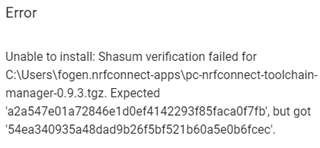
It retruns the following message
running Windows 10
What can I do? Integrity seems to be NOK?
Thanks.
Kind regards,
René Fogen
Hello,
I was able to install all tools proposed by the nRF Connect v3.7.0 except the most important : Toolchain manager.
It retruns the following message

running Windows 10
What can I do? Integrity seems to be NOK?
Thanks.
Kind regards,
René Fogen
Hi,
Try to backup the folder .nrfconnect-apps, remove it from the home folder and try to install the toolchain manager again.
Please let me know this can help or not. Thanks.
Regards,
Amanda
Hi,
Try to backup the folder .nrfconnect-apps, remove it from the home folder and try to install the toolchain manager again.
Please let me know this can help or not. Thanks.
Regards,
Amanda
Hi Amanda,
thanks for your reply.
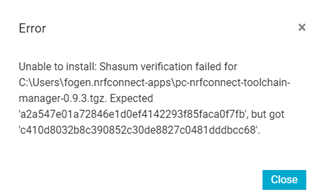
So I removed the .nrfconnect-apps, launched the nRF connect v3.7.0. All previous installed tools are no more installed. So I tried to install first the toolchain manager. It still fails with the following message.

Let me know what I should do as next.
best regards,
René
Hi Rene,
Could you check the network?
Download it in the browser https://developer.nordicsemi.com/.pc-tools/nrfconnect-apps/pc-nrfconnect-toolchain-manager-0.9.3.tgz
Ok, I'm a step further. I installed this package manually and after several trials it appeared in the nRF connect. Now, when

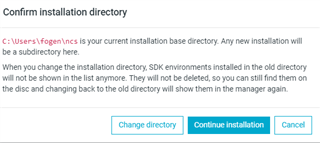
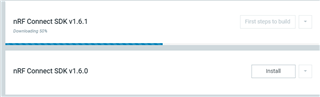
I try to install this, I got another problem. So, I click on continue installation and then it start the (apparently) the download jumps immediately to 50% and it stays there forever I have the impression.

Waht is now wrong here?
Thanks.
René
Hi Rene,
Could you remove the ncs folder and try again? Our expert feels there are some issues with your network connecting to our server.
-Amanda H.
thank for your reply.
I erased.
Tried again.
that is what i get

![]()
it creates the folder. Everythin remains empty, except the following file

which has only 5kb.
I think the network is not restricted. We have a special acces avoiding firewall and usually security issues.
But I can double check with our IT.
Maybe you can see something else related to the folder structre and the *.zip file which is not completed. I can't open it.
kind regards,
René Fogen