This post is older than 2 years and might not be relevant anymore
More Info: Consider searching for newer posts

Segger EMBEDDED STUDIO debugger breaks at random lines

Hello

I am running this version of SES

SEGGER Embedded Studio for ARM

Release 5.34a  Build 2021011401.44914

Nordic Edition

Windows x64

When I run my program in Segger it keeps stopping at these two particular lines. I do not understand why it is breaking because there are no breakpoints set. I deleted all of them.

It seems as if there are two 'hidden' breakpoints at these two lines. The Breakpoints window shows none.

Can someone please help?

Kind regards

Mohamed

Parents
  • Hello Mohamed,

    Could you specify which two lines you are referring to?
    Is it the NRF_BREAKPOINT_COND you are referring to?

    Could you also make sure to have DEBUG defined in your preprocessor defines, like shown in the included image?

    This will make the logger output a detailed error message whenever a non-NRF_SUCCESS error code is passed to an APP_ERROR_CHECK.

    Best regards,
    Karl

  • Hi Karl,

    I am not sure what NRF_BREAKPOINT_COND is. But just before this problem started showing up I tried to set a data breakpoint breaking when a variable is set to a particular value. I thought it di not work because I could not see any breakpoint in the Breakpoints window in SES. Could it be that this data breakpoint is actually set but not showing up?

    Kind regards

    Mohamed Belaroussi

  • Hello again Mohamed,

    Learner said:
    but I am not sure if it worked or not. 

    Could you share with me how the debug breakpoint screen looks after you've added the data breakpoint, and what you click on in order to delete it?

    Could you perform a small test, in which you open a mint condition example from the SDK, run it, and see that there is no breakpoints being triggered, and then redo the test after having added and removed a data breakpoint on any of the variables? Are you then still seeing any lingering behavior of the data breakpoint?
    If so, could you then send me the SES project file, so I may take a closer look and see what might be going wrong?

    Best regards,
    Karl

  • Hi Karl,

    Thank you for trying to investigate this problem further.

    I will provide you with the requested information later on today.

    What is the correct way of setting a data breakpoint in Segger Embedded Studio?

    Note, I am using the version below.

    SEGGER Embedded Studio for ARM

    Release 5.34a  Build 2021011401.44914

    Nordic Edition

    Windows x64

    Kind regards

    Mohamed

  • Hello again Mohamed,

    Learner said:
    I will provide you with the requested information later on today.

    Did you get a chance to look at this further? Or is this perhaps not an issue anymore?

    Learner said:
    What is the correct way of setting a data breakpoint in Segger Embedded Studio?

    Click on the debug tab and select Breakpoints -> New Data Breakpoint option to setup a data breakpoint in Segger Embedded Studios. The new breakpoint will appear in the Breakpoints window. You can see the breakpoints windows if you click on Debug and select Breakpoints -> Breakpoints in the dropdown menu.
    It might also be helpful to have a look through Segger's own page regarding Data Breakpoints and how to use them.

    Best regards,
    Karl

  • Good Morning Karl,

    Did you get a chance to look at this further? Or is this perhaps not an issue anymore?

    Not an issue anymore.

    Click on the debug tab and select Breakpoints -> New Data Breakpoint option to setup a data breakpoint in Segger Embedded Studios.

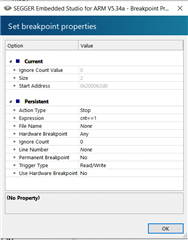
    I did setup a data breakpoint as you described but the program never stops and I know full well the condition is occurring. The breakpoint I set is to break when when the expression  cnt==1 is true. I know the counter cnt is incremented because when I set a normal breakpoint on the line where it gets incremented the program does break. Note, cnt is a volatile int16_t but I don't think this explains the behaviour I am seeing.

    Kind regards
    Mohamed 
  • Hello again, Mohamed

    Thank you for your patience with this. 

    Learner said:
    Not an issue anymore.

    I am glad to hear that this is no longer an issue for your development.

    Learner said:
    I did setup a data breakpoint as you described but the program never stops and I know full well the condition is occurring. The breakpoint I set is to break when when the expression  cnt==1 is true. I know the counter cnt is incremented because when I set a normal breakpoint on the line where it gets incremented the program does break. Note, cnt is a volatile int16_t but I don't think this explains the behaviour I am seeing.

    Hm, this looks correct to me. I just tested this here on my end, and I am seeing the same behavior you describe - strange!
    I have created an internal ticket for this so that our SES NE developers may examine this more closely.
    Thank you for bringing this to our attention! :) 

    Best regards,
    Karl

Reply
  • Hello again, Mohamed

    Thank you for your patience with this. 

    Learner said:
    Not an issue anymore.

    I am glad to hear that this is no longer an issue for your development.

    Learner said:
    I did setup a data breakpoint as you described but the program never stops and I know full well the condition is occurring. The breakpoint I set is to break when when the expression  cnt==1 is true. I know the counter cnt is incremented because when I set a normal breakpoint on the line where it gets incremented the program does break. Note, cnt is a volatile int16_t but I don't think this explains the behaviour I am seeing.

    Hm, this looks correct to me. I just tested this here on my end, and I am seeing the same behavior you describe - strange!
    I have created an internal ticket for this so that our SES NE developers may examine this more closely.
    Thank you for bringing this to our attention! :) 

    Best regards,
    Karl

Children
  • Hello again, Mohamed

    I just heard back from our SES NE developers and they are already aware of the issue and have raised an issue with Segger directly. In the meantime, they had this to say about the issue:

    Data breakpoints have a certain latency so the program will stop a few instructions after the actual variable is updated. To verify add some dummy linear code lines (for instance a few volatile vars which are incremented) after the watched counter is changed. To get a precise analysis of a stray variable write from a crazy pointer you have to use instruction trace and look a couple of instructions back in the trace from where the program stops. This latency does not apply to program break points as they operate on the program counter.

    So this should function as a workaround while we wait for it to be fixed. I hope it helps! :)

    Best regards,
    Karl

  • Good Morning Karl,

    Thank you for your help.

    Data breakpoints have a certain latency so the program will stop a few instructions after the actual variable is updated.
    I think I found that my program never stopped and I thought you also confirmed this in your previous message. So, putting extra dummy instructions will not help. 
    Did you see you program stopping few instructions after the actual variable was updated?
    Kind regards
    Mohamed 
  • Hello again, Mohamed

    Thank you for your patience with this.

    Learner said:
    Did you see you program stopping few instructions after the actual variable was updated?

    Yes, I see the program stopping a few instructions after the data breakpoint condition was met. You will need to make sure that the variable is a global one, so they have a fixed address instead of being on the stack.

    I have included a simple demonstration of this made for the nRF52840 DK with the nRF Connect v1.6.1 toolchain. Place it in \v1.6.1\zephyr\samples\basic\ and see if it works.
    Please run this and see if you see the breakpoint triggering when the tester_variable is equal to 5.

    Best regards,
    Karl

    5126.blinky_databreakpoint.zip

  • Thank you Karl,

    I don't have access to an nRF52840DK.

    Will the example run on nRF52833DK?

    Kind regards

    Mohamed

  • Yes, you should be able to run it just fine on a nRF52833 DK, just change the build target in the Open NCS SDK project prompt. Remember to select the Clean build directory option before opening.
    It might be that the breakpoint is not already there for the nRF52833 DK build, but then you can add it yourself following my prior instructions. Just set the expression to be tester_value == 5 or similar, you should also use set it as a hardware breakpoint.
    Let me know if you encounter any issues with it.

    Best regards,
    Karl

Related