This post is older than 2 years and might not be relevant anymore
More Info: Consider searching for newer posts

How to use EasyDMA as an event for PPI?

I combined the BLE UART and SPIS Peripheral example of SDK V17.0.2 to receive data from a microcontroller using SPIS protocol in every 32 milliseconds and send it over through BLE at 128 milliseconds intervals. However, the EasyDMA is turned on all the time (see the main loop in the attached code) and thus the nRF52832 is consuming around 2mA current all the time.

So, to reduce current consumption, I want to enable EasyDMA only when the SPIS transfer is occurring i.e., 32 milliseconds. Thus, I am planning to use PPI and GPIOTE to sense chip select (CS) pin and use it as an Event and enable EasyDMA as the Task. 

However, as I went through the documentation, I could not find any reference on how to get the task endpoint address for EasyDMA. I need that address to configure the PPI.

Please let me know how can I get the EasyDMA task endpoint address or any other way to enable EasyDMA only for 32 milliseconds

int main(void)
{
    bool erase_bonds;
    
    // Initialize.
    log_init();
    timers_init();
    power_management_init();
    ble_stack_init();
    gap_params_init();
    gatt_init();
    services_init();
    advertising_init();
    conn_params_init();

    // Start execution.
    NRF_LOG_INFO("Debug logging for UART over RTT started.");
    advertising_start();
    
    conn_evt_len_ext_set(true);

    uint32_t       err_code;
    //SPI Initialization
    NRF_LOG_INFO("SPIS example");
    nrf_drv_spis_config_t spis_config = NRF_DRV_SPIS_DEFAULT_CONFIG;
    spis_config.csn_pin               = APP_SPIS_CS_PIN;
    spis_config.miso_pin              = APP_SPIS_MISO_PIN;
    spis_config.mosi_pin              = APP_SPIS_MOSI_PIN;
    spis_config.sck_pin               = APP_SPIS_SCK_PIN;

    APP_ERROR_CHECK(nrf_drv_spis_init(&spis, &spis_config, spis_event_handler));

    // Enter main loop.
    for (;;)
    {
      // Reset rx buffer and transfer done flag
        if (master_connected == true) //Start SPIS receive only when master is connected
        {
            memset(m_rx_buf, 0, m_length);
            spis_xfer_done = false;

            APP_ERROR_CHECK(nrf_drv_spis_buffers_set(&spis, connected_buf, m_length_connected, m_rx_buf, m_length));
     
            connected_buf[m_length] = 1; //connected_buf is used to send data to the SPI master
            while (!spis_xfer_done)
            {
                __WFE();
            }
            //__NOP();
        }
        else
        {
            connected_buf[m_length] = 0; //connected_buf is used to send data to the SPI master
        }
        //NRF_LOG_INFO("idle state started.");
        idle_state_handle();
    }
}

Parents
  • Hello , sorry for the delay. I was testing the chip a bit more. One thing I figured out was that the chip was not going to sleep as some log process was active. I disabled the log and now the chip consumes only around 16uA when advertising only. 

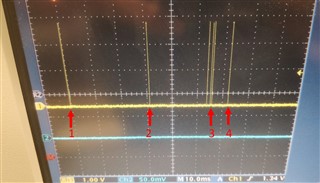
    However, when the SPIS is on, it is consuming around 900uA. To see the SPIS duty cycle, I cleared a GPIO pin before __WFE() (line 46 in the code of the main post) and set a GPIO pin after WFE (line 48). You can see in the attached image that 1, 2, and 4 are prominent 'WFE on' peak that was initialized in every 32ms as I said earlier in the main post. However, in 3, there are some extra peaks that should not be there. Please keep in mind that in this code I combined the BLE UART example and SPIS peripheral example but no data was sent over BLE. Also, I disabled all UART and button functions to mitigate the possibility of pin leakage.  

    Also, I included power management code in the SPIS peripheral example in the SDK and traced the WFE. There are no extra peaks between the prominent WFE peaks in 32ms. Also, the current consumption is around 480uA.  

     So, I think the extra peaks (WFE on time) are responsible for the extra (900-480) or, 520uA current consumption. What steps should I take to debug those extra 'WFE on' peaks?

  • Thank you for your response. According to your recommendation, I have scoped the CS pin and confirmed that it is low (active) for 430us.

    Then I included the nrf_pwr_mgmt_run() function in the SPIS example (…\example\peripheral\spis) provided in the 17.0.2 SDK. Next, I confirmed that the SPIS is running properly by sending some known data.

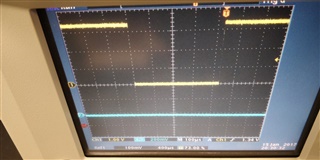
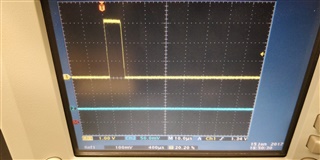
    After that, I added a gpio_clear before WFE() and a gpio_set after WFE() to check WFE on time (code attached for reference). As you can see in the picture below, the WFE off time is only 8us.

    Also, I have tried,

    __SEV();

    __WFE();

    // Enter System ON sleep mode

    __WFE();

    However, current consumption was the same.

    Even without any BLE code, with nrf_pwr_mgmt_run() function active and 430us CS on time, the current consumption is still 480uA.

    According to this post, the EasyDMA draws 1.2mA, and according to Nordic Infocenter, the SPIS run current is 45 uA.

    So, even if we consider that EasyDMA is on for the whole CS active time, i.e., 430us, according to my calculation, the current consumption should be maximum of 45uA (SPIS) + (1.2mA * 430us) (EasyDMA) or 45.52uA.

    Thus, my questions are:

    1. Is my calculation correct?
    2. If my calculation is correct, what can draw this extra (480 – 45.52) or 434.48uA?

     I am using the breakaway module of the MBN52832DK Development Kit.

    My SPIS configuration:

    Data transfer: 251 bytes.

    Mode: 0

    NRF_DRV_SPIS_DEFAULT_CONFIG

    MISO, MOSI, CS, and SCK pins are defined according to my needs.

    int main(void)
    {
        // Enable the constant latency sub power mode to minimize the time it takes
        // for the SPIS peripheral to become active after the CSN line is asserted
        // (when the CPU is in sleep mode).
        NRF_POWER->TASKS_CONSTLAT = 1;
        timers_init();
        power_management_init();
        bsp_board_init(BSP_INIT_LEDS);
    
        //APP_ERROR_CHECK(NRF_LOG_INIT(NULL));
        //NRF_LOG_DEFAULT_BACKENDS_INIT();
    
        //NRF_LOG_INFO("SPIS example");
    
        nrf_drv_spis_config_t spis_config = NRF_DRV_SPIS_DEFAULT_CONFIG;
        spis_config.csn_pin               = APP_SPIS_CS_PIN;
        spis_config.miso_pin              = APP_SPIS_MISO_PIN;
        spis_config.mosi_pin              = APP_SPIS_MOSI_PIN;
        spis_config.sck_pin               = APP_SPIS_SCK_PIN;
    
        APP_ERROR_CHECK(nrf_drv_spis_init(&spis, &spis_config, spis_event_handler));
        
        nrf_gpio_cfg_output(WFE_Check);
        while (1)
        {
         // Reset rx buffer and transfer done flag
            memset(m_rx_buf, 0, m_length);
            spis_xfer_done = false;
    
            APP_ERROR_CHECK(nrf_drv_spis_buffers_set(&spis, m_tx_buf, m_length, m_rx_buf, m_length_rx));
            //nrf_gpio_pin_clear(WFE_Check);
            while (!spis_xfer_done)
            {
                nrf_gpio_pin_clear(WFE_Check);
                //__SEV();
                //__WFE();
                // Enter System ON sleep mode
                __WFE();
                nrf_gpio_pin_set(WFE_Check);
                //nrf_gpio_pin_toggle(WFE_Check);
                //__NOP();
            }
            //nrf_gpio_pin_set(WFE_Check);
            //NRF_LOG_FLUSH();
            nrf_pwr_mgmt_run();
            //bsp_board_led_invert(BSP_BOARD_LED_0);
        }
    }


  • Hi,


    You are setting CONSTLAT:

    NRF_POWER->TASKS_CONSTLAT = 1;

    This will cause the HFCLK to run in sleep mode to ensure constant latency on wakeup, but will also draw more power (around ~500 uA)


    Kind regards,

    Håkon

  • Hello ,

    Thank you for your reply. You were right. After removing the “NRF_POWER->TASKS_CONSTLAT = 1;” the current consumption was ~40uA, which is close to our calculation.

    However, in my BLE+SPIS code, I did not use “NRF_POWER->TASKS_CONSTLAT = 1;”

    I will refer to my code for details.

    When I disabled the constant latency in the BLE+SPI code with this command, NRF_POWER->TASKS_CONSTLAT = 0; in line 24 below, the BLE stopped advertising.

    int main(void)
    {
        bool erase_bonds;
        // Initialize.
        log_init();
        timers_init();
        power_management_init();
        ble_stack_init();
        gap_params_init();
        gatt_init();
        services_init();
        advertising_init();
        conn_params_init();
        advertising_start();
        conn_evt_len_ext_set(true);
        
        //SPI Initialization
        nrf_drv_spis_config_t spis_config = NRF_DRV_SPIS_DEFAULT_CONFIG;
        spis_config.csn_pin               = APP_SPIS_CS_PIN;
        spis_config.miso_pin              = APP_SPIS_MISO_PIN;
        spis_config.mosi_pin              = APP_SPIS_MOSI_PIN;
        spis_config.sck_pin               = APP_SPIS_SCK_PIN;
    
        NRF_POWER->TASKS_CONSTLAT = 0;
    
        nrf_drv_spis_init(&spis, &spis_config, spis_event_handler);
        // Enter main loop.
        for (;;)
        {
            memset(m_rx_buf, 0, m_length);
            spis_xfer_done = false;
            APP_ERROR_CHECK(nrf_drv_spis_buffers_set(&spis, connected_buf, m_length_connected, m_rx_buf, m_length));
            connected_buf[m_length] = 1;
            while (!spis_xfer_done)
            {
                __WFE();
            }
            idle_state_handle();
        }
    }
    Only after commenting out that previous command, on line 24, the BLE start to advertise.

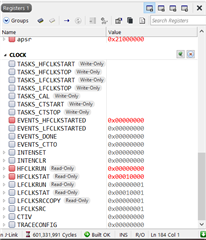
    As I understand, this means the softdevice needs constant latency to operate properly and it enables it whenever necessary. Thus, when constant latency is enabled, the SPIS also starts using HFCLK. I checked the clock register values and found that HFCLK is indeed active all the time (attached screenshot)

    Thus, my queries are,

    1. While keeping TASKS_CONSTLAT = 0, is there any other option that I can enable for the advertising to work?
    2. How can I use HFCLK only for softdevice and keep LFCLK active during the SPIS event?

    A brief overview of my observations before I added the TASKS_CONSTLAT part of the code on line 24 above:

    1. If I remove the SPIS part from the code and keep the BLE part active (code below), the current consumption is ~16uA. BLE part active means that the device is only advertising and the advertising interval is 1.5s.

    int main(void)
    {
        bool erase_bonds;
        // Initialize.
        log_init();
        timers_init();
        power_management_init();
        ble_stack_init();
        gap_params_init();
        gatt_init();
        services_init();
        advertising_init();
        conn_params_init();
        advertising_start();
        conn_evt_len_ext_set(true);
        
        // Enter main loop.
        for (;;)
        {
            idle_state_handle();
        }
    }
    1. On the other hand, if I remove the BLE part from the code and keep the SPIS part active, the current consumption is ~40uA (code below). SPIS part active means that I am receiving 244 bytes of data from the microcontroller every 32ms.

    int main(void)
    {
        bool erase_bonds;
        // Initialize.
        log_init();
        timers_init();
        power_management_init();
        
        //SPI Initialization
        nrf_drv_spis_config_t spis_config = NRF_DRV_SPIS_DEFAULT_CONFIG;
        spis_config.csn_pin               = APP_SPIS_CS_PIN;
        spis_config.miso_pin              = APP_SPIS_MISO_PIN;
        spis_config.mosi_pin              = APP_SPIS_MOSI_PIN;
        spis_config.sck_pin               = APP_SPIS_SCK_PIN;
    
        nrf_drv_spis_init(&spis, &spis_config, spis_event_handler);
        // Enter main loop.
        for (;;)
        {
            memset(m_rx_buf, 0, m_length);
            spis_xfer_done = false;
            APP_ERROR_CHECK(nrf_drv_spis_buffers_set(&spis, connected_buf, m_length_connected, m_rx_buf, m_length));
            connected_buf[m_length] = 1;
            while (!spis_xfer_done)
            {
                __WFE();
            }
            idle_state_handle();
        }
    }

    1. However, if I keep both SPIS and BLE active, the current consumption is ~890uA (code below).

    int main(void)
    {
        bool erase_bonds;
        // Initialize.
        log_init();
        timers_init();
        power_management_init();
        ble_stack_init();
        gap_params_init();
        gatt_init();
        services_init();
        advertising_init();
        conn_params_init();
        advertising_start();
        conn_evt_len_ext_set(true);
        
        //SPI Initialization
        nrf_drv_spis_config_t spis_config = NRF_DRV_SPIS_DEFAULT_CONFIG;
        spis_config.csn_pin               = APP_SPIS_CS_PIN;
        spis_config.miso_pin              = APP_SPIS_MISO_PIN;
        spis_config.mosi_pin              = APP_SPIS_MOSI_PIN;
        spis_config.sck_pin               = APP_SPIS_SCK_PIN;
    
        nrf_drv_spis_init(&spis, &spis_config, spis_event_handler);
        // Enter main loop.
        for (;;)
        {
            memset(m_rx_buf, 0, m_length);
            spis_xfer_done = false;
            APP_ERROR_CHECK(nrf_drv_spis_buffers_set(&spis, connected_buf, m_length_connected, m_rx_buf, m_length));
            connected_buf[m_length] = 1;
            while (!spis_xfer_done)
            {
                __WFE();
            }
            idle_state_handle();
        }
    }
    PS.: I DO NOT send any data over BLE in any of these configurations. Only, the advertisement part of the BLE code remains active. My application requires sending data in a 127ms connection interval. As I am receiving 244 bytes of data in every 32ms over SPI communication, I have to send (127/32) ~4 packets in each connection interval. In my application, if I send (244*4) or 976 bytes in 127ms connection interval, the current consumption jumps to 1.2mA.

  • Hi,


    Rafi said:
    Only after commenting out that previous command, on line 24, the BLE start to advertise

    You should not write '0' to a task. Only '1' is valid for all TASKS_* prefixed registers.

    Rafi said:
    On the other hand, if I remove the BLE part from the code and keep the SPIS part active, the current consumption is ~40uA (code below). SPIS part active means that I am receiving 244 bytes of data from the microcontroller every 32ms.

    This is expected if the SPIS is active in such a interval, as it will draw added current when the CSN pin is asserted and at the end, the cpu will be awoken to handle the event itself.


    Kind regards,

    Håkon

Reply
  • Hi,


    Rafi said:
    Only after commenting out that previous command, on line 24, the BLE start to advertise

    You should not write '0' to a task. Only '1' is valid for all TASKS_* prefixed registers.

    Rafi said:
    On the other hand, if I remove the BLE part from the code and keep the SPIS part active, the current consumption is ~40uA (code below). SPIS part active means that I am receiving 244 bytes of data from the microcontroller every 32ms.

    This is expected if the SPIS is active in such a interval, as it will draw added current when the CSN pin is asserted and at the end, the cpu will be awoken to handle the event itself.


    Kind regards,

    Håkon

Children
No Data
Related