This post is older than 2 years and might not be relevant anymore
More Info: Consider searching for newer posts

How to change example codes of pca10040 code to pca 10059

Hi Sir/ Madam,

I want to create  a modul to scan and advertise data using Nordic Dongle , (PCA10059). The example code in sdk , ble_app_multirole_lesc has been tested with pca10040 and its working; however I need to reuse the same code to deploy inthe dongle without the led fucntionality, so could you tell me how can I do it. Am new to the nrf modules, so kindly provide me with a step by step procedure if possible . 

Thanks, 

  • Hey Rommel,

    I move a lot between nrf52840 DKs and Dongles (pca10056 and pca10059).

    I would use the pca10056 project and rather convert that to a pca10059 project (that is what I do with all my projects).

    To do this (assuming that you are using Segger embedded studio):

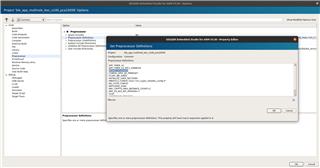
    1. Right click on Project 'ble_app_mutlirole_lesc_s140_pca10056'

    2. Select 'Common'

    3. Select Preprocessor

    4. Change BOARD_PCA10056 to BOARD_PCA10059

    Below is a screenshot:

    Hope this helps.

    Regards

    Chris

  • Hi,

    When you are adapting a project created for the nRF52840 DK (pca10056) using the SoftDevice, you only need to change the preprocessor definitions as explained by . Adapting a pca10056 project will be easier, as both are using nRF52840, so things such as ROM and RAM size will be the same, and the same SoftDevices are supported. Please be aware that if you are adapting a project that does not use the SoftDevice, you must also adjust the linker configuration, in order to make sure there is room for the Master Boot Record (MBR). You can find guides on how to adapt nRF5 SDK projects for the nRF52840 Dongle in nRF52840 Dongle Programming Tutorial.

    As you are adapting a project from another SoC to nRF52840, you must perform some additional steps in addition to changing the preprocessor settings. To do this, you can follow the guide in Transferring the project to nRF52811 hardware. This is originally for nRF52811, but the process is similar. Remember to use the correct preprocessor definitions and linker script settings for the nRF52840, and not nRF52811.

    Best regards,

    Marte

  • Hi, 

    I did try the same;however the nrf connect applciation asks for selection of the soft device and I am not sure which one to choose. COuld you help me with the same. 

  • Hi, 

    Thank you for reaching out to my query; however , upon creation of the hex file once I try to upload the hex file to the dongle using nrf connect , its asking me to select the soft device. No matter which soft device I choose , the appliation is throwing me error as follows 

    FU failed: Error message for known extended error code from DFU target: The array of supported SoftDevices for the update does not contain the FWID of the current SoftDevice.

  • Hi,

    This happens because the SoftDevice ID in your application does not match the Softdevice version on the Dongle, so the bootloader rejects the upgrade. I would recommend programming the SoftDevice as well as the application, so you are certain what version of the SoftDevice you are using. You can find the hex file for the SoftDevices in <SDK_root>/components/softdevices. You can see supported SoftDevices in the nRF52840 compatibility matrix, but I would recommend using S140.

    If you are adapting a project that use another SoftDevice, you should also change the project settings related to the SoftDevice. If the original project is using for example S132, then you must change all instances of this to S140 instead. This will be the preprocessor definitions and include directories.

    Best regards,

    Marte

Related