This post is older than 2 years and might not be relevant anymore
More Info: Consider searching for newer posts

How to change example codes of pca10040 code to pca 10059

Hi Sir/ Madam,

I want to create  a modul to scan and advertise data using Nordic Dongle , (PCA10059). The example code in sdk , ble_app_multirole_lesc has been tested with pca10040 and its working; however I need to reuse the same code to deploy inthe dongle without the led fucntionality, so could you tell me how can I do it. Am new to the nrf modules, so kindly provide me with a step by step procedure if possible . 

Thanks, 

Parents
  • Hey Rommel,

    I move a lot between nrf52840 DKs and Dongles (pca10056 and pca10059).

    I would use the pca10056 project and rather convert that to a pca10059 project (that is what I do with all my projects).

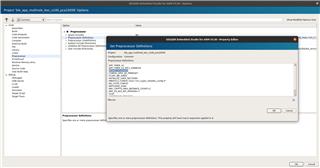
    To do this (assuming that you are using Segger embedded studio):

    1. Right click on Project 'ble_app_mutlirole_lesc_s140_pca10056'

    2. Select 'Common'

    3. Select Preprocessor

    4. Change BOARD_PCA10056 to BOARD_PCA10059

    Below is a screenshot:

    Hope this helps.

    Regards

    Chris

Reply
  • Hey Rommel,

    I move a lot between nrf52840 DKs and Dongles (pca10056 and pca10059).

    I would use the pca10056 project and rather convert that to a pca10059 project (that is what I do with all my projects).

    To do this (assuming that you are using Segger embedded studio):

    1. Right click on Project 'ble_app_mutlirole_lesc_s140_pca10056'

    2. Select 'Common'

    3. Select Preprocessor

    4. Change BOARD_PCA10056 to BOARD_PCA10059

    Below is a screenshot:

    Hope this helps.

    Regards

    Chris

Children
Related