Hi!
It must be something stupid from my side.
I'd like to add new device ( first one ) on Dashboard. According the manual I should press on green add sign, but there is no " + sign".
Any suggestion?
Best regards,
Simon.

Hi!
It must be something stupid from my side.
I'd like to add new device ( first one ) on Dashboard. According the manual I should press on green add sign, but there is no " + sign".
Any suggestion?
Best regards,
Simon.

Hello Simon,
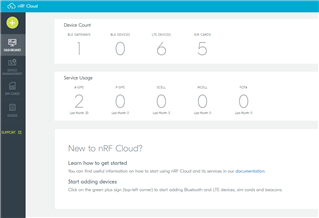
I've never seen that kind of issue before. Have you tried to refresh the page? This is what it should look like:
Kind regards,
Øyvind
Thank You Øyvind for replay,
Yes I did! I was re_enter ( longing out and in ) several times in past two days.
Simon.
I did clear the cookies. This did not change anything.
I'm shore something went wrong with registration, because I can not delete my account.
I can login from another computer, with the same result -> No + sign.
Another browser will not change anything according My opinion.
Best regards,
Simon
In Firefox can you please open the developer tools and open console while logging in to nRF Cloud. This should output errors from the web page.
Testing Chrome will verify that we are seeing the correct issue and are able to fix.
After loging:
Uncaught Error: Unhandled error. (undefined)
Thank you for providing this information. I will forward to our nRF Cloud team.
Dear Øyvind,
Thank You for help, the team made good job!
Best regards,
Simon.
Dear Øyvind,
Thank You for help, the team made good job!
Best regards,
Simon.
Hi Simon, is your issue fixed?
SSimon said:Uncaught (in promise) InvalidSignatureException: Signature not yet current: 20210902T134316Z is still later than 20210902T134244Z (20210902T133744Z + 5 min.)
Our dev team informs me that AWS endpoints calculate a signature for authenticating request (they do not transmit the actual user secrets), and they are time based, to make these signed requests very short lived.
From the timestamps printed it looks like the users time is a little more than 5 minutes in the future.
The AWS Sig v4 algorithm however only allows for a maximum of 5 minutes: https://docs.aws.amazon.com/general/latest/gr/signing_aws_api_requests.html
Kind regards,
Øyvind
Maybe I was too fast.
It is working from the first computer (Win7), but it is still not working from my laptop (Win10). Maybe the time delay is still too short?
If you are getting the same error, than it might still be too short. Please ensure that your clock is synced to a NTP server close to you.
Yes, You were right! My clock synchronization was disabled.Immediately when I synchronized the clock, I was able to login onto amazon cloud and consequently on nRF Cloud.
Thanks again and Best Regards,
Simon.
Happy to hear, Simon! Glad we were able to find the root cause.
Kind regards,
Øyvind