This post is older than 2 years and might not be relevant anymore
More Info: Consider searching for newer posts

Unable to Program nRF52840 Dongle with any App in nRF Connect

Hi,

The Dongle was given to me by a colleague of mine who has the exact same laptop as I do. The Dongle was and is working fine with his laptop. The problem is with my office laptop. I can not try any of the App in nRF Connect.

I tried on an other personal laptop and it is working.

I tried many things but never got it to work.

Uninstall and reinstall nRF Connect 3.7.0

Uninstall and reinstall nRF Connect 3.6.1 (previous version, same as my colleague)

In one support thread, Jorgen suggest to reinstall nRF Connect, which solve the problem for someone.

https://devzone.nordicsemi.com/f/nordic-q-a/59926/nrf52840-dongle-installation---win10---libusb-error

It didn't worked for me. Driver was correctly installed during the reinstallation.

Then I tried to install the USB CDC ACM driver using: nrfconnect_cdc_acm.inf from Github. Didn't helped.

I am having all sorts of problem since the beginning

right now I have: Error while setting up device EA4A9FE62ECB: Missing serial port (while trying to run the RSSI App)

I had, previously LIBUSB error

I also had, previously a timeout while programming. Dongle was in DFU mode begin programation, red LED flashed a few times and then timeout.

Is there any known problem with Windows 10.

Best regards,

Mathieu

Parents
  • On the Same "problematic" laptop. I have a Virtual machine running on VMware. I was able to install nRF Connect on it and I have more success than using the software directly on my laptop.

    It is a little more annoying because I have to unplug and re-plug the Dongle every time I change App.

    This confirm that the USB port are ok

  • Hi Nordic,


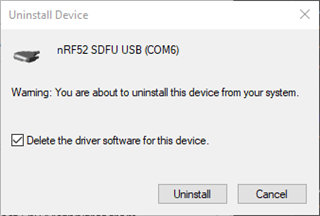
    I eventually got it working. I completely Uninstalled the driver by checking the “Delete the driver software for this device”, to make sure that there was no remaining file that could cause any problem…

    I don’t recall what was the driver’s name but here is a screenshot of the dialog.. (while uninstalling a driver in Device Manager):

    Then, there is a driver that you can get here(the executable):

    https://github.com/NordicSemiconductor/pc-nrfconnect-launcher/tree/master/build/drivers

    Now it is working/programming correctly.

    However, there is still something annoying. Bluetooth Low Energy works perfectly, but when flashing RSSI Viewer, once flash complete, I must remove the Dongle and re-plug it to make it run correctly.

    I get the following error: "Error while setting up device EA4A9FE62ECB: Timeout while waiting for device EA4A9FE62ECB to be attached and enumerated"

    I looks like the Dongle is not able to get out of DFU mode once flash is completed.

Reply
  • Hi Nordic,


    I eventually got it working. I completely Uninstalled the driver by checking the “Delete the driver software for this device”, to make sure that there was no remaining file that could cause any problem…

    I don’t recall what was the driver’s name but here is a screenshot of the dialog.. (while uninstalling a driver in Device Manager):

    Then, there is a driver that you can get here(the executable):

    https://github.com/NordicSemiconductor/pc-nrfconnect-launcher/tree/master/build/drivers

    Now it is working/programming correctly.

    However, there is still something annoying. Bluetooth Low Energy works perfectly, but when flashing RSSI Viewer, once flash complete, I must remove the Dongle and re-plug it to make it run correctly.

    I get the following error: "Error while setting up device EA4A9FE62ECB: Timeout while waiting for device EA4A9FE62ECB to be attached and enumerated"

    I looks like the Dongle is not able to get out of DFU mode once flash is completed.

Children
  • Hi,

    I am glad to see your solved the initial problem.

    Regarding the RSSI viewer I have unfortunately not been able to reproduce the issue where you have to power-cycle it after programming it with the appropriate firmware. It should reset automatically and start surveying the BLE channels.

    Do you use a USB hub or is the dongle connected to the PC directly? If using a hub, does it help to plug it into the PC directly?

Related