Stand alone modem requirements

Hello Nordic team, 

I am building an IoT solution and plan to use the nrf9160 just as a stand alone modem. App will reside on a separate MCU and talk to Nrf9160 on uart. 

My questions are:

1) I believe I need to flash the SLM (serial link monitor) on to the nrf9160. Is this available as a hex?

2) Is there any need to install and config NCS/ Zephyr in my use case? Will there be any limitation in *not* doing so?

3) Is segger embedded studio sufficient to flash hex / binaries, or are any other tools needed? Is there any other configuration needed beyond just flashing the SLM hex ?

Apologies if this has been answered elsewhere in the past, just wanting to get the most recent answers.

Kind regards, 

Hari 

  • Hello Hari,

    In short, I would say it is generally recommended to acquire an nRF9160 DK for development and learn how to modify the application you are planning to run on nRF9160. Testing and debugging is difficult without being able to compile by yourself.

    You would need to download nRF Connect for Desktop, then install Toolchain Manager, then install nRF Connect SDK. The nRF Connect SDK Tutorial series - Part 0 to 3 is likely to answer many of your questions when you are getting started. Also see nRF Command Line Tools.

    In your case, where you would like to fire the commands from your host MCU you need to make sure the serial_lte_modem application is configured and compiled to be connecting with an external MCU.

    During development you may choose command line or VSCode as alternatives to Segger Embedded Studio(SES).

    Below are answers to your specific questions. Some of this might already be known to you.

    1) I believe I need to flash the SLM (serial link monitor) on to the nrf9160.

    I assume you are talking about the serial_lte_modem.

    Is this available as a hex?

    The serial_lte_modem is available as a compiled hex for the nRF9160 DK(recommended starting point) as well as for Thingy:91(prototyping platform). If you are using custom HW you need to compile your own hex(this also applies if you are using a third party module which is different from the DK or Thingy:91).

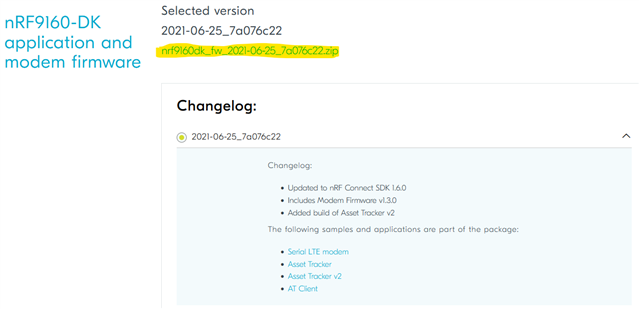
    Please navigate to the respective downloads page for either the DK or Thingy:91. Select the version of choice and click the blue link(highlighted in yellow).


    The .zip contains multiple hex files. The CONTENTS.txt file will help you select the correct hex, for example "img_fota_dfu_hex/serial_lte_modem_2021-06-25_7a076c22.hex". This hex is compiled using nRF Connect SDK v1.6.0.

    2) Is there any need to install and config NCS/ Zephyr in my use case?

    Most likely, yes. Please let us know more about your use case, and it would be easier to say. Are you building a prototype for demo purposes? Are you aiming for high volume production?

    Using the hex 'as is' might get you connected. However, I assume it is very common to modify the serial_lte_modem to some degree. As mentioned, the available hex files are compiled for either the DK or Thingy:91. If you would like to use custom HW you will need to install the nRF Connect SDK and compile your own modified version of the serial_lte_modem application.

    Will there be any limitation in *not* doing so?

    If you compile your own version you will be able to adapt the application to your own project. Please browse through the configs for serial_lte_modem to get a small flavor of how you will be able to modify the application if you compile it yourself.

    3) Is segger embedded studio sufficient to flash hex / binaries, or are any other tools needed?

    SES will allow you to flash the application. You could also use nRF Connect->Programmer or nrfjprog to flash the hex.

    Please see Testiing a prebuilt application in the nRF9160 DK Getting started guide.

    Please also consult the getting starting tutorials mentioned at the top and let us know if you get stuck. The need for nRF Command Line Tools is mentioned in part 0 of the tutorial.

    Is there any other configuration needed beyond just flashing the SLM hex ?

    Again, this depends on your use case. You might also need to update the nRF9160 modem FW. You could do so using nRF Connect->Programmer or nrfjprog. It is also possible to update the modem over the air(FOTA).

    When your board is programmed with serial_lte_modem you may start configuring the device using AT commands. How this is done depends on your use case as well as where in the world your device is located and what your SIM card and carrier of choice allows. You may provide the AT commands trough nRF Connect->LTE Link Monitor or through a serial terminal(Termite, for instance).

  • Hello Helsing, 

    Thank you very much for the detailed responses. 

    Hari 

Related