This discussion has been locked.
You can no longer post new replies to this discussion. If you have a question you can start a new discussion

System requirements for nrf connect and other Nordic software.

Hello ,I am starting new development in Nordic environment and my system configuration is intel i3 with 8gb ram.

Still it is way too much slow to open nrf connect for desktop and other Nordic software .(Taking 10 mins to open the application)

So can you please suggest the required configuration ,so that applications will run smoothly .

Thanks,

Ram  

Parents
  • Hi Ram,

    intel i3 with 8gb ram

    Your hardware setup sounds like it should work smoothly in theory, although I have not tested nRF Connect for Desktop on Intel i3 myself.

    Here are a few thoughts and a few quick things to try:

    OS

    Which OS are you running?

    Several people(inhouse) are reporting a positive experience when using Linux during development, especially when it comes to speed and build times.

    nRF Connect for Desktop

    Which version of nRF Connect for Desktop are you running?

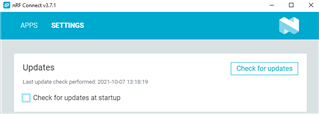
    One thing to try is to go to nRF Connect for Desktop->Settings->Updates and uncheck the box for automatic updates, as shown below:

    Which Nordic apps/tools are you planning to use?

    Have you tried or considered developing, building and flashing using command line?

    Windows related things to try

    Have you checked the your computer's performance before and after opening nRF Connect for Desktop?

    Is your computer running at 100%. How much ram is in use? Are you able to free up any computer resources by closing other applications?

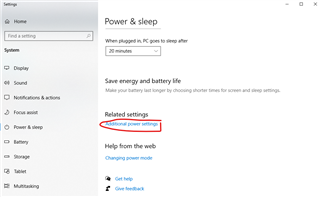
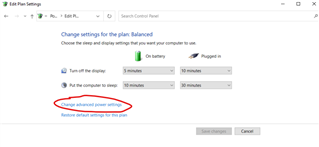
    Is there any chance your computer is configured to save power by lowering the processor usage? Check this by hitting Start and typing Power & Sleep, then click "Additional power settings". If not Select

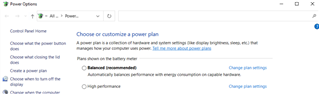
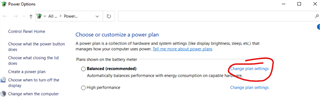
    Try selecting "High Performance" if not already selected:

    Hardware related

    Is your computer very hot?

    If your computer becomes too hot the CPU and GPU clock speed will slow down in order to stay safe. A warm CPU could be the result of either high work loads, or from for instance old and dried up cooling paste on the CPU and GPU. There are multiple guides on how to apply fresh cooling paste: https://www.ifixit.com/Guide/How+to+Apply+Thermal+Paste/744 .

    How to avoid high temperatures in Windows:

    Close unnecessary applications.

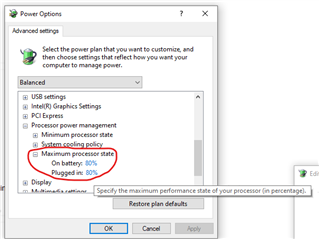
    Lower the maximum CPU speed:

    I might be wrong, however, my gut feeling says that if your fan is not coping with the heat, perhaps lowering the CPU speed might give you a better user experience. Here is how to do it in Windows:

    Why not experiment with 50% and 80%?

    You could also do the same as above with the GPU.

    If your computer allows it, more memory might provide better performance. However, my assumption is that 8gb should normally be sufficient for a smooth use of nRF Connect for Desktop.

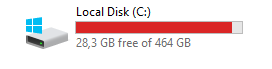
    Last thing to check is your OS drive's capacity. Is the drive by any change near full? A full drive could slow down the performance

    Best regards,

    Håkon

  • Hello Håkon,

    Have you checked the your computer's performance before and after opening nRF Connect for Desktop?

    Is your computer running at 100%. How much ram is in use? Are you able to free up any computer resources by closing other applications?

    I checked before and after performance ,

    Ram usage isn't much difference but disk usage all of sudden goes high upto 100% immediately and CPU usage gone upto 92%.

    Ram usage previously 4.6gb out of 7.6 and after opening nrf connect it goes to 5.4gb.

    Best regards,

    Ram

  • Thank your for the feedback.

    RAM_MS said:
    disk usage all of sudden goes high upto 100% immediately

    How much free space is available on your hard drive? If you have more than one drive it might be relevant to check both the OS disk as well as the disk where nRF Connect for Desktop is installed.

  • Hello Håkon,

    How much free space is available on your hard drive? If you have more than one drive it might be relevant to check both the OS disk as well as the disk where nRF Connect for Desktop is installed.

    169GB free in DISK(C). and NRF Connect for Desktop is installed in Local Disk(C).

    Best regards,

    Ram

  • Thanks you for the confirmation. The we can rule this one out :)

    Could you please also confirm which OS you are using, as well as which version of nRF Connect for Desktop?

  • Hello Håkon,

    Could you please also confirm which OS you are using, as well as which version of nRF Connect for Desktop?

    I am using windows and nrf connect for Desktop v 3.7.1.

    Best regards,

    Ram

Reply Children
  • Hi Ram,

    Thank you. Are you using Windows 7 or Windows 10? Windows 7 is no longer supported.

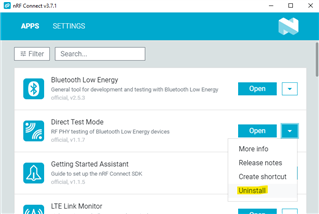
    Another thing to try is to uninstall all apps and then install only the ones you really need. Try installing one at a time and try to find out which one is causing the long startup times.

    It could also be worth a try to reinstall nRF Connect for Desktop.

    Best regards,

    Håkon

  • Hello Håkon,

    Are you using Windows 7 or Windows 10?

    I am using windows 10.

    And I tested by reinstalling every app one by one mainly Toolchain manager is too much slow ,others are in normal speed .

    Do I need to upgrade the system from i3 to i5 or need  i3  latest generation?

    Best regards,

    Ram

Related