This discussion has been locked.
You can no longer post new replies to this discussion. If you have a question you can start a new discussion

System requirements for nrf connect and other Nordic software.

Hello ,I am starting new development in Nordic environment and my system configuration is intel i3 with 8gb ram.

Still it is way too much slow to open nrf connect for desktop and other Nordic software .(Taking 10 mins to open the application)

So can you please suggest the required configuration ,so that applications will run smoothly .

Thanks,

Ram  

Parents
  • Hello Ram,

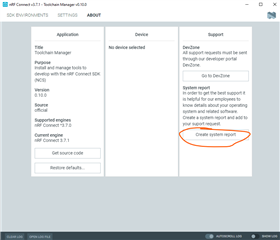
    If the problem is mostly related to Toolchain manager, please create a system report for the app and send it back to us.

    Best regards,

    Håkon

  • Hello Håkon,

                      I attached system report here for your reference.


    # nRFConnect System Report - 2021-10-08T11-55-01.263Z
    
    - System:     Dell Inc. Latitude 3480
    - BIOS:       Dell Inc. 01.06.01
    - CPU:        1 x Intel® Core™ i3-6006U 2 GHz 4 cores (2 physical)
    - Memory:     1.2 GB free of 7.6 GB total
    - Filesystem: C: (NTFS) 292 GB 43.5% used
    
    - OS:         Microsoft Windows 10 Home (10.0.19043) win32 ia32
    
    - Versions
        - kernel: 10.0.19043
        - git: 2.32.0.windows.1
        - node: 12.13.0
        - python: 
        - python3: 
    
    - Connected devices:
    

    Best regards,

    Ram

  • Thank you for the report. I am checking for solutions with the team.

    An alternative for you could be to use VSCode. We are receiving very positive feedback from both customers and inhouse engineers who are moving to VSCode.

    In Toolchain Manager, click the "VSCode" button next to the ncs version you would like to use. The first time you do this a few things will need to be configured and set up. When this is done, you could save the workspace. Next time you can double click the workspace-file, open it with VSCode and you will be ready to go. Hopefully, this way you do not need to open nRF Connect for Desktop and Toolchain Manager as often.

    Best regards,

    Håkon

Reply
  • Thank you for the report. I am checking for solutions with the team.

    An alternative for you could be to use VSCode. We are receiving very positive feedback from both customers and inhouse engineers who are moving to VSCode.

    In Toolchain Manager, click the "VSCode" button next to the ncs version you would like to use. The first time you do this a few things will need to be configured and set up. When this is done, you could save the workspace. Next time you can double click the workspace-file, open it with VSCode and you will be ready to go. Hopefully, this way you do not need to open nRF Connect for Desktop and Toolchain Manager as often.

    Best regards,

    Håkon

Children
  • Hello Håkon,


    An alternative for you could be to use VSCode. We are receiving very positive feedback from both customers and inhouse engineers who are moving to VSCode.

    I will definitely check with VSCode .

    And will update .

    Best regards,

    Ram

  • Hello Ram,

    If you have not found this already, here is the link to nRF Connect for VS Code for downloads and video tutorials.

    Best regards,

    Håkon

  • Hello Håkon,


    If you have not found this already, here is the link to nRF Connect for VS Code for downloads and video tutorials.

    I tested with nRF Connect with VS code also .Its also taking long time to open .

    I think I have to upgrade RAM of the system or I need SSD?

    Best regards,

    Ram

  • Hi Ram,

    I would say 8GB of RAM should normally be sufficient, although more RAM is alwaysnice.

    Is development using west and command line an option for you? This style probably requires the least amount of resources. The nRF Connect SDK Tutorial series 0-3 covers some of the workflow using command line and west.

    If VS Code is slow as well, it sounds like you could benefit from upgrading parts of your system in order to speed up the experience. If you have not ruled out old cooling paste, I would start there. Next, you could perhaps consult a hardware shop or PC hardware forum in order to narrow down what to do. There are likely some hardware tests/benchmarking sw you could run that would reveal the bottleneck in your system. As you suggested, switching the OS disk to an SSD is likely to give you a better experience, however, the processor could also be the bottleneck.

    Best regards,

    Håkon

Related