VS Code Having Trouble With Project Created From Asset Tracker Version 2 Sample

Hi,

Thanks for the great work in making VS Code a solid option for the nRF Connect SDK. It was a huge and pleasant surprise when I came across this effort. VS Code will be my (and I am sure the same goes for many) IDE of choice going forward.

I was able to import several projects and trial the debugging features without any problem. However, I was not so fortunate with a project based on Asset Tracker version 2. I am able to build it from the IDE, but the IDE seems to have trouble resolving dependencies and symbols/macros in the editor tabs - for most files at least. I have attached a screenshot to show what I mean.

Could you kindly advise whether I may be doing something wrong, or is this simply down to that the nRF connect plugin is still a work in progress?
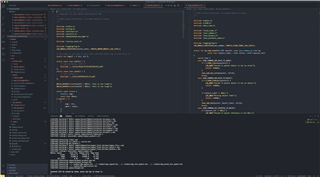
Many thanks. 

Parents Reply Children
  • Hi Jared,

    Thanks for taking a look. I tried the following:
    - CMD + Click - A message shows saying: "cannot open source file "../certs/DSTRootCA-X3.pem"C/C++(1696)"
    - Right Click and selecting "Go To Definition" - A message shows saying: "No definition found for XXXX"

    XXXX in the second point above differs with where in the line you click, but generally maps to the word clicked on, e.g. 'include' and 'certs'.

    However, building seems to work fine.

  • Hi,

    I don't think this issue is directly related to the VS code extension but maybe is a more general VS code issue, so consider posting this issue at a VS code forum or similar. Have you made sure that all relevant paths are included in c_cpp_properties.json ? 

    regards

    Jared 

Related