Easy ways to debug BLE connectivity issues

Are there any convenient ways to debug BLE connectivity issues? I have the service up and running but the connection on nRFConnect App doesn't quite go through: it remains stuck on "Connecting" state.

It was working all fine until of a sudden and I can't seem to figure out what went wrong

Parents
  • Hello,

    The most convenient way of debugging connectivity issues is to use the nRF Sniffer tool - are you already familiar with this? It is a powerfull tool to wield when developing and debugging with BLE, since it lets you monitor the on-air traffic.
    It does however require an extra piece of hardware to act as the sniffer - you can see a list of supported devices in the sniffer's documentation.

    Best regards,
    Karl

  • Alright. It gets frustrating at times when you try to follow along and still don't make it through. I programmed the nRF Sniffer firmware but in wireshark, I don't see the nRF Sniffer COM PORT showing up. Plus I can't seem to get the interface toolbar as shown in the screenshot here. I also have the nRF Sniffer API folder which has a bunch of python files but the link you shared doesn't seem to talk about it. 

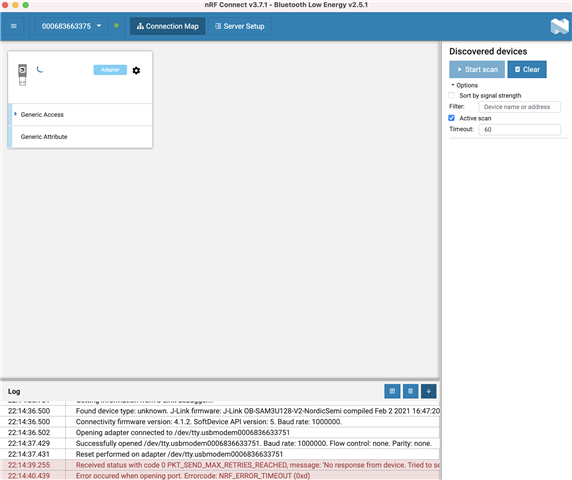
    Also, in my case, BLE doesn't even connect. Do you still think nRF Sniffer tool would be useful? Can I not use nRF Connect on my desktop? Scan devices option is greyed out let alone any scanned devices


    Any quick support is appreciated

  • Hello Morpho,

    morpho said:
    right, but how does the phone app work then? I already have my FW running on nRF MCU and I use the app to connect to the BLE profile.

    Most smartphones already have a available BLE adapter, so the nRF Connect for smartphone application will use this instead of needing an external device.

    morpho said:

    Okay, so ALL i'm trying to do is: create a custom BLE service, and add read/write characteristics to read/send the attribute values. PREVIOUSLY, I have been able to connect to the BLE profile via nRF Connect phone app, but lately i have been seeing issues with nRF Connect app showing it's not CONNECTED, despite the ble_evt_handler getting invoked with a BLE_GAP_EVT_CONNECTED parameter passed in.

    I even tried the existing samples from the SDK including the ble_nus app, and it behaves the same way: nRF app doesn't show it's connected/i don't see any profiles but the ble_evt_handler does get passed with BLE_GAP_EVT_CONNECTED.

    To me, it looks like connection does happen and there's an issue with the app itself.

    Aha - now I understand what you meant earlier. Thank you for elaborating, this made you issue much more clear to me!
    This does indeed definitely sound like it could be an issue with the nRF Connect for Smartphones application. Could I ask which phone you are using the nRF Connect application with, and what version of the application you are using?
    I will try to reproduce this on my end so that I may raise an internal ticket on this to have it examined, if I am able to reproduce it properly.

    morpho said:
    that's what I mean

    How does the Client tab look? Could you also show me the logs from the nRF Connect application? You could click the 'Log' button to see these.
    What does the log on the nRF Connect's side say when you connect to a peripheral device (as indicated by the connected event on the peripheral side)?

    Best regards,
    Karl

  • Could I ask which phone you are using the nRF Connect application with, and what version of the application you are using?

    App version 2.4.12, and it's an iOS app.

    What does the log on the nRF Connect's side say when you connect to a peripheral device (as indicated by the connected event on the peripheral side)?

    Turning Off Scanner...
    Scanner On.
    Device Scanned.
    [Callback] centralManager(central, didDiscover: peripheral, advertisementData: ["kCBAdvDataRxSecondaryPHY": 0, "kCBAdvDataTimestamp": 656911790.671123, "kCBAdvDataServiceUUIDs": <__NSArrayM 0x28272db00>(
    F3641400-00B0-4240-BA50-05CA45BF8ABC
    )
    , "kCBAdvDataIsConnectable": 1, "kCBAdvDataRxPrimaryPHY": 1, "kCBAdvDataLocalName": Xyp-CUS], rssi: -62)
    Attempting to connect...
    cbCentralManager.connect()

  • morpho said:
    App version 2.4.12, and it's an iOS app.

    Thank you for clarifying.
    I just tested this on an iPhone X with the 2.4.12 version without issues - testing against the ble_app_uart application.
    Are these the only loggings available in the "Log" section during a connection? Does it not show anything about service discovery and connection parameter updates, etc?

    I know that iOS devices sometimes might experience a caching issue if their bluetooth adapter has been on for a long time. Could you try this again after having turned off and on again the phone's bluetooth?
    If this does not resolve the issue, could you try this again after uninstalling and reinstalling the nRF Connect application for smartphone entirely?

    Best regards,
    Karl

  • could you try this again after uninstalling and reinstalling the nRF Connect application for smartphone entirely?

    I actually tried this the first time it happened, and it solved the issue but this time i have tried like 4-5 times to no avail

  • morpho said:
    I actually tried this the first time it happened, and it solved the issue but this time i have tried like 4-5 times to no avail

    That sounds very peculiar indeed. I have not heard of anyone else experiencing this either yet, but I will file an internal ticket with the developers of the application so that they could be aware of it.

    Before I do so, could you try to clear the app's cache too, to see if this perhaps fixes the issue?
    And just to have it confirmed, the issue is that the view in the screenshot you sent does not change to 'connected' right? It only ever says 'connecting' when this happens?

    Best regards,
    Karl

Reply
  • morpho said:
    I actually tried this the first time it happened, and it solved the issue but this time i have tried like 4-5 times to no avail

    That sounds very peculiar indeed. I have not heard of anyone else experiencing this either yet, but I will file an internal ticket with the developers of the application so that they could be aware of it.

    Before I do so, could you try to clear the app's cache too, to see if this perhaps fixes the issue?
    And just to have it confirmed, the issue is that the view in the screenshot you sent does not change to 'connected' right? It only ever says 'connecting' when this happens?

    Best regards,
    Karl

Children
Related