Easy ways to debug BLE connectivity issues

Are there any convenient ways to debug BLE connectivity issues? I have the service up and running but the connection on nRFConnect App doesn't quite go through: it remains stuck on "Connecting" state.

It was working all fine until of a sudden and I can't seem to figure out what went wrong

Parents
  • Hello,

    The most convenient way of debugging connectivity issues is to use the nRF Sniffer tool - are you already familiar with this? It is a powerfull tool to wield when developing and debugging with BLE, since it lets you monitor the on-air traffic.
    It does however require an extra piece of hardware to act as the sniffer - you can see a list of supported devices in the sniffer's documentation.

    Best regards,
    Karl

  • Alright. It gets frustrating at times when you try to follow along and still don't make it through. I programmed the nRF Sniffer firmware but in wireshark, I don't see the nRF Sniffer COM PORT showing up. Plus I can't seem to get the interface toolbar as shown in the screenshot here. I also have the nRF Sniffer API folder which has a bunch of python files but the link you shared doesn't seem to talk about it. 

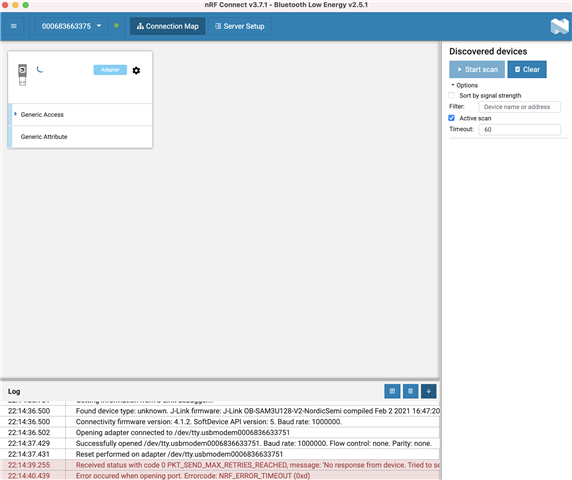
    Also, in my case, BLE doesn't even connect. Do you still think nRF Sniffer tool would be useful? Can I not use nRF Connect on my desktop? Scan devices option is greyed out let alone any scanned devices


    Any quick support is appreciated

  • Thank you for confirming - I'll write this up in the internal ticket.

    To clear an app's cache in iOS you should see a "Clear cache" option when navigating to the app in Settings. I do not have an iOS device myself, but I am making an assumption that this should be an available option for all apps.

    Best regards,
    Karl

  • But, getting back to your original question - we should proceed to look at getting your sniffer up and running in order to properly being able to see what is being transmitted on-air between your devices. This will greatly help any BLE related debugging effort.

    Do you have an additional device that you may use as the sniffer's connectivity device for your connection?

    Best regards,
    Karl

  • Thought you had an iPhone X (or maybe it was someone else's). Regardless, I couldn't find an option to clear the cache in the app. 

  • I already mentioned the issues I had with setting up the sniffer. I don't see any relevant option to select the nRF device in wireshark despite copying the Profile_nRF_Sniffer_Bluetooth_LE dir into the profiles folder of wireshark

  • morpho said:
    Thought you had an iPhone X (or maybe it was someone else's). Regardless, I couldn't find an option to clear the cache in the app. 

    Oh, yes, I borrowed a colleagues iPhone X to perform the previous test.
    My apologies, I should have been more specific, I meant the iPhone's system settings, not the nRF Connect's setting. If you go to the settings in which you can administer apps and permissions, etc. there should be an option to clear the app data and cache.
    Our developers has unfortunately not gotten back to me yet about the internal ticket I created. I will update you as soon as they do, but I can unfortunately not say anything about when this might be.

    morpho said:
    I already mentioned the issues I had with setting up the sniffer. I don't see any relevant option to select the nRF device in wireshark despite copying the Profile_nRF_Sniffer_Bluetooth_LE dir into the profiles folder of wireshark

    Could you confirm if you successfully program your nRF Device prior to this? And have you successfully installed the python requirements from \extcap\?

    Best regards,
    Karl

Reply
  • morpho said:
    Thought you had an iPhone X (or maybe it was someone else's). Regardless, I couldn't find an option to clear the cache in the app. 

    Oh, yes, I borrowed a colleagues iPhone X to perform the previous test.
    My apologies, I should have been more specific, I meant the iPhone's system settings, not the nRF Connect's setting. If you go to the settings in which you can administer apps and permissions, etc. there should be an option to clear the app data and cache.
    Our developers has unfortunately not gotten back to me yet about the internal ticket I created. I will update you as soon as they do, but I can unfortunately not say anything about when this might be.

    morpho said:
    I already mentioned the issues I had with setting up the sniffer. I don't see any relevant option to select the nRF device in wireshark despite copying the Profile_nRF_Sniffer_Bluetooth_LE dir into the profiles folder of wireshark

    Could you confirm if you successfully program your nRF Device prior to this? And have you successfully installed the python requirements from \extcap\?

    Best regards,
    Karl

Children
  • I meant the iPhone's system settings, not the nRF Connect's setting. If you go to the settings in which you can administer apps and permissions, etc. there should be an option to clear the app data and cache.

    have you tried it yourself? I know you don't have an iPhone but it'd have been worth a try at least, cause I can't seem to find any option to delete the cache.

  • Hello,

    morpho said:
    have you tried it yourself? I know you don't have an iPhone but it'd have been worth a try at least, cause I can't seem to find any option to delete the cache.

    Ah, my mistake - it seems my described approach was a little too android-y.
    My colleague confirm this, and tells me that the way to make sure that an apps cache is cleared in iOS is as described in this article in the Reinstall apps to clear cache section. Could you confirm that you did not use the Offload App option when you reinstalled the application last?

    Best regards,
    Karl

  • I think the smart approach would be to first trying it on your end, and see whether you're successful in doing so. As mentioned earlier, I CANNOT see a clear cache option for the nRF Connect App (as the article talks about third-party apps which isn't the same for ALL the apps including nRF Connect). And as mentioned earlier too, I have tried deleting the app and reinstalling TO NO AVAIL. I tried it again and the same result.

    Please provide a helpful response regarding this. This seems to be getting dragged for a bit now...


    Thanks

  • morpho said:
    I think the smart approach would be to first trying it on your end, and see whether you're successful in doing so.

    Part of the issue here is that I am unable to reproduce the behavior you describe on my end, which diminishes the value of debugging actions taken on my end - since I have no idea if the steps I take resolve the issue on your end.
    I have discussed this with multiple colleagues as well, and none of them have seen or heard about the behavior you describe, unfortunately.

    morpho said:
    And as mentioned earlier too, I have tried deleting the app and reinstalling TO NO AVAIL. I tried it again and the same result.

    I know this, and I hear you. I only asked you to confirm that you did not do so using the Offload Apps option when you did the reinstallation, as this would mean that the iOS device could keep app data.

    morpho said:

    Please provide a helpful response regarding this. This seems to be getting dragged for a bit now...

    As mentioned I have already reported this to our nRF Connect for iOS developers, and I will update you as soon as I hear anything back from them on this issue. Unfortunately, I can not say anything about when this will be.

    Best regards,
    Karl

  • Isn't it possible to set the priority of the issue you assigned to the iOS team? sure I don't want it resolved overnight but at least some idea as to whether the bug actually exists or some input from the corresponding team?

Related