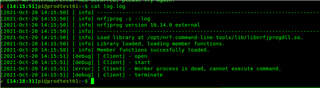
Hi
I am trying to setup a raspberry pi 4 for flashing nrf devices. But Nrfjprog doesn't seem to work.
I am using a Raspberry Pi 4 with 2021-05-07-raspios-buster-armhf-lite
I have fetched Segger and nrfjprog deb packages using :
installed them using:


Hi
I am trying to setup a raspberry pi 4 for flashing nrf devices. But Nrfjprog doesn't seem to work.
I am using a Raspberry Pi 4 with 2021-05-07-raspios-buster-armhf-lite
I have fetched Segger and nrfjprog deb packages using :
installed them using:


I don't know if this might help but this happens when trying to connect using directly the JLinkExe binary
$ JLinkExe SEGGER J-Link Commander V7.56b (Compiled Oct 18 2021 16:39:39) DLL version V7.56b, compiled Oct 18 2021 16:39:22 Connecting to J-Link via USB...O.K. Firmware: J-Link OB-SAM3U128-V2-NordicSemi compiled Feb 2 2021 16:47:20 Hardware version: V1.00 S/N: 682820128 License(s): RDI, FlashBP, FlashDL, JFlash, GDB VTref=3.300V Type "connect" to establish a target connection, '?' for help J-Link>r Target connection not established yet but required for command. Please specify device / core. <Default>: Unspecified Type '?' for selection dialog Device>reset Please specify target interface: J) JTAG (Default) S) SWD F) FINE I) ICSP C) C2 T) cJTAG TIF>s Specify target interface speed [kHz]. <Default>: 4000 kHz Speed>4000 /opt/SEGGER/JLink_V756b/JLinkGUIServerExe: error while loading shared libraries: libSM.so.6: cannot open shared object file: No such file or directory No valid device has been selected. J-Link>
I don't know if this might help but this happens when trying to connect using directly the JLinkExe binary
$ JLinkExe SEGGER J-Link Commander V7.56b (Compiled Oct 18 2021 16:39:39) DLL version V7.56b, compiled Oct 18 2021 16:39:22 Connecting to J-Link via USB...O.K. Firmware: J-Link OB-SAM3U128-V2-NordicSemi compiled Feb 2 2021 16:47:20 Hardware version: V1.00 S/N: 682820128 License(s): RDI, FlashBP, FlashDL, JFlash, GDB VTref=3.300V Type "connect" to establish a target connection, '?' for help J-Link>r Target connection not established yet but required for command. Please specify device / core. <Default>: Unspecified Type '?' for selection dialog Device>reset Please specify target interface: J) JTAG (Default) S) SWD F) FINE I) ICSP C) C2 T) cJTAG TIF>s Specify target interface speed [kHz]. <Default>: 4000 kHz Speed>4000 /opt/SEGGER/JLink_V756b/JLinkGUIServerExe: error while loading shared libraries: libSM.so.6: cannot open shared object file: No such file or directory No valid device has been selected. J-Link>
@picatostas I think this is an unrelated error because you entered the wrong device name (nRF9160_xxAA should be the device name you use with JLinkExe) and if you had a GUI, JLink would have opened a dialog box with a list of device names. So you get the GUI library errors
Yes
JLinkExe SEGGER J-Link Commander V7.52d (Compiled Aug 17 2021 17:19:03) DLL version V7.52d, compiled Aug 17 2021 17:18:47 Connecting to J-Link via USB...O.K. Firmware: J-Link V11 compiled Oct 6 2021 11:22:15 Hardware version: V11.00 S/N: 51010127 License(s): GDB VTref=3.613V Type "connect" to establish a target connection, '?' for help J-Link>connect Please specify device / core. <Default>: Unspecified Type '?' for selection dialog Device>nRF9160_xxAA Please specify target interface: J) JTAG (Default) S) SWD T) cJTAG TIF>S Specify target interface speed [kHz]. <Default>: 4000 kHz Speed> Device "NRF9160_XXAA" selected. Connecting to target via SWD ConfigTargetSettings() start ---Setting ROM table--- ConfigTargetSettings() end Found SW-DP with ID 0x6BA02477 DPIDR: 0x6BA02477 Scanning AP map to find all available APs AP[7]: Stopped AP scan as end of AP map has been reached AP[0]: AHB-AP (IDR: 0x84770001) AP[1]: AHB-AP (IDR: 0x24770011) AP[2]: JTAG-AP (IDR: 0x12880000) AP[3]: APB-AP (IDR: 0x54770002) AP[4]: JTAG-AP (IDR: 0x12880000) AP[5]: JTAG-AP (IDR: 0x12880000) AP[6]: MEM-AP (IDR: 0x128800A1) Iterating through AP map to find AHB-AP to use AP[0]: Core found AP[0]: AHB-AP ROM base: 0xE00FF000 CPUID register: 0x410FD212. Implementer code: 0x41 (ARM) Feature set: Mainline Found Cortex-M33 r0p2, Little endian. FPUnit: 8 code (BP) slots and 0 literal slots Security extension: implemented Secure debug: enabled CoreSight components: ROMTbl[0] @ E00FF000 ROMTbl[0][0]: E000E000, CID: B105900D, PID: 000BBD21 Cortex-M33 ROMTbl[0][1]: E0001000, CID: B105900D, PID: 000BBD21 DWT ROMTbl[0][2]: E0002000, CID: B105900D, PID: 000BBD21 FPB ROMTbl[0][3]: E0000000, CID: B105900D, PID: 000BBD21 ITM ROMTbl[0][5]: E0041000, CID: B105900D, PID: 002BBD21 ETM ROMTbl[0][6]: E0042000, CID: B105900D, PID: 000BBD21 CSS600-CTI Cortex-M33 identified.
Okay me too
J-Link>connect Device "NRF52832_XXAA" selected. Connecting to target via SWD InitTarget() start InitTarget() end Found SW-DP with ID 0x2BA01477 DPIDR: 0x2BA01477 Scanning AP map to find all available APs AP[2]: Stopped AP scan as end of AP map has been reached AP[0]: AHB-AP (IDR: 0x24770011) AP[1]: JTAG-AP (IDR: 0x02880000) Iterating through AP map to find AHB-AP to use AP[0]: Core found AP[0]: AHB-AP ROM base: 0xE00FF000 CPUID register: 0x410FC241. Implementer code: 0x41 (ARM) Found Cortex-M4 r0p1, Little endian. FPUnit: 6 code (BP) slots and 2 literal slots CoreSight components: ROMTbl[0] @ E00FF000 [0][0]: E000E000 CID B105E00D PID 000BB00C SCS-M7 [0][1]: E0001000 CID B105E00D PID 003BB002 DWT [0][2]: E0002000 CID B105E00D PID 002BB003 FPB [0][3]: E0000000 CID B105E00D PID 003BB001 ITM [0][4]: E0040000 CID B105900D PID 000BB9A1 TPIU [0][5]: E0041000 CID B105900D PID 000BB925 ETM Cortex-M4 identified. J-Link>exit