Hi
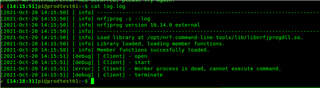
I am trying to setup a raspberry pi 4 for flashing nrf devices. But Nrfjprog doesn't seem to work.
I am using a Raspberry Pi 4 with 2021-05-07-raspios-buster-armhf-lite
I have fetched Segger and nrfjprog deb packages using :
installed them using:


Hi
I am trying to setup a raspberry pi 4 for flashing nrf devices. But Nrfjprog doesn't seem to work.
I am using a Raspberry Pi 4 with 2021-05-07-raspios-buster-armhf-lite
I have fetched Segger and nrfjprog deb packages using :
installed them using:


Hi
It seems like the JLinkarm_nrf_worker is failing to start for some reason. This could be due to the execution privileges not being correctly applied, which makes the worker non-executable here. Can you check the access rights to jlinkarm_nrf_worker?
Best regards,
Simon
Hi,
I'm facing the same exact issue. This is what I get -
$ls -l /opt/nrf-command-line-tools/bin/ total 9372 -rwxr-xr-x 1 root root 5263624 Aug 27 13:32 jlinkarm_nrf_worker_linux -rwxr-xr-x 1 root root 1802516 Aug 27 13:33 mergehex -rwxr-xr-x 1 root root 2521320 Aug 27 13:33 nrfjprog
Same here
$ ls -l /opt/nrf-command-line-tools/bin/ total 9372 -rwxr-xr-x 1 root root 5263624 Aug 27 13:32 jlinkarm_nrf_worker_linux -rwxr-xr-x 1 root root 1802516 Aug 27 13:33 mergehex -rwxr-xr-x 1 root root 2521320 Aug 27 13:33 nrfjprog
I don't know if this might help but this happens when trying to connect using directly the JLinkExe binary
$ JLinkExe SEGGER J-Link Commander V7.56b (Compiled Oct 18 2021 16:39:39) DLL version V7.56b, compiled Oct 18 2021 16:39:22 Connecting to J-Link via USB...O.K. Firmware: J-Link OB-SAM3U128-V2-NordicSemi compiled Feb 2 2021 16:47:20 Hardware version: V1.00 S/N: 682820128 License(s): RDI, FlashBP, FlashDL, JFlash, GDB VTref=3.300V Type "connect" to establish a target connection, '?' for help J-Link>r Target connection not established yet but required for command. Please specify device / core. <Default>: Unspecified Type '?' for selection dialog Device>reset Please specify target interface: J) JTAG (Default) S) SWD F) FINE I) ICSP C) C2 T) cJTAG TIF>s Specify target interface speed [kHz]. <Default>: 4000 kHz Speed>4000 /opt/SEGGER/JLink_V756b/JLinkGUIServerExe: error while loading shared libraries: libSM.so.6: cannot open shared object file: No such file or directory No valid device has been selected. J-Link>
Hi
It seems like there's a missing library here. (libSM.so.6). Have you instealled the libsm6 package? It can be done with the following command:
sudo apt install libsm6
We might have to add this package as a dependency if this occurs by default when using .deb packages for the tools.
Best regards,
Simon