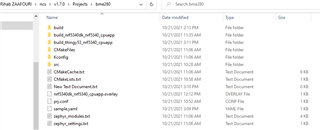
Hello i'm trying to run a sample from my projects
but each time i'm getting the CMake error
i tried changing project and running from another directory but the problem still persist
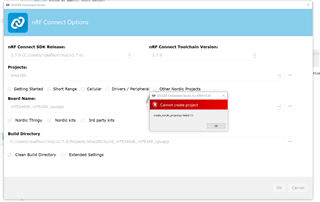
i'm trying to run the example of the BME280 but it doesn't seem to work
i was having the device tree error issue and now i'm having the error of CMake
i'm puttting the output below
Creating solution bme280.emProject
C:/Users/rzaafouri/ncs/v1.7.0/toolchain/opt/bin/cmake.exe -GNinja -DBOARD=nrf5340dk_nrf5340_cpuapp -DBOARD_DIR=C:\Users\rzaafouri\ncs\v1.7.0\zephyr\boards\arm\nrf5340dk_nrf5340 -BC:\Users\rzaafouri\ncs\v1.7.0\Projects\bme280\build_nrf5340dk_nrf5340_cpuapp -SC:\Users\rzaafouri\ncs\v1.7.0\Projects\bme280 -DNCS_TOOLCHAIN_VERSION=1.7.0 -DDTC_OVERLAY_FILE=C:/Users/rzaafouri/ncs/v1.7.0/Projects/bme280/nrf5340dk_nrf5340_cpuapp.overlay -DEXTRA_KCONFIG_TARGETS=menuconfig_ses -DEXTRA_KCONFIG_TARGET_COMMAND_FOR_menuconfig_ses=C:\Users\rzaafouri\ncs\v1.7.0\toolchain\segger_embedded_studio/html/configure_nordic_project_menuconfig.py
-- Application: C:/Users/rzaafouri/ncs/v1.7.0/Projects/bme280
-- Zephyr version: 2.6.99 (C:/Users/rzaafouri/ncs/v1.7.0/zephyr), build: v2.6.99-ncs1
-- Found Python3: C:/Users/rzaafouri/ncs/v1.7.0/toolchain/opt/bin/python.exe (found suitable exact version "3.8.2") found components: Interpreter
-- Found west (found suitable version "0.11.1", minimum required is "0.7.1")
-- Board: nrf5340dk_nrf5340_cpuapp
-- Cache files will be written to: C:/Users/rzaafouri/ncs/v1.7.0/zephyr/.cache
-- Found dtc: C:/Users/rzaafouri/ncs/v1.7.0/toolchain/opt/bin/dtc.exe (found suitable version "1.4.7", minimum required is "1.4.6")
-- Found toolchain: gnuarmemb (C:/Users/rzaafouri/ncs/v1.7.0/toolchain/opt)
-- Found BOARD.dts: C:/Users/rzaafouri/ncs/v1.7.0/zephyr/boards/arm/nrf5340dk_nrf5340/nrf5340dk_nrf5340_cpuapp.dts
-- Found devicetree overlay: C:/Users/rzaafouri/ncs/v1.7.0/Projects/bme280/nrf5340dk_nrf5340_cpuapp.overlay
-- Generated zephyr.dts: C:/Users/rzaafouri/ncs/v1.7.0/Projects/bme280/build_nrf5340dk_nrf5340_cpuapp/zephyr/zephyr.dts
-- Generated devicetree_unfixed.h: C:/Users/rzaafouri/ncs/v1.7.0/Projects/bme280/build_nrf5340dk_nrf5340_cpuapp/zephyr/include/generated/devicetree_unfixed.h
-- Generated device_extern.h: C:/Users/rzaafouri/ncs/v1.7.0/Projects/bme280/build_nrf5340dk_nrf5340_cpuapp/zephyr/include/generated/device_extern.h
-- Including generated dts.cmake file: C:/Users/rzaafouri/ncs/v1.7.0/Projects/bme280/build_nrf5340dk_nrf5340_cpuapp/zephyr/dts.cmake
Parsing C:/Users/rzaafouri/ncs/v1.7.0/Projects/bme280/Kconfig
-- Configuring incomplete, errors occurred!
Including boilerplate (Zephyr base): C:/Users/rzaafouri/ncs/v1.7.0/zephyr/cmake/app/boilerplate.cmake
-- Using NCS Toolchain 1.7.0 for building. (C:/Users/rzaafouri/ncs/v1.7.0/toolchain/cmake)
C:/Users/rzaafouri/ncs/v1.7.0/zephyr/scripts/kconfig/kconfig.py: [Errno 13] Permission denied: 'C:/Users/rzaafouri/ncs/v1.7.0/Projects/bme280/Kconfig'
CMake Error at C:/Users/rzaafouri/ncs/v1.7.0/zephyr/cmake/kconfig.cmake:268 (message):
  command failed with return code: 1
Call Stack (most recent call first):
  C:/Users/rzaafouri/ncs/v1.7.0/zephyr/cmake/app/boilerplate.cmake:554 (include)
  C:/Users/rzaafouri/ncs/v1.7.0/zephyr/share/zephyr-package/cmake/ZephyrConfig.cmake:24 (include)
  C:/Users/rzaafouri/ncs/v1.7.0/zephyr/share/zephyr-package/cmake/ZephyrConfig.cmake:35 (include_boilerplate)
  CMakeLists.txt:4 (find_package)


error: cmake failed
create_nordic_project.py failed (1)
if you have aby recommendation please feel free to suggest
seeking help please !
thanks in advance