

Hello everybody,
i succeeded to get the output from BME280 and MPU6060 sensors
I need to merge them together
Kindly, I need help to Setup prj.conf file
Thanks & Regards
You can put both the BME280 and the MPU6060 dts nodes inside the same I2C node instance. Check how it's done in the board thingy91_nrf9160: https://github.com/nrfconnect/sdk-nrf/blob/v1.7.0/boards/arm/thingy91_nrf9160/thingy91_nrf9160_common.dts#L107-L126
Best regards,
Simon
I don't think I can give you any other advice from what I stated earlier:
Simon said:If you want to merge two projects, you simply merge both of the corresponding files into one file. E.g. merge bme280/prj.conf and mpu6060/prj.conf into bme280_mpu_6060/prj.conf. Do the same with the .c/.h, overlay files, CMakeLists.txt and so on...
Just do it one step at the time and rebuild the project (pristine) after every addition. If it fails, read the error log, understand the error and try to fix it.
Be aware that some Kconfigs are dependent on others. E.g. if CONFIG_OPTION_1 depends on CONFIG_OTPION_2, you need to add both.
Could you upload the error logs here?
i have plenty of errors that i' not familiar with
Knowing that i'm new for development, i'm a bit lost
i'm seeking hep from you
i will post below my overlay, Main and sample.yaml
&i2c1 {
	status = "okay";
	sda-pin = < 25 >;
	scl-pin = < 26 >;
    clock-frequency = <100000>;

	mpu6050@68 {
		compatible = "invensense,mpu6050";
		reg = <0x68>;
		status = "okay";
		label = "MPU6050";
		int-gpios = <&gpio0 11 GPIO_ACTIVE_HIGH>;
	};
};

&i2c1 {
	status = "okay";
	sda-pin = < 34 >;
	scl-pin = < 35 >;
    clock-frequency = <100000>;

	bme280: bme280@76 {
	    status = "okay";
		compatible = "bosch,bme280";
		reg = <0x76>;
		label = "BME280";
	};
};

&uart1 {
    status = "disabled";
};

&gpio27 {
	compatible = "gpio-keys, nordic";
    status = "okay";
	GPIO_DETECT: gpio_detect{
		gpio-pin = < 27 >;
		int-gpios = <&gpio0 0x27 (GPIO_PULL_UP|GPIO_ACTIVE_LOW)>;
	};
    clock-frequency = <100000>;
};
{
	buttons {
		compatible = "gpio-keys";
		button27: button_27 {
			gpios = <&gpio0 27 (GPIO_PULL_UP | GPIO_ACTIVE_LOW)>;
			label = "GPIO P0.27";
		};
	};

	aliases {
		sw27 = &button27;
	};
};
#include <zephyr.h>
#include <device.h>
#include <drivers/sensor.h>
#include <stdio.h>
#include <sys/util.h>
#include <sys/printk.h>
#include <inttypes.h>

#define SLEEP_TIME_MS	1

/*
 * Get button configuration from the devicetree sw0 alias. This is mandatory.
 */
#define SW0_NODE	DT_ALIAS(sw27)
#if !DT_NODE_HAS_STATUS(SW0_NODE, okay)
#error "Unsupported board: sw0 devicetree alias is not defined"
#endif
static const struct gpio_dt_spec button = GPIO_DT_SPEC_GET_OR(SW0_NODE, gpios,
							      {0});
static struct gpio_callback button_cb_data;
static struct gpio_dt_spec led = GPIO_DT_SPEC_GET_OR(DT_ALIAS(led0), gpios,
						     {0});


static const char *now_str(void)
{
	static char buf[16]; /* ...HH:MM:SS.MMM */
	uint32_t now = k_uptime_get_32();
	unsigned int ms = now % MSEC_PER_SEC;
	unsigned int s;
	unsigned int min;
	unsigned int h;

	now /= MSEC_PER_SEC;
	s = now % 60U;
	now /= 60U;
	min = now % 60U;
	now /= 60U;
	h = now;

	snprintf(buf, sizeof(buf), "%u:%02u:%02u.%03u",
		 h, min, s, ms);
	return buf;
}
static const struct device *get_bme280_device(void)
{
	const struct device *dev = DEVICE_DT_GET_ANY(bosch_bme280);

	if (dev == NULL) {
		/* No such node, or the node does not have status "okay". */
		printk("\nError: no device found.\n");
		return NULL;
	}

	if (!device_is_ready(dev)) {
		printk("\nError: Device \"%s\" is not ready; "
		       "check the driver initialization logs for errors.\n",
		       dev->name);
		return NULL;
	}

	printk("Found device \"%s\", getting sensor data\n", dev->name);
	return dev;
}
static int process_mpu6050(const struct device *dev)
{
	struct sensor_value temperature;
	struct sensor_value accel[3];
	struct sensor_value gyro[3];
	int rc = sensor_sample_fetch(dev);

	if (rc == 0) {
		rc = sensor_channel_get(dev, SENSOR_CHAN_ACCEL_XYZ,
					accel);
	}
	if (rc == 0) {
		rc = sensor_channel_get(dev, SENSOR_CHAN_GYRO_XYZ,
					gyro);
	}
	if (rc == 0) {
		rc = sensor_channel_get(dev, SENSOR_CHAN_AMBIENT_TEMP,
					&temperature);
	}
	if (rc == 0) {
		printf("[%s]:%g Cel\n"
		       "  accel %f %f %f m/s/s\n"
		       "  gyro  %f %f %f rad/s\n",
		       now_str(),
		       sensor_value_to_double(&temperature),
		       sensor_value_to_double(&accel[0]),
		       sensor_value_to_double(&accel[1]),
		       sensor_value_to_double(&accel[2]),
		       sensor_value_to_double(&gyro[0]),
		       sensor_value_to_double(&gyro[1]),
		       sensor_value_to_double(&gyro[2]));
	} else {
		printf("sample fetch/get failed: %d\n", rc);
	}

	return rc;
}

#ifdef CONFIG_MPU6050_TRIGGER
static struct sensor_trigger trigger;

static void handle_mpu6050_drdy(const struct device *dev,
				struct sensor_trigger *trig)
{
	int rc = process_mpu6050(dev);

	if (rc != 0) {
		printf("cancelling trigger due to failure: %d\n", rc);
		(void)sensor_trigger_set(dev, trig, NULL);
		return;
	}
}
#endif /* CONFIG_MPU6050_TRIGGER */
void button_pressed(const struct device *dev, struct gpio_callback *cb,
		    uint32_t pins)
{
	printk("Button pressed at %" PRIu32 "\n", k_cycle_get_32());
}
void main(void)
{
	int ret;

	if (!device_is_ready(button.port)) {
		printk("Error: button device %s is not ready\n",
		       button.port->name);
		return;
	}

	ret = gpio_pin_configure_dt(&button, GPIO_INPUT);
	if (ret != 0) {
		printk("Error %d: failed to configure %s pin %d\n",
		       ret, button.port->name, button.pin);
		return;
	}

	ret = gpio_pin_interrupt_configure_dt(&button,
					      GPIO_INT_EDGE_TO_ACTIVE);
	if (ret != 0) {
		printk("Error %d: failed to configure interrupt on %s pin %d\n",
			ret, button.port->name, button.pin);
		return;
	}

	gpio_init_callback(&button_cb_data, button_pressed, BIT(button.pin));
	gpio_add_callback(button.port, &button_cb_data);
	printk("Set up button at %s pin %d\n", button.port->name, button.pin);

	if (led.port && !device_is_ready(led.port)) {
		printk("Error %d: LED device %s is not ready; ignoring it\n",
		       ret, led.port->name);
		led.port = NULL;
	}
	if (led.port) {
		ret = gpio_pin_configure_dt(&led, GPIO_OUTPUT);
		if (ret != 0) {
			printk("Error %d: failed to configure LED device %s pin %d\n",
			       ret, led.port->name, led.pin);
			led.port = NULL;
		} else {
			printk("Set up LED at %s pin %d\n", led.port->name, led.pin);
		}
	}

	printk("Press the button\n");
	if (led.port) {
		while (1) {
			/* If we have an LED, match its state to the button's. */
			int val = gpio_pin_get_dt(&button);

			if (val >= 0) {
				gpio_pin_set_dt(&led, val);
			}
			k_msleep(SLEEP_TIME_MS);
		}
	}

	const char *const label = DT_LABEL(DT_INST(0, invensense_mpu6050));
	const struct device *mpu6050 = device_get_binding(label);

	if (!mpu6050) {
		printf("Failed to find sensor %s\n", label);
		return;
	}

#ifdef CONFIG_MPU6050_TRIGGER
	trigger = (struct sensor_trigger) {
		.type = SENSOR_TRIG_DATA_READY,
		.chan = SENSOR_CHAN_ALL,
	};
	if (sensor_trigger_set(mpu6050, &trigger,
			       handle_mpu6050_drdy) < 0) {
		printf("Cannot configure trigger\n");
		return;
	}
	printk("Configured for triggered sampling.\n");
#endif

	while (!IS_ENABLED(CONFIG_MPU6050_TRIGGER)) {
		int rc = process_mpu6050(mpu6050);

		if (rc != 0) {
			break;
		}
		k_sleep(K_SECONDS(2));
	}
	const struct device *dev = get_bme280_device();

	if (dev == NULL) {
		return;
	}

	while (1) {
		struct sensor_value temp, press, humidity;

		sensor_sample_fetch(dev);
		sensor_channel_get(dev, SENSOR_CHAN_AMBIENT_TEMP, &temp);
		sensor_channel_get(dev, SENSOR_CHAN_PRESS, &press);
		sensor_channel_get(dev, SENSOR_CHAN_HUMIDITY, &humidity);

		printk("temp: %d.%06d; press: %d.%06d; humidity: %d.%06d\n",
		      temp.val1, temp.val2, press.val1, press.val2,
		      humidity.val1, humidity.val2);

		k_sleep(K_MSEC(1000));
	}

	/* triggered runs with its own thread after exit */
}
sample:
  name: BME280 Sensor sample
tests:
  sample.sensor.bme280:
    harness: console
    tags: sensors
    platform_allow: nrf5340dk_nrf5340cpuapp adafruit_feather_m0_basic_proto
    harness_config:
        type: one_line
        regex:
            - "temp: (.*); press: (.*); humidity: (.*)"
        fixture: fixture_i2c_bme280
  sample.sensor.bme280.spi:
    harness: console
    tags: sensors
    depends_on: spi bme280
    extra_args: "CONF_FILE=prj_spi.conf"
    harness_config:
        type: one_line
        regex:
            - "temp: (.*); press: (.*); humidity: (.*)"
        fixture: fixture_spi_bme280

sample:
  name: MPU6050 Sensor Sample
tests:
  sample.sensor.mpu6050:
    build_only: true
    platform_allow: nrf5340dk_nrf5340_cpuapp
    tags: sensors
    integration_platforms:
    - nrf5340dk_nrf5340_cpuapp


sample:
  name: Button Sample
tests:
  sample.basic.button:
    tags: button gpio
    filter: dt_enabled_alias_with_parent_compat("sw0", "gpio-keys")
    depends_on: gpio
    harness: button
Yeah i tested it but it's only returning the values when the button is pressed
how can i get to display the output of the 2 other sensors on the same output please ?
is there something to add on the .overlay file ?
can you help me please display all the values
kindly, very grateful
Yeah i tested it but it's only returning the values when the button is pressed
how can i get to display the output of the 2 other sensors on the same output please ?
is there something to add on the .overlay file ?
can you help me please display all the values
kindly, very grateful
Like I explained in this answer https://devzone.nordicsemi.com/support-private/support/279408#permalink=709631
you can execute stuff indirectly from an interrupt handler (button_pressed() in your case) using k_sem_give()/k_sem_take or a work queue thread.
I was just explaining how to execute stuff using an interrupt handler, e.g. the button interrupt handler. Such that when you click the button, you get the sensor output.
I'm not sure what your final goal is, do you want to get the sensor output when the button is pressed, or do you want to get it every 1 second, like it's done in your sample right now, or do you want to use trigger mode, such that the measurements are displayed at the rate they are produced by the sensor (only the mpu6050 sample supports this).
Rihab said:how can i get to display the output of the 2 other sensors on the same output please ?
Right now you're only printing the data from the BME280, like done in the bme280 sample. If you want to get the data from the mpu6050 as well at 1 second interval, you have to call process_mpu6050().
Best regards,
Simon
My final goal is to get both sensors output when the button is pressed but for now i'm only getting the clock of the button every time it's clicked .Knowing that when the button is clicked the led1 should be disactivated.
but for now i'm only getting this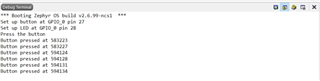
i don't get what need to be done in order to get the other 2 sensors output .
i did integrated their code in my main.c
but i believe that something need to be added or edited in order to get the output of the MPU6050 and the BME280.
Infact, i need to create a functional loop : the main idea is, when i click the button the information of the sensors need to be displayed .
click the button ->get the output that I posted in the photo below + the output of the MPU & BME + the Led which gets disactivated when the button is clicked
but for now I'm getting the button pressed output and the Led disactivated when it's pressed
so can you please help me get this displayed please
Because i tried Multiple changes but unfortunately i didn't succeed
i'm seeking help from u please
and i'm very thankful for all of our responses
Kindly,
Rihab

