Hello Developers,
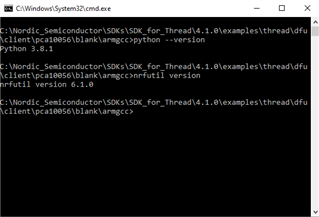
I am currently developing an application on top of mqtt-sn publisher example. Now i want to add OTA DFU in my mqtt-sn based application. I have started up with simple dfu example present in Thread folder and it works fine. Than i created few firmware packages of my mqtt-sn based applications and updated it on the device flashed with dfu client example and it also works fine. Now i am looking to flash the end device with mqttsn client example integrated with dfu client example and than update it over the air with another mqtt-sn client example. I am using Segger Embedded Studio for development with, nRF52840 DK and nRF SDK for Thread and Zigbee SDK v4.1 .
I have followed this post on devzone along with dfu example docs from infocenter and started to integrate dfu client example and my mqtt-sn based example in Segger Embedded Studio:
-
https://devzone.nordicsemi.com/f/nordic-q-a/73401/ota-thread-dfu-merge-sdk-example-with-custom-application/307331#307331
I have attached my flash_placement.xml file based on the dfu client example, please refer it and tell me if i have to make any changes.
<!DOCTYPE Linker_Placement_File>
<Root name="Flash Section Placement">
  <MemorySegment name="FLASH" start="$(FLASH_PH_START)" size="$(FLASH_PH_SIZE)">
    <ProgramSection load="no" name=".reserved_flash" start="$(FLASH_PH_START)" size="$(FLASH_START)-$(FLASH_PH_START)" />
    <ProgramSection alignment="0x100" load="Yes" name=".vectors" start="$(FLASH_START)" />
    <ProgramSection alignment="4" load="Yes" name=".init" />
    <ProgramSection alignment="4" load="Yes" name=".init_rodata" />
    <ProgramSection alignment="4" load="Yes" name=".text" />
    <ProgramSection alignment="4" keep="Yes" load="Yes" name=".crypto_data" inputsections="*(SORT(.crypto_data*))" address_symbol="__start_crypto_data" end_symbol="__stop_crypto_data" />
    <ProgramSection alignment="4" keep="Yes" load="Yes" name=".nrf_queue" inputsections="*(.nrf_queue*)" address_symbol="__start_nrf_queue" end_symbol="__stop_nrf_queue" />
    <ProgramSection alignment="4" keep="Yes" load="Yes" name=".pwr_mgmt_data" inputsections="*(SORT(.pwr_mgmt_data*))" address_symbol="__start_pwr_mgmt_data" end_symbol="__stop_pwr_mgmt_data" />
    <ProgramSection alignment="4" keep="Yes" load="Yes" name=".log_const_data" inputsections="*(SORT(.log_const_data*))" address_symbol="__start_log_const_data" end_symbol="__stop_log_const_data" />
    <ProgramSection alignment="4" keep="Yes" load="Yes" name=".log_backends" inputsections="*(SORT(.log_backends*))" address_symbol="__start_log_backends" end_symbol="__stop_log_backends" />
    <ProgramSection alignment="4" keep="Yes" load="Yes" name=".nrf_balloc" inputsections="*(.nrf_balloc*)" address_symbol="__start_nrf_balloc" end_symbol="__stop_nrf_balloc" />
    <ProgramSection alignment="4" keep="Yes" load="Yes" name=".dfu_trans" inputsections="*(SORT(.dfu_trans*))" address_symbol="__start_dfu_trans" end_symbol="__stop_dfu_trans" />
    <ProgramSection alignment="4" keep="Yes" load="No" name=".nrf_sections" address_symbol="__start_nrf_sections" />
    <ProgramSection alignment="4" keep="Yes" load="Yes" name=".fs_data" inputsections="*(.fs_data*)" runin=".fs_data_run" />
    <ProgramSection alignment="4" keep="Yes" load="Yes" name=".log_dynamic_data" inputsections="*(SORT(.log_dynamic_data*))" runin=".log_dynamic_data_run" />
    <ProgramSection alignment="4" keep="Yes" load="Yes" name=".log_filter_data" inputsections="*(SORT(.log_filter_data*))" runin=".log_filter_data_run" />
    <ProgramSection alignment="4" load="Yes" name=".dtors" />
    <ProgramSection alignment="4" load="Yes" name=".ctors" />
    <ProgramSection alignment="4" load="Yes" name=".rodata" />
    <ProgramSection alignment="4" load="Yes" name=".ARM.exidx" address_symbol="__exidx_start" end_symbol="__exidx_end" />
    <ProgramSection alignment="4" load="Yes" runin=".fast_run" name=".fast" />
    <ProgramSection alignment="4" load="Yes" runin=".data_run" name=".data" />
    <ProgramSection alignment="4" load="Yes" runin=".tdata_run" name=".tdata" />
  </MemorySegment>
  <MemorySegment name="RAM" start="$(RAM_PH_START)" size="$(RAM_PH_SIZE)">
    <ProgramSection load="no" name=".reserved_ram" start="$(RAM_PH_START)" size="$(RAM_START)-$(RAM_PH_START)" />
    <ProgramSection alignment="0x100" load="No" name=".vectors_ram" start="$(RAM_START)" address_symbol="__app_ram_start__" />
    <ProgramSection alignment="4" keep="Yes" load="No" name=".nrf_sections_run" address_symbol="__start_nrf_sections_run" />
    <ProgramSection alignment="4" keep="Yes" load="No" name=".fs_data_run" address_symbol="__start_fs_data" end_symbol="__stop_fs_data" />
    <ProgramSection alignment="4" keep="Yes" load="No" name=".log_dynamic_data_run" address_symbol="__start_log_dynamic_data" end_symbol="__stop_log_dynamic_data" />
    <ProgramSection alignment="4" keep="Yes" load="No" name=".log_filter_data_run" address_symbol="__start_log_filter_data" end_symbol="__stop_log_filter_data" />
    <ProgramSection alignment="4" keep="Yes" load="No" name=".nrf_sections_run_end" address_symbol="__end_nrf_sections_run" />
    <ProgramSection alignment="4" load="No" name=".fast_run" />
    <ProgramSection alignment="4" load="No" name=".data_run" />
    <ProgramSection alignment="4" load="No" name=".tdata_run" />
    <ProgramSection alignment="4" load="No" name=".bss" />
    <ProgramSection alignment="4" load="No" name=".tbss" />
    <ProgramSection alignment="4" load="No" name=".non_init" />
    <ProgramSection alignment="4" size="__HEAPSIZE__" load="No" name=".heap" />
    <ProgramSection alignment="8" size="__STACKSIZE__" load="No" place_from_segment_end="Yes" name=".stack" address_symbol="__StackLimit" end_symbol="__StackTop" />
    <ProgramSection alignment="8" size="__STACKSIZE_PROCESS__" load="No" name=".stack_process" />
  </MemorySegment>
  <MemorySegment name="mbr_params_page" start="0x000FE000" size="0x1000">
    <ProgramSection alignment="4" keep="Yes" load="No" name=".mbr_params_page" address_symbol="__start_mbr_params_page" end_symbol="__stop_mbr_params_page" start="0x000FE000" size="0x1000" />
  </MemorySegment>
  <MemorySegment name="bootloader_settings_page" start="0x000FF000" size="0x1000">
    <ProgramSection alignment="4" keep="Yes" load="No" name=".bootloader_settings_page" address_symbol="__start_bootloader_settings_page" end_symbol="__stop_bootloader_settings_page" start="0x000FF000" size="0x1000" />
  </MemorySegment>
  <MemorySegment name="ot_flash_data" start="0xf4000" size="0x4000">
    <ProgramSection alignment="4" keep="Yes" load="Yes" name=".ot_flash_data" address_symbol="__start_ot_flash_data" end_symbol="__stop_ot_flash_data" start="0xf4000" size="0x4000" />
  </MemorySegment>
  <MemorySegment name="uicr_bootloader_start_address" start="0x10001014" size="0x4">
    <ProgramSection alignment="4" keep="Yes" load="Yes" name=".uicr_bootloader_start_address" address_symbol="__start_uicr_bootloader_start_address" end_symbol="__stop_uicr_bootloader_start_address" start="0x10001014" size="0x4" />
  </MemorySegment>
  <MemorySegment name="uicr_mbr_params_page" start="0x10001018" size="0x4">
    <ProgramSection alignment="4" keep="Yes" load="Yes" name=".uicr_mbr_params_page" address_symbol="__start_uicr_mbr_params_page" end_symbol="__stop_uicr_mbr_params_page" start="0x10001018" size="0x4" />
  </MemorySegment>
</Root>
I have also attached the memory view of my application :
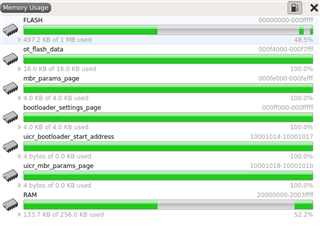
MQTT-SN DFU Client
So my mqtt-sn client example integrated with dfu client example and interfaced with sensor after build takes 437.0K code area and 209.9K Data+RO area as per segger studio. Now in Memory Usage out of the 1MB flash 511.8KB of flash is used up and 135KB RAM is used up.
I have attached the image for reference.:
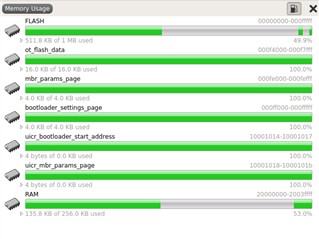
- Now i flash MBR, bootloader, and the merged hex file generated using application hex and bootloader setting hex on my end device. I can see my device gets connected to the network.
Here is my boot-loader settings file generated for my MQTT-SN based application:
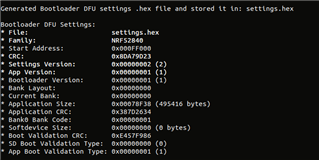
Here is the memory read layout from the nRF Connect Programmer :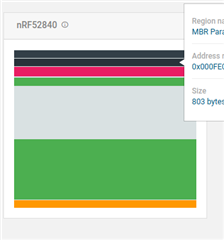
MQTT-SN DFU Client (To be updated via OTA)
- I have changed the sensor and built the project it takes approximately the same memory space as above. I have created a package file and started DFU process:
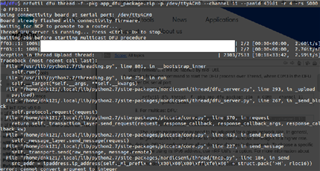
Three things happened:
1) One-time DFU process got stuck at 98percent and the DFU client running also got stopped
2) One-time DFU process was completed but the update didn't happen. The client got disconnected from the broker and got connected but with the previous firmware.
3) And one time my MQTT-sn firmware example got updated successfully.
Can be a Problem and How to Solve this issue :
1. I think this can be the issue of flash memory as my hex file combined with other segments in flash make it around 500KB.
Secondly when I flash the end device with DFU Client example and then update it with MQTT-SN firmware 1. The firmware 1 starts running. Then on the same device running firmware 1, I try to update a new firmware MQTTSN firmware 2 and this firmware also gets updated successfully. So from this, I can also think there can be an issue with the creation of MQTT-SN-based DFU client.
SECONDLY, I WOULD ALSO LIKE TO KNOW HOW CAN I USE EXTERNAL FLASH FOR DFU Example because my example build may get increased in size.