This discussion has been locked.
You can no longer post new replies to this discussion. If you have a question you can start a new discussion

Create nRF connect project

Hello,

My colleague and I created ESB prx project based on SDK 1.6.0 version and nrf5340 dk.

And some source codes in ncs/nrf/samples/esb/prx/src folder are changed.

The changed files are shared with me and my colleague. But build results were different.

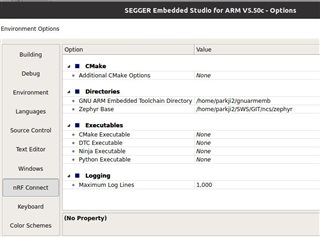
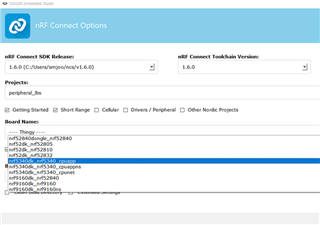
Only difference is Tool chain version. I can't specify tool chain version. But my colleague has 1.6.0 version.

It could effect zephyer.hex?  How could I specify tool chain version?

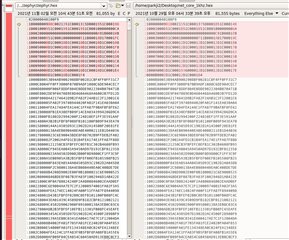
<mine>

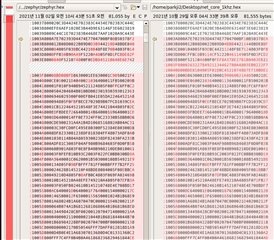
<colleague>
Parents
  • Hi,

    Installing nRF Connect SDK using the Toolchain Manager will give you the option to select a specific toolchain version in "nRF Connect Toolchain Version". If you have installed it manually, the option will be NONE, as in your case.

    You should make sure to set the build environment in SES to correspond to the version of nRF Connect SDK you are using. For information about how to set the build environment manually, please see Set up the build environment in SES. For SDK v1.6.0 the recommended version of the GNU Arm Embedded Toolchain is 9-2019-q4-major. Also make sure to use the correct version of the other repositories and models used by the SDK, such as Zephyr, nrfxlib and more. If you have installed the SDK manually, you can do this by going to ncs/nrf in a terminal, make sure that you are working with the v1.6.0 tag of the sdk-nrf repository, and running "west update". 

    What changes are you seeing between the two builds?

    Best regards,

    Marte

  • Hello,

    Environment Options are configured according to your information.

    And 9-2019-q4-major is installed as gnuarmemb.

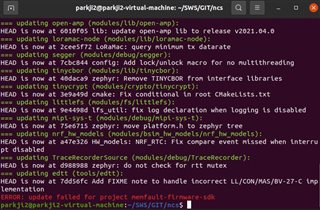
    During "west update", I got a error message which says "ERROR: update failed for project memfault-firmware-sdk".

    Could It effect build results?

    The purpose of my project is to receive ESB message at Network core

    and to send it to UART at Application core.

    I checked that ESB message is received periodically from Network core to Application core.

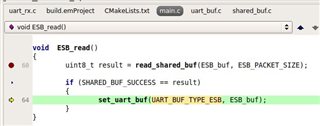
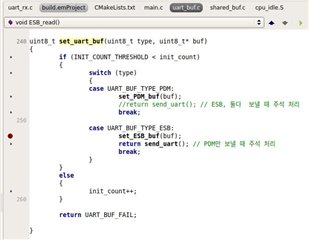
    ESB_read function send ESB_buf to set_uart_buf.

    But break point doesn't stop at UART_BUF_TYPE_ESB.

    When I used zephyr.hex of prx which are build by my colleague, It works fine.

    So I compared .hex. It looks lot different

    <left- mine>, <right-colleague>

    Thanks for your help:)

Reply
  • Hello,

    Environment Options are configured according to your information.

    And 9-2019-q4-major is installed as gnuarmemb.

    During "west update", I got a error message which says "ERROR: update failed for project memfault-firmware-sdk".

    Could It effect build results?

    The purpose of my project is to receive ESB message at Network core

    and to send it to UART at Application core.

    I checked that ESB message is received periodically from Network core to Application core.

    ESB_read function send ESB_buf to set_uart_buf.

    But break point doesn't stop at UART_BUF_TYPE_ESB.

    When I used zephyr.hex of prx which are build by my colleague, It works fine.

    So I compared .hex. It looks lot different

    <left- mine>, <right-colleague>

    Thanks for your help:)

Children
  • Hi,

    JIYEON said:

    During "west update", I got a error message which says "ERROR: update failed for project memfault-firmware-sdk".

    Could It effect build results?

    If you are not using Memfault in your current project the build should not be affected by this error, and Memfault is currently only supported on nRF9160-based boards, so it should not be an issue in your case. 

    Are all the other files identical, both the SDK and project files? Have you made any configuration changes using menuconfig in SES? Changes made in menuconfig are not static, and will be removed if you clean or delete the build folder, and they might be overwritten by prj.conf. Have you tried deleting the build folder and trying again? Sometimes, configurations might be cached in the build folder, affecting following builds.

    There might also be something different between the SES configurations. You can open your SES project files (.emProject) located in the build folder in a text editor and compare them.

    Best regards,

    Marte

  • Hello,

    I didn't know about the relationship between menuconfig  and build folder.

    Thanks for let me know.


    The problem was ESB payload length.

    ESB payload length has been changed. And I didn't know that.

    After update ESB  payload length, everything works fine.

    Thank you:)

Related