This discussion has been locked.
You can no longer post new replies to this discussion. If you have a question you can start a new discussion

nRFConnect for Desktop 3.9.0 still has problem with JLink

Hi teams,

I noticed nRFConnect v3.9.0 is released.

After upgrading it, I got different errors as following, while detecting my nRF dongle & PPK during BLE app & Power profiler app.

2021-11-10T04:47:51.051Z ERROR Error while probing devices, more details in the debug log: JLINKARM_DLL_ERROR
2021-11-10T04:47:51.051Z DEBUG "Error when running nrfdl_enumerate"

As it says, I tried to find debug.log, but don't know where to find. Let me know if further problem details required.

I am using two J-Link devices and several nRF52833 DKs on my desktop, and using another BLE vendor's board, too.

I can roll back to 3.6.1, and continue to use nRFConnect, but it is quite inconvenient and hope this problem solved.

Is this problem only for my case? I searched forum but no one reported this isssue yet.

Parents
  • Hi,

    Could you try using the nrfjprog command:

    nrfjprog --ids --log

    Does the serial number of the PPKs get listed? 

    For the dongle, are you using a stand alone debugger? 

    Is the development boards connected directly to the computer, or are you using a hub?

    I am using two J-Link devices and several nRF52833 DKs on my desktop, and using another BLE vendor's board, too.

    Are you seeing the same issues with the nRF5833s DKs?

    regards

    Jared 

  • Hi Jared,

    The following is the nrfjprog results. I have 5 JTAGs.

    51001235    -> J-Link Debugger 1 connected to custom board
    685090243   -> nRF52833 DK board 1
    685720715   -> nRF52833 DK board 2
    483060254   -> Other vendors BLE DK board
    50128807    -> J-Link Debugger 2 connected to custom board

    The above boards are shown, and it is the same result with SEGGER JLink configurator.

    In addition, I have one 52840 dongle for using with Bluetooth LE app, and one PPK2 for power profiler, but it is not shown in J-Link list, which is also not shown when they works correctly with nRFConnect 3.7.0.

  • Another observation...

    In the above, both J-Link is connected to unpowered target board.

    Now I powered one target board (not nRF), and got the following error message.

    2021-11-11T05:51:56.374Z ERROR Error while probing devices, more details in the debug log: WRONG_FAMILY_FOR_DEVICE
    2021-11-11T05:51:56.374Z DEBUG "Error when running nrfdl_enumerate"
    

  • choehyunho said:

    The above boards are shown, and it is the same result with SEGGER JLink configurator.

    In addition, I have one 52840 dongle for using with Bluetooth LE app, and one PPK2 for power profiler, but it is not shown in J-Link list, which is also not shown when they works correctly with nRFConnect 3.7.0.

    Ok. So your 5 boards are recognized by nrfjprog and nRF Connect Desktop but your PPK2 and Dongle is not recognized by either after updating to v3.9.0.?

    Could you disconnect the other boards and only connect the PKK2 directly to the USB port on your machine and provide the log when you do:

    nrfjprog --ids --log

  • Hi, 

    I have the same problem with 2 different computers. I tried to update Segger Jlink to the last version but nothing has changed.

    I found something that might help you understand what's going on : 

    I have 2 nRF devices connected : the PCA10059 (nRF52840-dongle) and the PCA10040 (nRF52 EVK).

    If I start the Programmer with only the PCA10059 plugged in, the device list is shown correctly. I can unplug and plug the PCA10059 and it disappears/appears dynamically correctly. Then, if I plug in the PCA10040, nothing appears. And if I restart the Programmer with the PCA10040 plugged in, I have the error (and an empty device list).

  • Seems different in my case.

    I removed all my DKs, whether nRF or others, and JLinks, but PPK2 and PCA10059 dongle is not listed with nrfjprog command.

    But Power profiler app now detects PPK2, and BLE app also detects nRF52840 dongle properly.

    Unfortunately, after I connected nRF52833 DK, these apps no longer detect PPK2 and dongle, even after disconnect 52833 DK, and for a few minutes after disconnecting DK, suddenly apps detect PPK2 and dongle properly again.

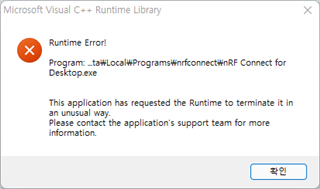
    And in this status, if I connect 52833 DK again, the following error popup appears.

  • Hi,

    Could you try downgrading the JLink driver to 6.88a or 7.20a? 

    regards

    Jared 

Reply Children
Related