This discussion has been locked.
You can no longer post new replies to this discussion. If you have a question you can start a new discussion

Trouble in configuring nrf_ble_lesc.c for PEER MANAGER

Dear Sir,

for my nRF52840 application made with the SDK v17.0.2 and S140 Softdevice I'm adding the peer module to a peripheral device example (UART with SAADC with timer based execution) in order to increase the security aspect.

Following many different thread I've added (I think...) all the C file for the peer module and FDS but, I've already added the nrf_ble_lesc.c file at the nRF_BLE file group in my project and I've also enabled into the sdk_config.h file the PM_LESC_ENABLED so what I've to do in order to get all working and avoid this missing function errors?

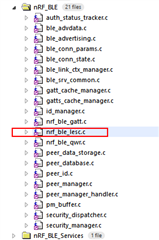
Looking through the source file nrf_ble_lesc.c I see this conditional check:

#if NRF_MODULE_ENABLED(NRF_BLE_LESC)

#include "nrf_ble_lesc.h"
#include "nrf_crypto.h"
...

the code included by the conditional statement #if is grayed out so it means that the module NRF_BLE_LESC is not enabled, looking inside the sdk_config.h file there are no label related this type of module, only the PM_LESC_ENABLED label is present.

Searching through all the SDK files for the key NRF_BLE_LESC give no results so how is possible to activate this module?

Just a side consideration, it is very frustrating and time consuming to do a trial and error procedures to get things working, I kindly ask if is possible to have a guide or some notes inside the docs to follow with all the dependencies related some modules so is possible to know what files are needed to add some functionality ... (I'm try to add the peer module functionality to my design).

Thanks for your time!

Best regards.

F.

Parents
  • Hello

    When it comes to BLE and security, it is generally easier to choose one of the examples already implementing the BLE protocol and peer manager, and then add the peripheral functionalities you would like to use.

    I would suggest checking out the glucose application for instance which already implements LESC, and add UART and ADC to that one instead.

    Best regards,

    Simon

Reply
  • Hello

    When it comes to BLE and security, it is generally easier to choose one of the examples already implementing the BLE protocol and peer manager, and then add the peripheral functionalities you would like to use.

    I would suggest checking out the glucose application for instance which already implements LESC, and add UART and ADC to that one instead.

    Best regards,

    Simon

Children
  • Dear Simonr,

    thanks for your help.

    I've see the suggested app because was addressed by many thread through the forum.

    After some attempt finally I was successfully in configuring this feature but was principally a trial and error procedure, so take a look at the compiler error messages and then include the necessary files.

    About the file main.c I've followed what reported at this link:

    https://devzone.nordicsemi.com/f/nordic-q-a/44658/communication-problems-between-ble_peripheral-and-ble_central-in-nrf52-project/176907#176907

    and used the peripheral part to modfify my main.c code.

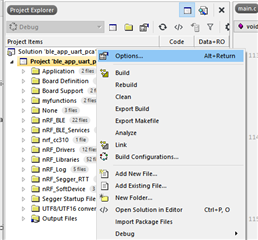
    Other than the source .c files is also necessary add related include path inside the common option of the project then:

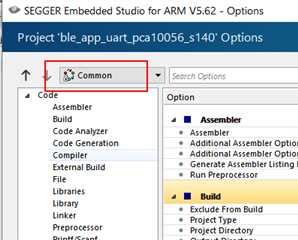
    select the Common profile:

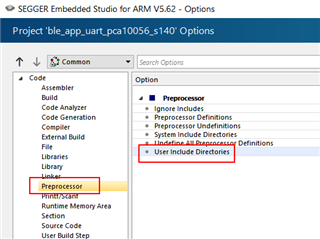
    then select Preprocessor and then select the User include Directories:

    so by comparing the example design and the own design add the necessary path, in my case was the following ones:

    ../../../../../../components/libraries/crypto

    ../../../../../../components/libraries/crypto/backend/cc310

    ../../../../../../components/libraries/crypto/backend/cc310_bl

    ../../../../../../components/libraries/crypto/backend/cifra

    ../../../../../../components/libraries/crypto/backend/mbedtls

    ../../../../../../components/libraries/crypto/backend/micro_ecc

    ../../../../../../components/libraries/crypto/backend/nrf_hw

    ../../../../../../components/libraries/crypto/backend/nrf_sw

    ../../../../../../components/libraries/crypto/backend/oberon

    ../../../../../../components/libraries/crypto/backend/optiga

    ...

    ../../../../../../components/libraries/stack_info

    ...

    ../../../../../../external/nrf_cc310/include

    ../../../../../../external/nrf_oberon

    ../../../../../../external/nrf_oberon/include

    ../../../../../../external/nrf_tls/mbedtls/nrf_crypto/config

    and may be some other ones that actually I can not remember, check by comparing with the example file what you have to add and by the error message from the compilation stage.

    Next step was add the "libnrf_cc310_0.9.13.a lib" to my project source file, this lib is at the following path "..\nRF5_SDK_17.0.2_d674dde\external\nrf_cc310\lib\cortex-m4\hard-float"

    and everty time that an error arise check what source file was missing and add it sequencially.

    For the ble_nus service, inside the function ble_nus_init() change the following rows:

        //add_char_params.read_access  = SEC_OPEN;
        //add_char_params.write_access = SEC_OPEN;
        add_char_params.read_access  = SEC_JUST_WORKS;
        add_char_params.write_access = SEC_JUST_WORKS;
        
        ........
        
        //add_char_params.read_access       = SEC_OPEN;
        //add_char_params.write_access      = SEC_OPEN;
        //add_char_params.cccd_write_access = SEC_OPEN;
        add_char_params.read_access       = SEC_JUST_WORKS ;
        add_char_params.write_access      = SEC_JUST_WORKS ;
        add_char_params.cccd_write_access = SEC_JUST_WORKS ;

    Inside the config file set:

    PEER_MANAGER_ENABLED

    PM_LESC_ENABLED

    FDS_ENABLED

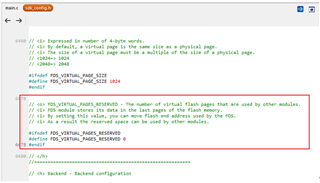
    add following lines to the config files:

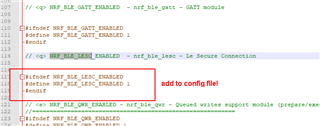
    in order to include the nrf_ble_lesc.c file also add the following line to the sdk_config.h file:

    It is not possible to add inside the doc for every SDK the necessary dependency file to use? it would be more simple and no time consuming follow the instruction for each module so include the needed file and enable the right switch into the config file, just a suggest.

    Thanks and best regards.

    F.

Related