ncs1.61 peripheral_uart : enable uart when connected and disable uart when disconnected

Hi,

I work with win10 laptop, Toolchain  nrf Connect SDK 1.6.1 on a nrf5340dk.

On peripheral_uart sample, I would like to enable uart when a device is connected and I want to disable uart when device is disconnected to reduce consumption.

There is the consumption mesure by PPK2:
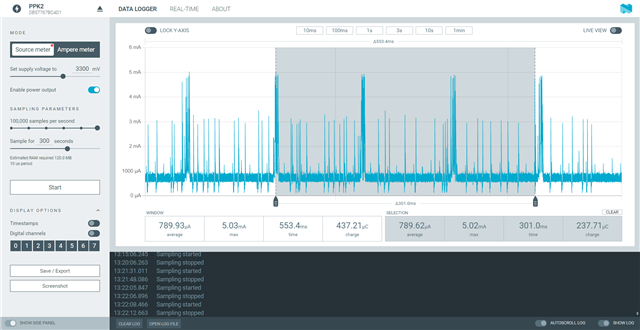
It's seem that between two advertisings the consumption is due to the enable uart.

I need to have the lowest consumption when the nrf5340dk is advertising.

First step, I tryed to disable uart from prj.conf:

CONFIG_SERIAL=n & CONFIG_LOG=n

but after build and download the 4 led were ON and the was no more advertising.

Second step, I tryed to disable uart from the overlay file:

&uart0 {
    status = "disable";

};

but after build and download there was no led on and no more advertising.

There is my project:

5040.peripheral_uart.zip

Could you give me, please,  an example how to enable uart when a device is connected and disable uart when device is disconnected ?

Best regards,

Rob.

Parents
  • Hello Robert,

    You can use the low-power UART driver implementation if you want to wake up on UART and keep the current consumption low.  

    The protocol used by this driver implements two control lines ( the Request line (REQ) and the ready line (RDY) to allow disable the UART during the idle period Low power UART driver — nRF Connect SDK 1.7.99 documentation (nordicsemi.com). So it requires extra flow control pins on the UART besides Rx-pin and Tx-pin. So, the device tree should look like this

    &uart1{

             compatible = "nordic, nrf-urate";

             status = "okay";

             rx-pin =<44>;

             tx-pin = <45>;

             baudrate =<1000000>;

     lpuart: nrf-sw-lpuart {   // this part is the child node of the UART instance that extends standard UART configuration with the control lines REQ and RDY 

               compatible = "nordic, nrf-sw-lpuart";

               status = "okay";

               label   = "LPUART";

              req-pin =<46>;

              rdy-pin = <47>;

    };

    };

    Apart from this, here is a sample of turning off and on the UART during run-time: https://github.com/nrfconnect/sdk-zephyr/tree/main/samples/boards/nrf/system_off

    Best Regards,

    Kazi Afroza Sultana

Reply
  • Hello Robert,

    You can use the low-power UART driver implementation if you want to wake up on UART and keep the current consumption low.  

    The protocol used by this driver implements two control lines ( the Request line (REQ) and the ready line (RDY) to allow disable the UART during the idle period Low power UART driver — nRF Connect SDK 1.7.99 documentation (nordicsemi.com). So it requires extra flow control pins on the UART besides Rx-pin and Tx-pin. So, the device tree should look like this

    &uart1{

             compatible = "nordic, nrf-urate";

             status = "okay";

             rx-pin =<44>;

             tx-pin = <45>;

             baudrate =<1000000>;

     lpuart: nrf-sw-lpuart {   // this part is the child node of the UART instance that extends standard UART configuration with the control lines REQ and RDY 

               compatible = "nordic, nrf-sw-lpuart";

               status = "okay";

               label   = "LPUART";

              req-pin =<46>;

              rdy-pin = <47>;

    };

    };

    Apart from this, here is a sample of turning off and on the UART during run-time: https://github.com/nrfconnect/sdk-zephyr/tree/main/samples/boards/nrf/system_off

    Best Regards,

    Kazi Afroza Sultana

Children
Related