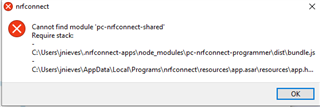
nrf connect cannot find module pc-nrfconnect-shared

We have been using nrf connect installers 3.3.0 and now 3.7.0. We have recently seen issues with new users encountering this error when installing 3.7.0. Are there any solutions to this right now? 

This is installed on a windows 10 64 bit machine.
Parents
  • Hi

    Here are instructions to add older versions of nRFConnect apps:

    • Download and install nRFConnect
    • Uninstall the current version of the app you have on your computer (click the dropdown tab and uninstall).
    • Close nRFConnect
    • Download and place the .tgz file in C:\Users\<username>\.nrfconnect-apps\local\.
    • Open nRFConnect and run the app. You should now be using the version you placed in the \local\ folder.

    Best regards,

    Simon

  • Simon,  

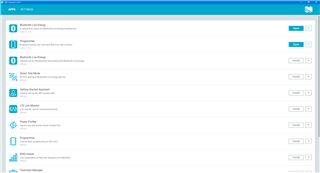
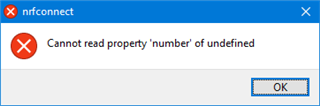
    Thank you - version numbers of BLE and Programmer are now in place.  BUT Programmer is the only one working.  I get an nrfconnect error notification:

             Cannot read property 'number' of undefined

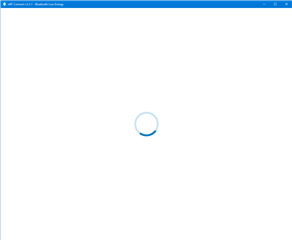
    and BLE keeps trying to open - the circle, wait/working symbol just keeps spinning around and nothing happens.  So, I cannot use BLE at the moment.

    Can you please help me with this?

    Thanks

  • Can you send me a screenshot of how the BLE app window looks so I can get a better picture of what's happening? Unfortunately what support we can provide on older versions of the BLE app is somewhat limited, as this is not an issue in the latest version for instance, so updating to a later version would be one "workaround".

    Best regards,

    Simon

  • When I click on 'open' for BLE and then get the following notification and it appears that nrfconnect is then trying to open BLE but stuck on loading (the last pic)

  • I'm sorry, but I don't have any specific suggestions on how to fix this, but I assume it is due to something going wrong during the installation of the nRFConnect or BLE app. I would recommend trying to reinstall and see if that helps or if it gives you the same or another error message.

    Our official recommendation is to use the latest version(s) of nRFConnect and the BLE app. Is there a specific reason you won't?

    Best regards,

    Simon

Reply
  • I'm sorry, but I don't have any specific suggestions on how to fix this, but I assume it is due to something going wrong during the installation of the nRFConnect or BLE app. I would recommend trying to reinstall and see if that helps or if it gives you the same or another error message.

    Our official recommendation is to use the latest version(s) of nRFConnect and the BLE app. Is there a specific reason you won't?

    Best regards,

    Simon

Children
Related