This discussion has been locked.
You can no longer post new replies to this discussion. If you have a question you can start a new discussion

nrf-9160 DK always disconnected

Hi,

 I have added a nrf-9160 DK device to nrf cloud and it is always is shown as disconnected (disconnect reason MQTT_KEEP_ALINE_TIMEOUT ).

Previously i have updated the last modem and applicaction firmware. Moreover when i open the LTE Link Monitor and I enter an AT command I always get the following error:

'AT+CFUN?' timed out

  • Hello,

    What application are you running on the nRF9160 DK? What version of nRF Connect SDK are you running? Can you please provide a screenshot and full log output ?

    when i open the LTE Link Monitor and I enter an AT command I always get the following error:

    'AT+CFUN?' timed out

    Sounds like the application does not have AT client enabled. Have you ensured that the Asset Tracker is programmed to the device? This has the AT client enabled in order to issue AT commands.

    Kind regards,
    Øyvind

  • The reason of first problem was that the signal was not good enough. I want in another place and it connected just fine.

    The second problem, AT commands I mean, it happened when I updated the modem (mfw_nrf9160_1.3.1.zip) and application firmware of the asset tracker (nrf9160dk_asset_tracker_nbiot_2021-10-20_d29f1dde.hex). After that it always send me the message Error: 'AT+CFUN? ' timed out on LTE Link Monitor

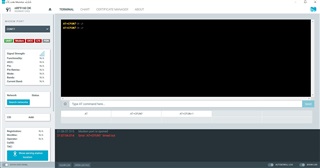
  • The nRF SDK version I am running is v1.7.1.  Before updating the modem and application firmware AT commands were enabled and Modem was green. I send you a screenshot of LTE Link Monitor 

    below is the output of logfile in LTE Link Monitor:

    ------------------------------------------------------

    2021-11-22T18:51:00.534Z INFO Application data folder: C:\Users\Stefania\AppData\Roaming\nrfconnect\pc-nrfconnect-linkmonitor
    2021-11-22T18:51:00.607Z DEBUG App pc-nrfconnect-linkmonitor v2.0.0 official
    2021-11-22T18:51:00.607Z DEBUG App path: C:\Users\Stefania\.nrfconnect-apps\node_modules\pc-nrfconnect-linkmonitor
    2021-11-22T18:51:00.607Z DEBUG nRFConnect 3.9.0, required by the app is (^3.8.0)
    2021-11-22T18:51:00.607Z DEBUG nRFConnect path: C:\Users\Stefania\AppData\Local\Programs\nrfconnect\resources\app.asar
    2021-11-22T18:51:00.607Z DEBUG HomeDir: C:\Users\Stefania
    2021-11-22T18:51:00.607Z DEBUG TmpDir: C:\Users\Stefania\AppData\Local\Temp
    2021-11-22T18:51:03.901Z INFO Modem port is opened
    2021-11-22T19:03:04.046Z INFO Modem port is closed
    2021-11-22T19:03:12.637Z INFO Modem port is opened
    2021-11-22T19:03:21.643Z DEBUG modem >> AT+CFUN?
    2021-11-22T19:03:22.643Z ERROR Error: 'AT+CFUN?
    ' timed out
    2021-11-22T19:06:52.684Z INFO Modem port is closed
    2021-11-22T19:06:57.515Z INFO Modem port is opened
    2021-11-22T19:07:03.004Z DEBUG modem >> AT+CFUN?
    2021-11-22T19:07:04.014Z ERROR Error: 'AT+CFUN?
    ' timed out

    --------------------------------------------------------

    How do i enable AT commands ?

    Thanks in advance ...

  • Hello, 

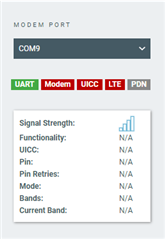
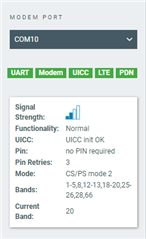
    Thanks for sharing these details. What version of the nRF9160DK are you running? I tested here and noticed that my LTE Link Monitor had the wrong COM port (will investigate internally). Could you please try to change the modem port in LTE Link Monitor:

    Note that the nRF9160DK has three virtual COM ports.

    Kind regards,
    Øyvind

Related