This discussion has been locked.
You can no longer post new replies to this discussion. If you have a question you can start a new discussion

nrf-9160 DK always disconnected

Hi,

 I have added a nrf-9160 DK device to nrf cloud and it is always is shown as disconnected (disconnect reason MQTT_KEEP_ALINE_TIMEOUT ).

Previously i have updated the last modem and applicaction firmware. Moreover when i open the LTE Link Monitor and I enter an AT command I always get the following error:

'AT+CFUN?' timed out

Parents
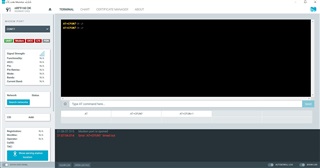
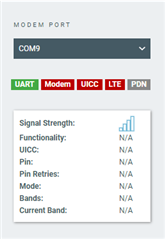
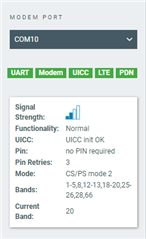
  • The nRF SDK version I am running is v1.7.1.  Before updating the modem and application firmware AT commands were enabled and Modem was green. I send you a screenshot of LTE Link Monitor 

    below is the output of logfile in LTE Link Monitor:

    ------------------------------------------------------

    2021-11-22T18:51:00.534Z INFO Application data folder: C:\Users\Stefania\AppData\Roaming\nrfconnect\pc-nrfconnect-linkmonitor
    2021-11-22T18:51:00.607Z DEBUG App pc-nrfconnect-linkmonitor v2.0.0 official
    2021-11-22T18:51:00.607Z DEBUG App path: C:\Users\Stefania\.nrfconnect-apps\node_modules\pc-nrfconnect-linkmonitor
    2021-11-22T18:51:00.607Z DEBUG nRFConnect 3.9.0, required by the app is (^3.8.0)
    2021-11-22T18:51:00.607Z DEBUG nRFConnect path: C:\Users\Stefania\AppData\Local\Programs\nrfconnect\resources\app.asar
    2021-11-22T18:51:00.607Z DEBUG HomeDir: C:\Users\Stefania
    2021-11-22T18:51:00.607Z DEBUG TmpDir: C:\Users\Stefania\AppData\Local\Temp
    2021-11-22T18:51:03.901Z INFO Modem port is opened
    2021-11-22T19:03:04.046Z INFO Modem port is closed
    2021-11-22T19:03:12.637Z INFO Modem port is opened
    2021-11-22T19:03:21.643Z DEBUG modem >> AT+CFUN?
    2021-11-22T19:03:22.643Z ERROR Error: 'AT+CFUN?
    ' timed out
    2021-11-22T19:06:52.684Z INFO Modem port is closed
    2021-11-22T19:06:57.515Z INFO Modem port is opened
    2021-11-22T19:07:03.004Z DEBUG modem >> AT+CFUN?
    2021-11-22T19:07:04.014Z ERROR Error: 'AT+CFUN?
    ' timed out

    --------------------------------------------------------

    How do i enable AT commands ?

    Thanks in advance ...

Reply
  • The nRF SDK version I am running is v1.7.1.  Before updating the modem and application firmware AT commands were enabled and Modem was green. I send you a screenshot of LTE Link Monitor 

    below is the output of logfile in LTE Link Monitor:

    ------------------------------------------------------

    2021-11-22T18:51:00.534Z INFO Application data folder: C:\Users\Stefania\AppData\Roaming\nrfconnect\pc-nrfconnect-linkmonitor
    2021-11-22T18:51:00.607Z DEBUG App pc-nrfconnect-linkmonitor v2.0.0 official
    2021-11-22T18:51:00.607Z DEBUG App path: C:\Users\Stefania\.nrfconnect-apps\node_modules\pc-nrfconnect-linkmonitor
    2021-11-22T18:51:00.607Z DEBUG nRFConnect 3.9.0, required by the app is (^3.8.0)
    2021-11-22T18:51:00.607Z DEBUG nRFConnect path: C:\Users\Stefania\AppData\Local\Programs\nrfconnect\resources\app.asar
    2021-11-22T18:51:00.607Z DEBUG HomeDir: C:\Users\Stefania
    2021-11-22T18:51:00.607Z DEBUG TmpDir: C:\Users\Stefania\AppData\Local\Temp
    2021-11-22T18:51:03.901Z INFO Modem port is opened
    2021-11-22T19:03:04.046Z INFO Modem port is closed
    2021-11-22T19:03:12.637Z INFO Modem port is opened
    2021-11-22T19:03:21.643Z DEBUG modem >> AT+CFUN?
    2021-11-22T19:03:22.643Z ERROR Error: 'AT+CFUN?
    ' timed out
    2021-11-22T19:06:52.684Z INFO Modem port is closed
    2021-11-22T19:06:57.515Z INFO Modem port is opened
    2021-11-22T19:07:03.004Z DEBUG modem >> AT+CFUN?
    2021-11-22T19:07:04.014Z ERROR Error: 'AT+CFUN?
    ' timed out

    --------------------------------------------------------

    How do i enable AT commands ?

    Thanks in advance ...

Children
Related