No matching trait found

Hi,

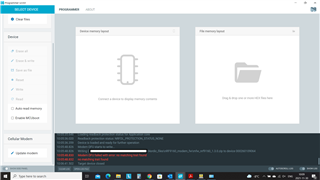
I am using Win10, nRF Connect 3.9.0, programmer 2.0.0. and I get "no matching trait found" when trying to program the 9160 on my board. I have seen a few other questions regarding this and wanted to confirm that the problem exist not only for Thingy91, but also for a custom board.

/Peter
Parents
  • I can confirm this issue. We are using a custom PCB and currently can't update the modems.

    This is my system report:

    # nRFConnect System Report - 2021-12-01T09-57-04.812Z
    
    - System:     Dell Inc. Latitude 5490
    - BIOS:       Dell Inc. DELL   - 1072009
    - CPU:        1 x Intel® Core™ i7-8650U 1.9 GHz 8 cores (4 physical)
    - Memory:     3.9 GB free of 15.9 GB total
    - Filesystem: C: (NTFS) 476.7 GB 73.6% used
    
    - OS:         Microsoft Windows 10 Enterprise (10.0.19043) win32 ia32
    
    - Versions
        - kernel: 10.0.19043
        - git: 2.30.0.windows.2
        - node: 14.16.0
        - python: 3.9.4
        - python3: 
    
    - Connected devices:
        - undefined: 000261014160 
        - COM3: {00000000-0000-0000-FFFF-FFFFFFFFFFFF} 
    
    - Current device:
        - name:          undefined
        - serialNumber:  000261014160
        - cores:         undefined
        - website:       undefined
    

    `nrfjprog --version` returns:

    nrfjprog version: 10.12.1
    JLinkARM.dll version: 6.88a

    Using a J-Link device for programming.

    The issue does not occur when trying to flash the modem fw on my nRF9160DK (Rev. 1.0.0) using the board's debugger.

    Update: Current workaround I found: It works when using the debug out port of the DK to programm our PCBs. So it seems to be an issue related to the nRF Programmer and J-Link adapter.

  • Hello, and thanks for sharing. 

    There are known issues with latest version of the nRF Connect for Desktop 3.9.x and its internal apps, and using an external J-Link device to program, which we are working to solve. 

    Currently, the best solution is to use nrfjprog command line to program your device with latest nRF Command line tools, which now supports modem updates. Or downgrade nRF Connect for Desktop to v3.7.1 with these steps:

    1. Download the latest 3.7 version of nRF Connect for Desktop from https://www.nordicsemi.com/Products/Development-tools/nRF-Connect-for-desktop/Download?lang=en#infotabs (for macOS this is 3.7.2, for Windows and Linux 3.7.1, because 3.7.2 was not needed and not released for these).
    2. After starting nRF Connect for Desktop 3.7 a prompt will come up about the 3.8 upgrade. Click “No” on this.
    3. In the Settings, click on “Add source”, enter the URL http://developer.nordicsemi.com/.pc-tools/nrfconnect-apps/3.7-apps/apps.json and click “Add”.
    4. Back in the list of all apps, all apps should show up twice now, one with “official” below them and one with “3.7 compatible apps” below them. If you want to hide the incompatible versions, click on “Filter” and deselect “Official”.
    5. Install the apps you need in the old versions and use them.

    Kind regards,
    Øyvind

  • Hi again,

    Are there any updates regarding the programmer in later versions of nRFConnect? I am still using rev 3.7.1...

    /Peter

  • Hi Peter, 

    the current version of nRF Connect for Desktop is v3.9.3. What J-Link device are you using?

    -Øyvind

Reply Children
Related