Hi,
I'm using nRF Connect SDK v1.7.0 to develop a firmware for a custom board with a nRF52832 MCU. I'm using VSCode to build and flash my device using the nRF Extension.
I currently have a software issue. I let my custom board run for a long term test. The program is doing well until approximately 2 days. The MCU seems to fall into a infinite loop and do not reset after a these 2 days. The tasks obviously stop running as well. The watchdog do not reset the device but I think this may be a normal behavior since I'm only using a task watchdog (software). Maybe I should add an hardware watchdog to make sure the device reset properly when this error occurs. I will add it to at least reset the device when this bug occurs.
The thing is that I don't know where this bug come from.
I tried to make sure there was no stack overflow using the Thread Analyzer and RTT Viewer to log the data over ~2 days.
I also tried to add this parameter to my prj.conf file : CONFIG_RESET_ON_FATAL_ERROR=y but the device didn't reset and keep looping somewhere. This parameter should reset the MCU when a hard fault occurs. That makes me think it's probably not due to a fatal error such as a stack overflow or others.
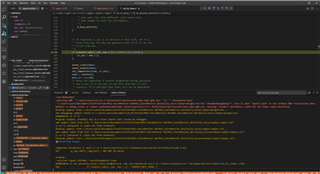
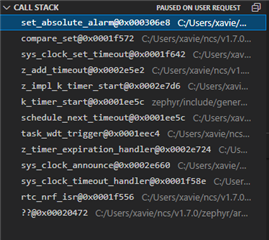
I'm currently trying to find where the MCU get stuck using the debugger.
Do you have any idea if I'm missing a parameter somewhere in my prj.conf or my dts file or even in my code that could cause an error like this? Do you have any good ways to debug this kind of problem?
This is my prj.conf file content:
# Thread analyser |
CONFIG_THREAD_ANALYZER=y |
CONFIG_THREAD_ANALYZER_USE_PRINTK=y |
CONFIG_THREAD_ANALYZER_AUTO=y |
CONFIG_THREAD_ANALYZER_AUTO_INTERVAL=5 |
# System |
CONFIG_REBOOT=y |
CONFIG_RESET_ON_FATAL_ERROR=y |
# Debug |
CONFIG_DEBUG_OPTIMIZATIONS=y |
CONFIG_DEBUG_THREAD_INFO=y |
# RTT Viewer |
CONFIG_USE_SEGGER_RTT=y |
CONFIG_RTT_CONSOLE=y |
CONFIG_UART_CONSOLE=n |
CONFIG_CBPRINTF_FP_SUPPORT=y |
# BLE |
CONFIG_BT=y |
CONFIG_BT_SMP=y |
CONFIG_BT_NUS=y |
CONFIG_BT_PERIPHERAL=y |
# See www.bluetooth.com/.../ for more information about the appearance. |
# Generic Sensor |
CONFIG_BT_DEVICE_APPEARANCE=1344 |
CONFIG_BT_DEVICE_NAME="Valve Monitor" |
CONFIG_BT_MAX_CONN=1 |
CONFIG_BT_MAX_PAIRED=1 |
# 384 - 252 + 512 = 644 |
CONFIG_MCUMGR_BUF_SIZE=644 |
CONFIG_BT_L2CAP_TX_MTU=512 |
CONFIG_BT_BUF_ACL_RX_SIZE=512 |
CONFIG_SYSTEM_WORKQUEUE_STACK_SIZE=2304 |
CONFIG_BT_LL_SOFTDEVICE=y |
# FOTA MCUMGR |
CONFIG_MCUMGR=y |
CONFIG_MCUMGR_CMD_OS_MGMT=y |
CONFIG_MCUMGR_CMD_IMG_MGMT=y |
CONFIG_MCUMGR_SMP_BT=y |
CONFIG_MCUMGR_SMP_BT_AUTHEN=n |
# MCUBoot |
CONFIG_BOOTLOADER_MCUBOOT=y |
# SAADC |
CONFIG_ADC=y |
CONFIG_ADC_ASYNC=y |
# GPIO |
CONFIG_GPIO=y |
# WDT |
CONFIG_WATCHDOG=y |
# Task watchdog |
CONFIG_TASK_WDT=y |
CONFIG_TASK_WDT_CHANNELS=3
I also added a .zip with my code and my custom board definition.
Thanks!
Alexandre