This discussion has been locked.
You can no longer post new replies to this discussion. If you have a question you can start a new discussion

Custom nRF52832 board - Buttonless DFU either stuck on DFUTarg or "No bootloader was found" error

Hello,

I'm currently having some issues where my custom board is either experiencing infinite DFUTarg cycle or "no bootloader was found" error.

I have been following the tutorial from https://github.com/gamnes/nRF52832-buttonless-dfu-development-tutorial and it works fine on my nRF52DK. 

However when I attempted to do the same approach on my custom board, it's either stuck on infinite DFUTarg during step 2; or "no bootloader was found" error when I download the app + sd + bootloader. I'm using SDK v17.1.0 and my custom board also has the optional 32KHz XTAL. I only have this issue with buttonless DFU, because I attempted ble_app_uart + bootloader and it works just fine. 

Can anyone please enlighten me on this issue? 

Thank you.

Eddy.

Parents
  • Hello Eddy,

    What DFU controller do you use, nRF connect on Android or iOS? Also, are you able to attach a debugger to the custom board and debug the application when you initiate DFU to see if it maybe crashes before entering the bootloader?

    Best regards,

    Vidar

  • I'm using Android version of NRF Connect to scan my board. When I tried to debug my custom board through SES, I got error on

    err_code = ble_dfu_buttonless_async_svci_init();
    APP_ERROR_CHECK(err_code);

    I made sure that Bootloader has been downloaded together with SD and app.hex before debugging, but I still get "No bootloader was found" error. so, my app crash before doing anything. But, if I disable that part and peer_manager_init, it'll work just fine.

    Edit:

    I tried to debug from bootloader by using secure_bootloader_ble_132_debug.hex, and it stated that there's no valid app to boot. 

    <info> app: Inside main
    <debug> app: In nrf_bootloader_init
    <debug> nrf_dfu_settings: Calling nrf_dfu_settings_init()...
    <debug> nrf_dfu_flash: Initializing nrf_fstorage_nvmc backend.
    <debug> nrf_dfu_settings: Using settings page.
    <debug> nrf_dfu_settings: Copying forbidden parts from backup page.
    <debug> nrf_dfu_settings: Destination settings are identical to source, write not needed. Skipping.
    <info> nrf_dfu_settings: Backing up settings page to address 0x7E000.
    <debug> nrf_dfu_settings: Destination settings are identical to source, write not needed. Skipping.
    <debug> app: Enter nrf_bootloader_fw_activate
    <info> app: No firmware to activate.
    <info> app: Boot validation failed. No valid app to boot.
    <debug> app: DFU mode because app is not valid.
    <info> nrf_bootloader_wdt: WDT is not enabled
    <debug> app: in weak nrf_dfu_init_user
    <debug> app: timer_stop (0x20005984)
    <debug> app: timer_activate (0x20005984)
    <info> app: Entering DFU mode.
    <debug> app: Initializing transports (found: 1)
    <debug> nrf_dfu_ble: Initializing BLE DFU transport
    <debug> nrf_dfu_ble: Setting up vector table: 0x00071000
    <debug> nrf_dfu_ble: Enabling SoftDevice.
    <debug> nrf_dfu_ble: Configuring BLE stack.
    <debug> nrf_dfu_ble: Enabling the BLE stack.
    <debug> nrf_dfu_ble: No advertising name found
    <debug> nrf_dfu_ble: Using default advertising name
    <debug> nrf_dfu_ble: Advertising...
    <debug> nrf_dfu_ble: BLE DFU transport initialized.
    <debug> nrf_dfu_flash: Initializing nrf_fstorage_sd backend.
    <debug> app: Enter main loop


    I'm really confused because through nRF Connect programmer, I can see that my application is already downloaded.

    There are only 2 results so far whenever I try to download the firmware.

    1. It'll stuck on DFUTarg if I download the firmware through programmer

    2. If I connect through target ->erase all-> then download it through nrfjprog, won't advertise at all.

    3. using other apps like ble_app_uart or ble_app_hts work just fine on my custom board.

Reply
  • I'm using Android version of NRF Connect to scan my board. When I tried to debug my custom board through SES, I got error on

    err_code = ble_dfu_buttonless_async_svci_init();
    APP_ERROR_CHECK(err_code);

    I made sure that Bootloader has been downloaded together with SD and app.hex before debugging, but I still get "No bootloader was found" error. so, my app crash before doing anything. But, if I disable that part and peer_manager_init, it'll work just fine.

    Edit:

    I tried to debug from bootloader by using secure_bootloader_ble_132_debug.hex, and it stated that there's no valid app to boot. 

    <info> app: Inside main
    <debug> app: In nrf_bootloader_init
    <debug> nrf_dfu_settings: Calling nrf_dfu_settings_init()...
    <debug> nrf_dfu_flash: Initializing nrf_fstorage_nvmc backend.
    <debug> nrf_dfu_settings: Using settings page.
    <debug> nrf_dfu_settings: Copying forbidden parts from backup page.
    <debug> nrf_dfu_settings: Destination settings are identical to source, write not needed. Skipping.
    <info> nrf_dfu_settings: Backing up settings page to address 0x7E000.
    <debug> nrf_dfu_settings: Destination settings are identical to source, write not needed. Skipping.
    <debug> app: Enter nrf_bootloader_fw_activate
    <info> app: No firmware to activate.
    <info> app: Boot validation failed. No valid app to boot.
    <debug> app: DFU mode because app is not valid.
    <info> nrf_bootloader_wdt: WDT is not enabled
    <debug> app: in weak nrf_dfu_init_user
    <debug> app: timer_stop (0x20005984)
    <debug> app: timer_activate (0x20005984)
    <info> app: Entering DFU mode.
    <debug> app: Initializing transports (found: 1)
    <debug> nrf_dfu_ble: Initializing BLE DFU transport
    <debug> nrf_dfu_ble: Setting up vector table: 0x00071000
    <debug> nrf_dfu_ble: Enabling SoftDevice.
    <debug> nrf_dfu_ble: Configuring BLE stack.
    <debug> nrf_dfu_ble: Enabling the BLE stack.
    <debug> nrf_dfu_ble: No advertising name found
    <debug> nrf_dfu_ble: Using default advertising name
    <debug> nrf_dfu_ble: Advertising...
    <debug> nrf_dfu_ble: BLE DFU transport initialized.
    <debug> nrf_dfu_flash: Initializing nrf_fstorage_sd backend.
    <debug> app: Enter main loop


    I'm really confused because through nRF Connect programmer, I can see that my application is already downloaded.

    There are only 2 results so far whenever I try to download the firmware.

    1. It'll stuck on DFUTarg if I download the firmware through programmer

    2. If I connect through target ->erase all-> then download it through nrfjprog, won't advertise at all.

    3. using other apps like ble_app_uart or ble_app_hts work just fine on my custom board.

Children
  • The "No bootloader was found" error indicates that the bootloader start address is not stored in the UICR register at address 0x10001014. This register gets set when you program bootloader. Maybe it gets erased when you program the application?

    You can use nrfjprog to check the register value:

    > nrfjprog --memrd 0x10001014

    And also to program the hex files:

    > nrfjprog --program <Softdevice> --chiperase

    > nrfjprog --program <bootloader>

    > nrfjprog --program <bootloader settings>

    > nrfjprog --program <app>

    > nrfjprog --reset

  • Hello,

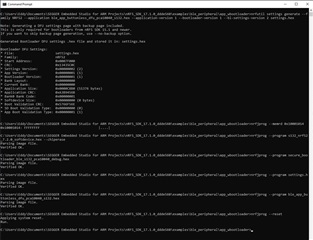
    I've attempted to execute nrfjprog commands you wrote above, and here's the result:

    Basically my custom board stuck at keep advertising DFUTarg and can't enter the buttonless_dfu app. Attempting to perform any DFU updates after connecting it to my Android-nRF Connect did nothing to my board. I got the same debug info when I did debugging through SES (No firmware to activate). 

  • Hello,

    eddyhaha89 said:
    I got the same debug info when I did debugging through SES (No firmware to activate). 

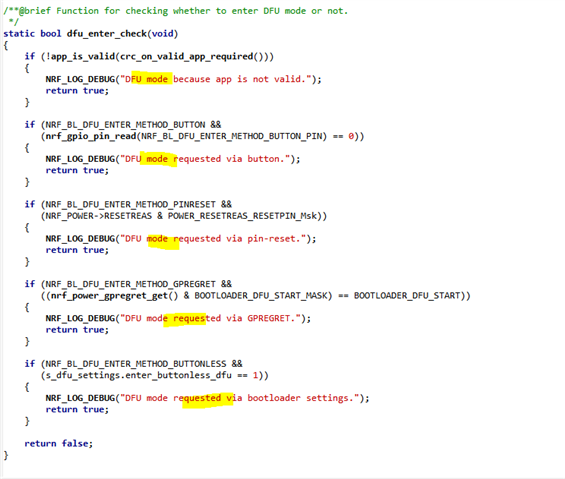
    The "No firmware to activate." message is expected when when you program everything with nrfjprog. The question is why it falls back to DFU again. Are you seeing any of these messages in your log output:

    ?

  • it was "DFU mode requested via button", which doesn't make sense considering I downloaded buttonless_dfu app.

    <info> app: Inside main
    <debug> app: In nrf_bootloader_init
    <debug> nrf_dfu_settings: Calling nrf_dfu_settings_init()...
    <debug> nrf_dfu_flash: Initializing nrf_fstorage_nvmc backend.
    <debug> nrf_dfu_settings: Using settings page.
    <debug> nrf_dfu_settings: Copying forbidden parts from backup page.
    <debug> nrf_dfu_settings: Destination settings are identical to source, write not needed. Skipping.
    <info> nrf_dfu_settings: Backing up settings page to address 0x7E000.
    <debug> nrf_dfu_settings: Destination settings are identical to source, write not needed. Skipping.
    <debug> app: Enter nrf_bootloader_fw_activate
    <info> app: No firmware to activate.
    <debug> app: App is valid
    <debug> app: DFU mode requested via button.
    <info> nrf_bootloader_wdt: WDT is not enabled
    <debug> app: in weak nrf_dfu_init_user
    <debug> app: timer_stop (0x20005984)
    <debug> app: timer_activate (0x20005984)
    <info> app: Entering DFU mode.
    <debug> app: Initializing transports (found: 1)
    <debug> nrf_dfu_ble: Initializing BLE DFU transport
    <debug> nrf_dfu_ble: Setting up vector table: 0x00071000
    <debug> nrf_dfu_ble: Enabling SoftDevice.
    <debug> nrf_dfu_ble: Configuring BLE stack.
    <debug> nrf_dfu_ble: Enabling the BLE stack.
    <debug> nrf_dfu_ble: No advertising name found
    <debug> nrf_dfu_ble: Using default advertising name
    <debug> nrf_dfu_ble: Advertising...
    <debug> nrf_dfu_ble: BLE DFU transport initialized.
    <debug> nrf_dfu_flash: Initializing nrf_fstorage_sd backend.
    <debug> app: Enter main loop
    

    EDIT:

    I realized the part I missed. removing (nrf_gpio_pin_read(NRF_BL_DFU_ENTER_METHOD_BUTTON_PIN) part in bootloader solved my issue. I've been looking around on buttonless_dfu, that I didn't pay attention to bootloader.

    Thanks for pointing out.

Related