This discussion has been locked.
You can no longer post new replies to this discussion. If you have a question you can start a new discussion

BLE automatic connection to other BLE device

Hello

I'm using multiple nRF52840-dk (SDK17.1.0, Windows, Segger, S140).  

I'm trying to make BLE device(nRF52840-dk) that automatically connects to specific BLE device(nRF52840-dk) whenever it turns on without connecting to other devices.

Is there any great example/tutorial for this case?

After some search, in ble_app_hrs example I discovered that peer_manager_init() provides pairing and bonding, but I don't know how to utilize it. Can you tell me how to use it?

PS, Does pairing/bonding save anything else beside encryption key? Where/ which variable is the key saved at?

PSS I did found filter, but the central device will connect to any other peripheral

Parents
  • Hello,

    This is a bit up to your application. As you mentioned, the filters that are used can be used to search for particular devices. Either a specific UUID, an advertising name, or a BLE address.

    On the other side you have bonding (pairing = encryption, bonding = storing pairing data for later use). When you bond, you store bonding data for a particular device, so even if a similar device is nearby, it will only connect to the already bonded device. 

    I suggest that you look into the ble_app_hrs and ble_app_hrs_c examples if you are interrested in bonding. The data is stored by the peer manager in something called FDS (flash Data Storage), but it is not straight forward to see how it is done. The basic information that is stored is the address of the bonded device, and the keys that are used for encryption. This goes both ways, so if only one of the devices have the correct key, they will not be able to connect (security measure). The easiest way to bond two devices is to let them connect and bond like it is done in the ble_app_hrs_c example. Then they will look for one another the next time they are turned on.

    On the other hand, if you don't need the security of bonding, you can try to add a filter on the BLE address (this is unique on all devices), and only connect if the advertisement comes from the address that you are looking for.You can do this either by adding the address to a whitelist, like the hrs examples does, or by manually checking the advertising packet and connect if you see that it is coming from the correct device. You can add the BLE_GAP_EVT_ADV_REPORT event to the ble_evt_handler() in main.c to experiment and see what the advertisement looks like. It will trigger whenever you are scanning an advertisement packet.

    Best regards,

    Edvin

  • Thank you so much for the reply.

    Sorry for the change, I had to switch peripheral device into nRF52833-DK but I couldn't find ble_app_hrs example for the device. 

    Are there other example recommendation for  bonding and pairing with nRF52840-DK central and nRF52833-DK peripheral?

    Thank you in advance.

    PS I tried copy pasting ble_app_hrs example from nRF52840 S140 to other nRF52833 example. I could build it but couldn't run it (got hard fault error). hids keyboard and mouse seems great but I couldn't find good central example to connect it.

  • Sorry, it doesn't look like we have any other samples that does bonding as a central, and it doesn't look like we have that sample for the nRF52833. It should be possible to port it yourself. Just copy the project folder pca10056, name it pca10100, and look at the settings in the project. You would typically want to change everything that says 52840 to 52833, and adjust the memory areas. 

    I don't have time for that right now, because of low staffing due to the Christmas holidays, and I am leaving for holidays myself tomorrow. 

    Either try this approach, or you can start with an example that you imagine you would want to use in your final application, and implement the peer manager to that example, and perform the bonding like it is done in the ble_app_hrs_c example. 

    PS: We are very short staffed for the Christmas Holidays. I will go on vacation tomorrow, and I will be back in January.

    Best regards,

    Edvin

  • Any tutorial for porting? Based on your answer, SW or application shouldn't be a issue.

    I tried modifying RAM and FLASH in SECTION PLACEMENT MACROS and change nRF52840 and pca10056 into nRF52833 and pca10100 in solution editor (</>). Building seems ok but running part is kinda stuck at "unknown fuction at 0x00000A60".

    Are there other things I should modify?

    Happy Holiday.

  • Hello.

    If it is stuck in 0x0A60, it is stuck in the hardfault handler. Probably related to some memory mapping or wrong device config. 

    I suggest that you start with a pca10100 project, and then add the peer manager like it is done in the ble_app_hrs_c example.

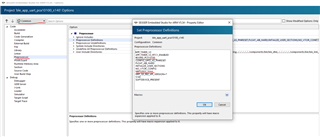
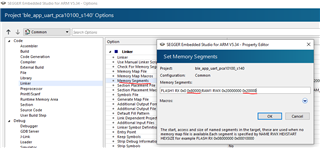
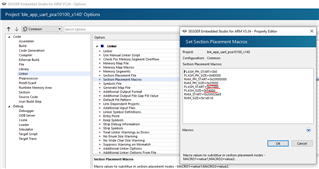
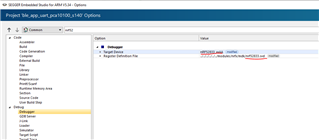
    If you really need to port the pca10056 to the pca10100, then open another pca10100 project, and make sure that the settings that you change look similar:

    I think those should cover it.

    Best regards,

    Edvin

Reply
  • Hello.

    If it is stuck in 0x0A60, it is stuck in the hardfault handler. Probably related to some memory mapping or wrong device config. 

    I suggest that you start with a pca10100 project, and then add the peer manager like it is done in the ble_app_hrs_c example.

    If you really need to port the pca10056 to the pca10100, then open another pca10100 project, and make sure that the settings that you change look similar:

    I think those should cover it.

    Best regards,

    Edvin

Children
No Data
Related