This discussion has been locked.
You can no longer post new replies to this discussion. If you have a question you can start a new discussion

Custom Board Issues with zypher project in SES

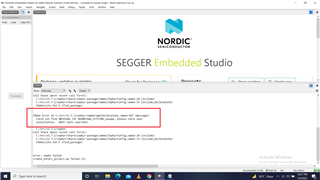
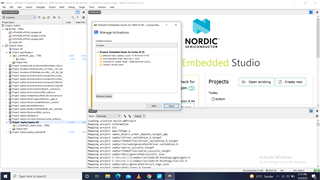
I copied the button project from samples in other drive. Copied the ../boards/arm/nRF534DK_nRF5340 in the new project folder. Then, I changed the names of board in all file as explined in video https://www.youtube.com/watch?v=KSivO9Cf1TE. When, try to create project usinf nRF Connect, error: can not create project .... the error shows incomplete comfiguration. The whole project in attachement.   I am using the free version of SES. The liscence configuration in shown in atached image.    5050.bms.rarbms1.rar  I tried other way also. I copied the ../boards/arm/ nRF5340DK_nRF5340 to location of new project. modified the CMkaelsits file and tried to create project usnf nRF Connect SDK. Same error appears. This project also in attched file bms1.
Parents
  • I tried to create a custom board from the nRF5340 DK in NCS v1.8.0

    I used the case sensitive find and replace functionality in vs code to do the following:

    • Replace all instances of "NRF5340DK" with "CUSTOM"
    • Replace all instances of "nrf5340dk" with "custom"
    • Replace all instances of "nRF5340 DK" with "Custom"

    Then I modifed all the file names by replacing "nrf5340dk" with custom.

    Evenutally I tested the sample ncs/zephyr/samples/hello_world (NCS v1.8.0) and it worked like expected:

    *** Booting Zephyr OS build v2.7.0-ncs1-1-g0dce71e2a469  ***
    Hello World! custom_nrf5340_cpuapp

    Here is the generated board folder. Can you test it on your side with NCS v1.8.0 and see if it works?

    6521.custom_nrf5340.zip

    Best regards,

    Simon

  • Dear Simon, I followed the procedure suggested by you to change board name. The custom name of my project is bms. When, project is created nRF Connect SDK , I selected my custom project and manually added the board from same directory. The bms project folder is in attachement. I am using nRF V1.71. The error as shown in attached is shown an project is not created.

    6406.bms.rar  

  • I did the following:

    • Updated NCS to v1.7.1
    • Copied the board folder bms_nrf5340 into /ncs/zephyr/boards/arm
    • Copied the bms sample into /ncs/zephyr/samples
    • Built the bms sample with the bms board:
      •  west build -b bms_nrf5340_cpuapp -d build_test

    It worked fine:

    simon@simon-HP-Pavilion-Laptop-14-bf1xx:~/ncs/zephyr/samples/bms$ west build -b bms_nrf5340_cpuapp -d build_1234
    -- west build: generating a build system
    Including boilerplate (Zephyr base): /home/simon/ncs/zephyr/cmake/app/boilerplate.cmake
    CMake Deprecation Warning at /home/simon/ncs/zephyr/cmake/app/boilerplate.cmake:37 (cmake_policy):
    .
    .
    .
    .
    -- Build files have been written to: /home/simon/ncs/zephyr/samples/bms/build_1234
    -- west build: building application
    [1/150] Preparing syscall dependency handling
    
    [143/150] Linking C executable zephyr/zephyr_prebuilt.elf
    
    [150/150] Linking C executable zephyr/zephyr.elf
    Memory region         Used Size  Region Size  %age Used
               FLASH:       21052 B         1 MB      2.01%
                SRAM:        6208 B       448 KB      1.35%
            IDT_LIST:          0 GB         2 KB      0.00%

    I'm using Linux and have not SES installed, but I don't see why the approach above shouldn't work on SES as well.

    Try the approach above. Delete the build folder before building again and make sure to place the board folder inside /ncs/zephyr/boards/arm

    If it still doesn't work for you I will install SES and try to get it working there.

    By the way, if you want to place the board inside the project, check out the sample /ncs/zephyr/samples/application_development/out_of_tree_board to see how to go about it.

    Best regards,

    Simon

  • Dear Simon, I also copied the my custom board to nrc/........ The CMake and Buil Solution now run successfully. But, is it mondatory to keep custom board in default directory of nrc ? If, a custom path of board is to be provided, how can that be done ? please, test at your end and then guide me .

    Thanks

Reply
  • Dear Simon, I also copied the my custom board to nrc/........ The CMake and Buil Solution now run successfully. But, is it mondatory to keep custom board in default directory of nrc ? If, a custom path of board is to be provided, how can that be done ? please, test at your end and then guide me .

    Thanks

Children
Related