Trying to receive only one packet per connection interval for every connection on a multi-link environment on SDK 1.7.0

Hi,

The project is a multi-link environment of nrf52840, The 7 peripherals has the task of send data constantly of a sensors. All is working on coded_s8.

The objective is keep the higher data rate of msgs received by central, but to guarantee the uniformity between every peripheral. For that i have done a deep investigation on how the central schedule the connections, and what is the best strategy to receive the data.

The ATT_MTU is set to minimum 23 bytes because of coded_s8.
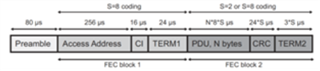
Time on air of a packet= 80+256+16+24+(23*8*8)+(24*8)+(3*8)=2'064ms

So if I disable Connection Event Length extension with:

static int EvtLen(void)
{       
        int err;
	struct net_buf *buf;
	sdc_hci_cmd_vs_conn_event_extend_t *evt_enable;

	buf = bt_hci_cmd_create(SDC_HCI_OPCODE_CMD_VS_CONN_EVENT_EXTEND,
				sizeof(*evt_enable));
	if (!buf) {
		printk("Could not allocate LLPM command buffer\n");
		return -ENOMEM;
	}
        evt_enable = net_buf_add(buf, sizeof(*evt_enable));
	evt_enable->enable = 0;

	err = bt_hci_cmd_send_sync(SDC_HCI_OPCODE_CMD_VS_CONN_EVENT_EXTEND, buf, NULL);
	if (err) {
		printk("Error enabling EVENT %d\n", err);
		return err;
	}

	printk("EVENT mode enabled\n");
	return 0;
}

And fix the maximum T event length on Kconfig with:

CONFIG_SDC_MAX_CONN_EVENT_LEN_DEFAULT=2500
Theorically making this configuration i guarantee that on a connection interval of 2500ms*7devices=17500ms/1.25=14 units i have enought time to attend the 7 devices and receive 1 packet of every one (Maybe could be packet drop but no may be systematic). Unfortunately I am not able to achieve this. Most of the times one or 2 devices keep sending half data comparing with the rest. I tried to modify a little the conn_interval without success.
If you could suggest me something more to try I will appreciate it, all code shared is done on Central
Thank you and regards.
Parents
  • I have another related question of schedule of central:

    Imagine the next context, only one peripheral with a maximum forced Tevent=2.5ms, Extended connection Event disabled, and a Conn_interval=1000ms.

    Independently of how much messages queued on tx of peripheral, theorically the Central only is going to receive 1 message every second, isn't it? Because on all Conn_interval of 1000ms the Central attend to peripheral once while the 2.5ms of Tevent.

    Thank you, regards.

  • Hi,

    If you could suggest me something more to try I will appreciate it

    Yes, if you could try to increase CONFIG_SDC_MAX_CONN_EVENT_LEN_DEFAULT closer to 3600 us. Looking at a sniffer trace a captured  a while back, the transmission time plus T_IFS for a 27 byte s8 encoded packet is actually 2600 us. You also need  time to time receive the acknowledgment packet from the central.

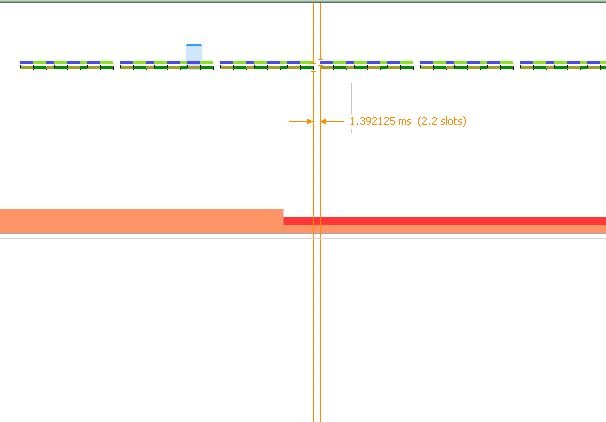
    Also, when determining what connection interval to use, note that there is a ~1.4 ms delay between scheduling of connection events that need to be accounted for:

    sotillo2409 said:
    Independently of how much messages queued on tx of peripheral, theorically the Central only is going to receive 1 message every second, isn't it? Because on all Conn_interval of 1000ms the Central attend to peripheral once while the 2.5ms of Tevent.

    Yes, that is correct.

    Best regards,

    Vidar

  • I have follow the tutorial of nRF Sniffer step by step with a nrf52840 dongle and i am able to sniff o Wireshark, but is impossible to me find the configuration or filter to make it on coded_s8.

    Knowing that is possible I willl re-investigate and probably update the version, Thanks for the information.

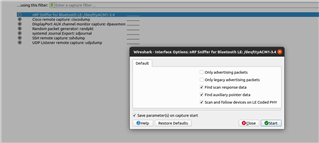
  • You can enable code phy support before starting the sniffer capture by clicking the options button for the nRF interface:

  • Ok i am able to see al advertising packets of devices, but i can't achieve follow a connection.

    On Device list isn't appear my devices, and if i want to add a LE device I enter the address on Key and Value. But the sniffers doen't show packets on conection.

    How I follow a device packets on connection?

  • Sometimes you have to restart the capture to make the device appear in the dropdown menu. Did you try that already?

    You can restart the capture by clicking the green button in the top left corner.

  • restart the capture

    That solve my problem completely, I am able to follow the packets on a Connection.

    Could you resolve a final doubt of my data sniff??

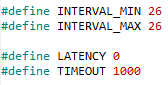
    I configure Conn_interval=32.5ms

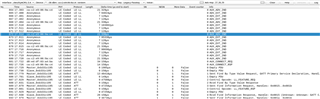
    So as I understand is, every 32.5ms aprox Master is going to send a packet to Slave(Empty PDU), if the slave have data to send then send data(L2CAP Fragment Start), the next Empty PDU of the Master the Slave send an ATT command saying something more. Could you explain-me a little bit what is the order and sense of every packet? And if you could suggest me some link to a more deep information.

    So central side isn't going to receive a message(23 bytes) in one conn_interval, otherwise is going to receive data once every 4 conn_interval. Is this normal??

    On another way as you can see on the sniff Master is sending the Empty PDU every 2*Conn_interval=65ms, is this correct??

    Sorry for make you spend more time with me, but if I achieve understand this I think that no more questions i would do on the future. 

    I am so gratefull, regards.

Reply
  • restart the capture

    That solve my problem completely, I am able to follow the packets on a Connection.

    Could you resolve a final doubt of my data sniff??

    I configure Conn_interval=32.5ms

    So as I understand is, every 32.5ms aprox Master is going to send a packet to Slave(Empty PDU), if the slave have data to send then send data(L2CAP Fragment Start), the next Empty PDU of the Master the Slave send an ATT command saying something more. Could you explain-me a little bit what is the order and sense of every packet? And if you could suggest me some link to a more deep information.

    So central side isn't going to receive a message(23 bytes) in one conn_interval, otherwise is going to receive data once every 4 conn_interval. Is this normal??

    On another way as you can see on the sniff Master is sending the Empty PDU every 2*Conn_interval=65ms, is this correct??

    Sorry for make you spend more time with me, but if I achieve understand this I think that no more questions i would do on the future. 

    I am so gratefull, regards.

Children
  • Yes, the master seems to be skipping every other connection event in your case. It's not normal, but not unusual either. It can happen in multilink scenarios where the master is forced to drop connection events to maintain other active links. Do you see the same if you increase the connection interval a bit more?

    The master must sent a packet to start the connection, which will be an empty one if it has no data to send.

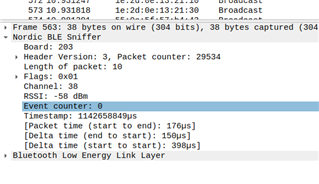
    It also looks like CONFIG_SDC_MAX_CONN_EVENT_LEN_DEFAULT is still too short for the master to have time to acknowledge (i.e. reply with an empty packet) your notification packets within the same connection event (you can see the connection event counter to the left of the "info" tab in Wireshark.

    You can read more about how the scheduling works in the Softdevice controller documentation here: https://developer.nordicsemi.com/nRF_Connect_SDK/doc/1.8.0/nrfxlib/softdevice_controller/doc/scheduling.html#controller-timing-activities-and-priorities

    Don't hesitate to ask if you have further questions or if any of the above is unclear.

  • Hi,

    Only for comment my final configuration.

    I need a CONFIG_SDC_MAX_CONN_EVENT_LEN_DEFAULT=8000 for achieve that on one connection event receive one msg:

    If I lower Tevent 500 less i find that only 2 events of the last 4 happen on a connection event.

    So with this Conn event and following:

    Conn_interval=(CONFIG_SDC_MAX_CONN_EVENT_LEN_DEFAULT+1.4)*Nºdevices

    I achieve the maximum throughput, near to 18kbps received by central. This value still constant independently of NºDevices.


    Apart from this I want to ask you for an hipotetic situation. Probably I need to combine two centrals to have more than 20 peripherals connected. There are many way to avoid noise between both centrals? As i know on One central with multiple peripherals there aren't noise problems due to Central coordinate the data transfer. But if I add another one this isn't going to happen and probably throughput go lower. There are some technique to don't disturb one with other? I hear about changing chanels of data transfer, this could solve my problem?? If I put one central working on the first half of channels availables and the second one on the final chanels for example. On advertisment  this don't have solution I guess.

    Thank you for the help,

    regards.

  • Hi,

    Thanks for sharing your findings. I didn't expect the connection event length to have to be that long.

    sotillo2409 said:
    Probably I need to combine two centrals to have more than 20 peripherals connected. There are many way to avoid noise between both centrals? As i know on One central with multiple peripherals there aren't noise problems due to Central coordinate the data transfer. But if I add another one this isn't going to happen and probably throughput go lower. There are some technique to don't disturb one with other? I hear about changing chanels of data transfer, this could solve my problem?? If I put one central working on the first half of channels availables and the second one on the final chanels for example. On advertisment  this don't have solution I guess.

    I'm not sure how much degradation of throughput you can expect in this scenario, if any. It's obviously best if you are able to actually test it. Other external noise sources (wifi,etc) and range may be a bigger factor.

    BLE has 37 different data channels that are used for channel hopping to mitigate interference problems, and you normally don't have update the channel map yourself.

    Note that the channel number is displayed for each packet in the sniffer trace:

  • Hi, 

    BLE has 37 different data channels that are used for channel hopping to mitigate interference problems, and you normally don't have update the channel map yourself.

    Ok so firstly i would try without update channel map and late within. I would try and share with you the results.

    Other external noise sources (wifi,etc) and range may be a bigger factor.

    That is a good new to me so Slight smile, i thought that have 2 Centrals would be a noiser environment.

    thank you, 

    regards

  • Sorry,

    there are some way to sniff the central side? I only am able to follow the connections on the side of every peripheral.

    Thanks, regards.

Related