This discussion has been locked.
You can no longer post new replies to this discussion. If you have a question you can start a new discussion

nRF52-DK as CENTRAL to discover services on peripheral

Hello Nordic team!

I'm working on a BLE app with the nRF52-DK and an armband(M6) that has a heart rate sensor. My goal is to discover this service and read those values from the nRF52 as a central.

So far I'm able to connect to the armband, and using the ble_app_hrs_c example, I'm able to read the battery service, but not the heart rate service.
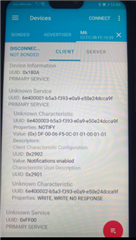
I understand that the armband is advertising the heart rate service in a custom fashion and that I must use the Discovery Service module. 

I'm a beginner on BLE, so it's being hard to develop the code to find the custom service. I have checked several examples and documentation about the nRF SDK 17, but I haven't been able to understand how to develop the code for the Discovery Service module, nor I have found a clear example of this.

I would appreciate it if someone can guide me on this, thanks in advance :) 

Parents
  • Hi Juan, 

    Do you have any trouble testing the ble_app_hrs and the ble_app_hrs_c ? 
    The ble_app_hrs_c is expected to read the ble_app_hrs' heart rate value out of the box. 

    We already provided the service discovery module (ble_db_discovery) so you don't have to do that in the code. Please follow what we did in the example. You can have a look at the ble_app_uart_c. It's an example of how you can do service discovery for proprietary service. Notice how ble_db_discovery_evt_register() is called inside ble_nus_c.c and how discovery is started  BLE_GAP_EVT_CONNECTED event in main.c (call ble_db_discovery_start() )

  • Hello Hung, thanks a lot!

    The error was that the ble_app_uart_c example doesn't have NRF_BLE_SCAN_NAME_CNT and NRF_BLE_SCAN_ADDRESS_CNT as 1 on the sdk_config.h, so, when nrf_ble_scan_filter_set() was called, it never found those definitions. 

    I changed the definitions to 1, and the application is able to find my service and my characteristics, thanks a lot :)

    Now I'm trying to print the data for that characteristic. I'm using the struct p_evt in static void db_disc_handler(ble_db_discovery_evt_t * p_evt) to print all the info about the discovery, but I'm not able to find the data value inside it.

    I really appreciate it if you can guide me on that part. Since the nus, hrs, and bas have their own event handler and different switches for their events, I'm not sure how to implement one for mine, like for example, the event handler to read the data.

    Thanks in advance and have a great day :) 

    Edit: Checking the nRF connect app I realized that the custom service I was trying to discover was not the heart rate service, but a blood pressure service. And, it doesn't advertise both up and down values like 120/90, but only the 90 value(in the smart band display both values are printed).

    As far as I know, BLE doesn't mandate to advertise all services, so, maybe it is possible that the M6 Smart Band I'm using doesn't advertise the heart rate service? and maybe that's the reason why ble_app_hrs_c doesn't find it? 

    If that's so, it is possible to discover ALL the services in the peripheral? even if they are not shown in the nRF connect app? 

    Thanks again 

  • Hi Juan, 

    I would suggest you to get very familiar with the ble_app_uart and the ble_app_uart_c to understand how the system work first before you start to test with the armband and develop your own central device. 
    You need to understand the difference between the UUID included in the advertising packet and the UUID in the attribute table. 
    What included in the advertising packet doesn't need to reflect everything in the attribute table. It's just a way to tell the central device some information about the peripheral. A heart rate sensor can advertise with just the name and no UUID, it's fine. 

    You also need to get familiar with how to define the UUID base and how the 2 bytes 13 and 14 of the service UUID and characteristic UUID is fit in the base. Please pay attention to the endianess. 

    What I would suggest you to do is to start from ble_app_uart, ble_app_uart_c , verify that it works. After that you modify them to use the same UUID as the armband using. Try to mimic that UUID and verify that the central can discover the peripheral. After that you can start to test with the armband. 

Reply
  • Hi Juan, 

    I would suggest you to get very familiar with the ble_app_uart and the ble_app_uart_c to understand how the system work first before you start to test with the armband and develop your own central device. 
    You need to understand the difference between the UUID included in the advertising packet and the UUID in the attribute table. 
    What included in the advertising packet doesn't need to reflect everything in the attribute table. It's just a way to tell the central device some information about the peripheral. A heart rate sensor can advertise with just the name and no UUID, it's fine. 

    You also need to get familiar with how to define the UUID base and how the 2 bytes 13 and 14 of the service UUID and characteristic UUID is fit in the base. Please pay attention to the endianess. 

    What I would suggest you to do is to start from ble_app_uart, ble_app_uart_c , verify that it works. After that you modify them to use the same UUID as the armband using. Try to mimic that UUID and verify that the central can discover the peripheral. After that you can start to test with the armband. 

Children
No Data
Related