Nordic Board is stuck in reset

On a MCU PCA10040 v2.0.0, I ran the command:

.\nrfjprog.exe -f NRF52 --program .\final_image.hex --verify --reset

Which subsequently caused the board to go into a reset state where the LEDs are constantly flashing.

How can I recover from this please?

z

Parents
  • Hello Zahid,

    Could you tell me a bit about final_image.hex? My first thought is that there is something wrong with it.

    Best regards,

    Elfving

  • I looked at the problem a little further and observed the following:  Using the latest SEGGER (v7.60g) and nrfjprog(10.15.1 external), I am unable to program the v2.0.0 Nordic Boards. These were put into the 'reset' state using the command discussed above.
    When I remove the SEGGER probe and external supply, and then plug in a USB cable, the green light (next to the MCU) is on and the four LEDs are very faintly on but I am still unable to program the board with the SEGGER and nrfjprog.
    If I use v2.1.0 Nordic boards, I have no problems and can program them via the USB cable using nrfjprog.
    So the problem is that it may not be the hex file but I need some help to program the older v2.0.0 boards?
  • Hello again,

    Could you try to reflash the firmware in bootloader mode?

    In order to do this, first download the interface MCU firmware from here. Then enter bootloader mode on your nRF52DK by keeping the reset button pressed while powering up the DK until LED (LD5) starts to blink. Then you should see a drive in windows explorer named BOOTLOADER. Drag and drop the bin file you've downloaded into the bootloader.

    Regards,

    Elfving

  • Hi Elfving,

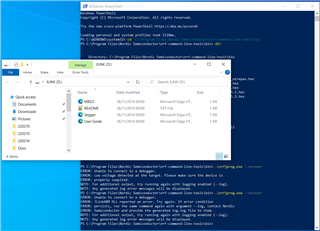
    I placed the board into bootloader mode and saw LD5 started a slow blink. I then dragged 'j-link-ob-sam3u128-v2-nordicsemi-170724.bin' into the BOOTLOADER drive.

    LD5 started to blink faster after the file had finished transferring.

    I then power cycled the board and tried to run the '--recover' command and still saw the same error :(

    PS C:\Program Files\Nordic Semiconductor\nrf-command-line-tools\bin> .\nrfjprog.exe --recover
    ERROR: Unable to connect to a debugger.
    ERROR: JLinkARM DLL reported an error. Try again. If error condition
    ERROR: persists, run the same command again with argument --log, contact Nordic
    ERROR: Semiconductor and provide the generated log.log file to them.
    NOTE: For additional output, try running again with logging enabled (--log).
    NOTE: Any generated log error messages will be displayed.

    Kind Regards,

    ZahidM

  • Hey Zahid,

    Are the LEDs still lit the same way as before? Are you still not seeing a flash drive appear when you plug it in?

    Could you try reinstalling your J-Link drivers? And if that doesn't help could you send me a photo of the board?

    Regards,

    Elfving

  • Hello Elfving,

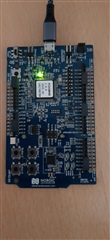
    On switching the board ON, the flash drive appears, LD5 comes on and the four LEDs are very faintly on. Please see attached photo of board,

    Kind Regards,

    ZahidM

  • Hello,

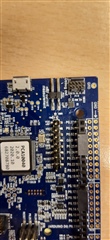
    Could you see if SB9 has been cut, or simply give me picture with a closer look at that part?

    And could you try to flash the standard NCS Blinky example to the board and see how it reacts?

    Regards,

    Elfving

Reply Children
Related